WordPress website development with custom themes your team can edit
Our WordPress website development team builds custom themes, Gutenberg blocks and WooCommerce stores for businesses that have outgrown a template or a slow page builder site. Custom WordPress website development gives you a site that loads quickly, is hard to break, and lets your marketing team publish new pages without waiting for a developer.
WordPress website development is the planning, build and launch of a website on WordPress: theme and block development, content modeling with custom post types and fields, plugins and integrations, hosting, security, performance and migration, so the site stays fast, secure and easy for your team to update.
Most WordPress vulnerabilities are in plugins, so a short, well-maintained plugin list matters more than any security plugin.
A custom block theme gives editors freedom inside your design system; a heavy page builder trades speed for flexibility.
Hosting is part of the build: PHP version, staging, caching and backups decide speed and safety.
Redesigns and migrations keep their rankings when every old URL has a planned redirect.
Best for
Business sites, content-heavy marketing sites, lead generation sites and WooCommerce stores that need flexible editing
What you get
Content model, custom theme and blocks, integrations, hosting setup, migration with redirects, training and documentation
Typical timeline
Most business sites take about 6 to 12 weeks from discovery to launch. WooCommerce, multilingual or integration-heavy builds take longer.
Pricing
Driven by templates, custom blocks, integrations, migration volume and WooCommerce. Published agency pricing we reviewed framed many custom WordPress builds at about $5,000 to $50,000. Our website projects run from under $1,000 to $30,000+, depending on scope. We quote a fixed price after discovery.
What our WordPress website development services include
Six workstreams that cover the site itself and everything it runs on. Each one has a standard we check before launch.
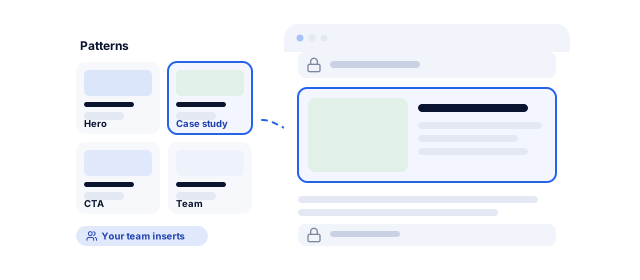
We build lightweight custom themes with Gutenberg blocks designed for your content: heroes, pricing, comparison tables, testimonials and forms. Blocks are registered with block.json, colors and type sizes live in theme.json, and patterns give editors ready-made layouts. Locked templates keep structured pages on brand.
Content modeling with ACF
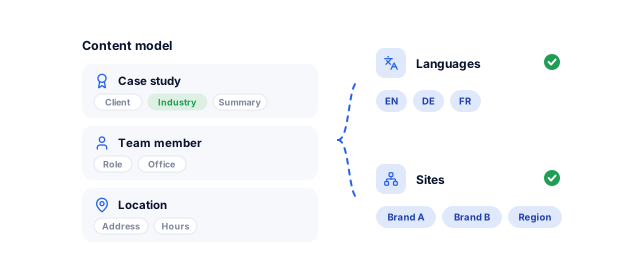
Case studies, team members, locations, products and events become custom post types with Advanced Custom Fields instead of free-form pages. Editors fill in fields and the theme handles layout, keeping hundreds of pages consistent and feeding Schema.org structured data automatically. For needs beyond WordPress, see our custom CMS development service.
Performance engineering
We build to Google's Core Web Vitals thresholds on mobile: a lean theme without a page builder framework, modern image formats at the right size, page caching and an object cache such as Redis, a CDN, and scripts loaded only where needed. Every plugin has to justify its weight.
Security hardening
We keep plugins few and vetted, enforce two-factor authentication and least-privilege roles, disable file editing in the dashboard, and put a web application firewall in front of the site. Updates are tested on staging first, and our website maintenance plans cover patching, monitoring and off-site backups after launch.
Hosting, staging and deployment
We set up hosting that meets the WordPress.org requirements: PHP 8.3 or greater, MariaDB 10.11 or MySQL 8.0 or greater, and HTTPS. Every project gets a staging site, code in Git and repeatable deployments, so nobody edits production files directly. We work with managed WordPress hosts or your own cloud through our AWS management team.
WooCommerce and integrations
We build WooCommerce stores with the payment gateways your market uses, such as Stripe, PayPal or Razorpay, plus shipping and tax rules. Forms send leads to HubSpot, Salesforce or Zoho with GA4 events attached, and ERPs and booking systems connect through their APIs. Larger catalogs go to our WooCommerce website team.
Problems a well-built WordPress site solves
WordPress runs 39.6% of all websites, according to W3Techs, so its strengths and its common failures are both well known. These are the problems we are most often asked to fix.
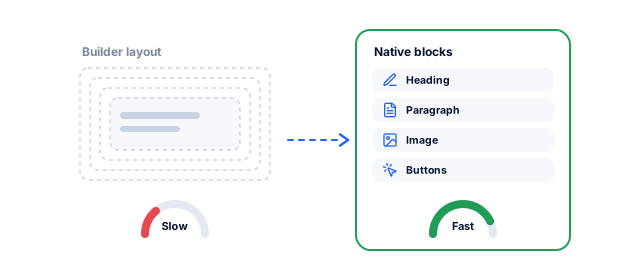
The HTTP Archive Web Almanac 2025 estimates that around 60% of WordPress sites use a page builder, and it ranks WordPress among the lowest CMSs for mobile Core Web Vitals, with a 45% pass rate. We replace builder layouts with native blocks, remove plugins that duplicate each other, and measure the result in PageSpeed Insights.
A developer needed for every small change
When every page is hand-built in code or a fragile builder layout, marketing waits on developers for simple updates. A block library with patterns and locked templates lets your team build landing pages, case studies and posts on their own, while the design system keeps spacing, colors and type consistent.
Plugin sprawl and security exposure
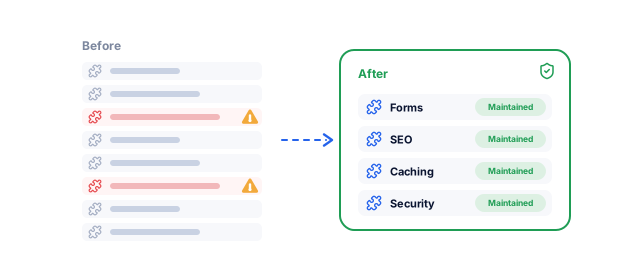
Patchstack's State of WordPress Security in 2026 counted 11,334 new vulnerabilities in the WordPress ecosystem in 2025: 91% in plugins and 9% in themes, and 46% had no fix in time for public disclosure. Fewer plugins, each chosen for active maintenance, cut that exposure more than any single security tool can.
Rankings lost in a redesign or migration
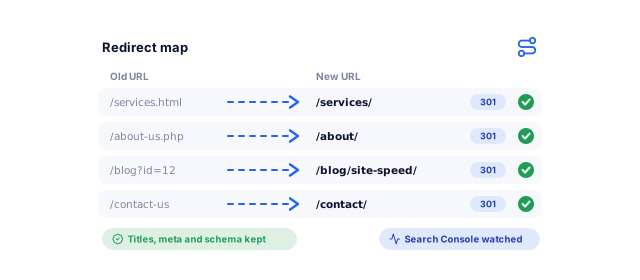
Changing URLs without redirects throws away years of search history. We crawl the old site, map every URL to its new home with one-to-one 301 redirects, carry over titles, meta descriptions and structured data, and watch Google Search Console after launch. Our Eric Originals case study shows this approach on a platform migration.
Content that does not scale
Sites that grow page by page end up with inconsistent layouts, duplicate content and no way to filter or reuse information. A content model with custom post types and taxonomies fixes that, and scales to several languages with WPML or Polylang, or several brands and regions with WordPress Multisite.
A website disconnected from sales
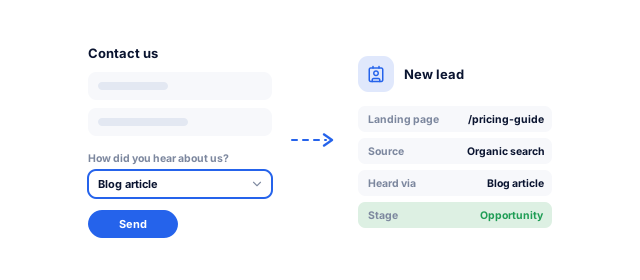
Contact forms that send emails to a shared inbox lose leads. We connect forms to your CRM with source data attached, track key events in GA4, and configure consent settings for regions that require them, so you can see which pages and campaigns produce inquiries. Our WordPress SEO team then builds on that data.
Not sure whether to rebuild or fix your current site?
Tell us what you need. We look at your theme, plugins, speed and hosting, and tell you in writing whether a targeted fix or a rebuild makes more sense, with a price range and timeline.
Your free project planFor what you need
1What we would buildYour current site, goals and content
2A price range and timelineFor the budget you pick, with the options that fit
3The stack we would useAnd how your team runs it after launch
A specialist walks you through it on a call
Our WordPress website design and development process
A Screaming Frog crawl lists every page, plugin and integration, and Google Search Console and GA4 data show which pages earn visits and leads, what has to migrate and which plugins can go.
Content and URL inventory
Plugin and integration audit
Goals and success metrics
A scope based on evidence
Content model and architecture
We define post types, taxonomies, fields and templates, plan the sitemap and URLs, choose hosting, and decide between a custom block theme, a page builder or headless WordPress, with our reasons.
Content model
Sitemap and template list
Hosting and stack plan
Structure agreed before design
Design system and block library
Designers create the key templates in Figma, mobile first. Developers turn them into theme.json tokens and a specified block library before any theme code is written.
Figma designs
Block library specification
Editor rules
Design your team can reuse
Development on staging
We build on staging with code in Git, following the WordPress Coding Standards and checking accessibility against WCAG 2.2. You review progress on staging, not in screenshots.
Staging site
Custom theme and blocks
Integrations
A working site you can click through
Migration, QA and launch
Content is imported with scripts or WP-CLI, and every old URL gets its redirect. We test forms, devices, speed and security, launch with a DNS plan, and watch Search Console daily for crawl errors.
Redirect map
QA and speed report
Launch checklist
A launch without lost pages
Training and handover
Editors get live training and a written guide. You receive admin access, the code repository, and hosting and domain credentials in your name, plus an optional maintenance plan.
Editor training
Site documentation
Maintenance plan option
A team that can run the site
WordPress builds for your type of business
The theme, plugins and integrations change with what the site has to do for your business.
01 / 05
Lead generation and service businesses
Service businesses need pages that turn visitors into calls and form fills. We build service and location templates with structured data, fast forms connected to your CRM, click-to-call on mobile and clear trust signals such as reviews. Location pages come from one template, so details stay accurate across every branch. Pair it with local SEO to win nearby searches.
Software and B2B marketing sites publish constantly: posts, guides, case studies, webinars and comparison pages. We build filterable resource hubs, gated content connected to HubSpot or Salesforce, and author pages with clear credentials, and a block library lets the content team ship campaign pages without a developer ticket. See our work for SaaS companies.
WordPress ecommerce website development makes sense when content and commerce sit together, or when you need checkout logic that hosted platforms restrict. We build WooCommerce with lean product templates, fast search, local payment gateways and clean order data. If a fully hosted platform suits you better, our Shopify website team can build that instead.
Clinic websites need doctor profiles, services, locations and online booking that patients can use on a phone. We build these as structured content, follow accessibility guidelines closely, and connect booking to secure systems rather than storing patient details in WordPress form entries. See Nabhaya Clinic and our work for healthcare providers.
Organizations with several languages, regions or brands need one system with clear rules. We set up WPML or Polylang with translated slugs and hreflang, or WordPress Multisite with shared code, and give editors in each market only the permissions they need. Our international SEO team plans the URL structure first.
Marketing and engineering work under one roof at improveFX. Our WordPress website developers sit with the SEO specialists tracking your rankings, so redirects, structured data, internal links and page speed are planned into the build, and migrations are run by people who will notice if a page drops.
02
Your site, your accounts
You own the code, content, hosting, domain and every analytics account from day one. We build on standard WordPress features and well-supported plugins, not a proprietary framework, and document the theme, blocks and integrations so any competent developer can pick up the work.
03
Support on rolling terms
After launch you can keep us on a monthly plan for updates, security and new features, on a rolling agreement with transparent monthly reporting. Clients stay with us 1.6 years on average and rate us 4.9 on Clutch from 221 reviews, 4.8 on Google from 189 and 4.9 on Trustpilot from 156.
Results we can put numbers on
Website, ecommerce and search results from client case studies and reviews, including a full platform migration that kept its rankings.
"From designing a high-converting website to managing our SEO, Google Ads, and Google Business Profile, improveFX delivered exceptional results across every channel."
210%more qualified leads
185%organic and local traffic growth
92%keywords on page one
Maureen CappalloBroker and founder, Momentus Real Estate Group
"They revolutionized our online presence with a 60% increase in web traffic through strategic e-commerce SEO and content optimization."
60%more organic traffic
47%more sales
Eric NoahPresident, Eric Originals & Antiques Ltd.
"Visionstar Technologies' online presence transformed significantly with a 40% boost in customer engagement, all thanks to their exceptional website structuring and SEO tactics."
+40%qualified leads
32%lower cost per acquisition
Thomas MorelFounder, Visionstar Technologies
"Their strategic approach to our website and SEO resulted in a 60% increase in local inquiries, revolutionizing our automobile service business."
60%more local inquiries
87%more organic traffic
Mike SteffanFounder, Sabulski Window Tinting
"Their SEO strategy helped us achieve top search rankings, while their Facebook Ads campaigns drove a steady flow of qualified prospects."
Published agency pricing we reviewed framed many custom WordPress builds at about $5,000 to $50,000. Small sites with a few templates cost much less, and we build those quickly too.
The main drivers are the number of templates and custom blocks, integrations, migration volume, multilingual needs and WooCommerce. Rather than fixed WordPress website development packages, we quote a fixed price after discovery, so you pay for what your site needs.
How long does it take to build a WordPress website?
Most business sites take about 6 to 12 weeks from discovery to launch, and a small site with a few templates and ready content launches sooner. WooCommerce stores, multilingual sites and builds with several integrations take longer.
Discovery and content modeling take one to two weeks, design two to three, and development and migration the rest. Content readiness and approval speed affect the timeline more than coding, so we agree dates for both at the start.
Is a custom WordPress theme better than a page builder?
For most business sites, yes. A custom block theme is usually faster, easier to maintain and keeps content in standard WordPress blocks rather than a builder's format.
Page builders still suit small sites with tight budgets, and we work with Elementor when a client relies on it. The trade-off is heavier pages and more plugins to update. The comparison table above sets out when each approach fits.
Can you migrate our website to WordPress without losing rankings?
Yes, when the migration is planned. Rankings are usually lost through missing redirects, changed content or blocked crawling, and all three can be prevented.
We crawl the old site, map every URL to a new one with one-to-one 301 redirects, keep titles, descriptions and structured data, and test redirects before launch. Then we monitor Google Search Console and fix crawl errors quickly. Some movement in the first weeks is normal.
Is WordPress secure enough for a business website?
Yes, if it is built and maintained properly. Patchstack's 2026 report found 91% of new WordPress vulnerabilities in plugins, so most risk comes from what is installed and how often it is updated.
We keep plugins few and actively maintained, enforce two-factor authentication and strong roles, use a firewall and off-site backups, and test updates on staging. Security is ongoing work, so we recommend a maintenance plan.
Will our team be able to edit the site without a developer?
Yes. Editors build pages from a library of blocks and patterns designed for your content, and update structured content such as team members or locations through simple fields.
Locked templates protect the layout where it matters, so nobody breaks the design by accident. Every project ends with live training and a written guide, and you can ask us for new blocks whenever your marketing needs change.
Should we build our store on WooCommerce or Shopify?
Choose WooCommerce when content and commerce need to live together or you need custom checkout logic. Choose Shopify when you want hosted infrastructure with less technical upkeep.
WooCommerce gives full control and no platform transaction fees beyond your payment provider, but you manage hosting, updates and security; Shopify handles those for a monthly fee. As a Shopify Partner that also builds WooCommerce, we recommend whichever fits your catalog.
Which hosting do you recommend for WordPress?
A managed WordPress host or a well-configured cloud server, both meeting WordPress.org's requirements of PHP 8.3 or greater and a current MariaDB or MySQL version.
What matters more than the brand is the setup: staging, automatic off-site backups, page and object caching, a CDN, HTTPS and support that responds quickly. For larger sites we can run hosting on AWS with monitoring. The hosting account stays in your name.
Can you take over or redesign our existing WordPress website?
Yes. We start with an audit of the theme, plugins, hosting and speed, then recommend either targeted fixes or a rebuild, in writing.
Many sites need a plugin cleanup, a hosting move and a few rebuilt templates rather than a full redesign. If a rebuild is right, we reuse your content and keep your URLs where possible, so the redesign does not reset your search visibility.
Should I hire a WordPress website developer or an agency?
Hire a freelance WordPress website developer for small, well-defined jobs. Choose a WordPress website development agency when you need design, development, SEO and ongoing support handled together.
A freelancer can be cost-effective but is one person with one calendar; an agency brings a team and continuity. Either way, check that you will own the code, hosting and accounts, and ask how migrations and updates are tested.
Do you build headless WordPress websites?
Yes. We build headless WordPress sites with a Next.js front end when speed, scale or reuse of content across apps and channels justifies the extra cost.
Editors keep the familiar WordPress dashboard while the public site is served from a CDN. The trade-off is two systems to build and maintain, so we recommend headless only when its benefits are clear. Our Next.js development team handles the front end.
Ready to plan your website?
Tell us what you need built, or book a strategy call with our team.
What we would build, and on which platform
A price range and timeline for your budget
A call with a specialist to plan the next steps, no obligation
A specialist replies personally 4.9 from 566 client reviews