
Custom email design in Figma
Mobile and desktop versions side by side, with live text, tap-sized buttons and real copy. Two rounds of revisions are included, and you approve the design before any code is written.
Our email template design services give you responsive HTML templates, designed in Figma, hand-coded, tested in Litmus or Email on Acid across Gmail, Outlook and Apple Mail in light and dark mode, and set up in your own Klaviyo, Mailchimp or HubSpot account. Your marketers edit them without touching code, and the files are yours.
 4.9
 4.8
 Written by Supriya Karmakar, Content Writer



















Email template design is designing and coding reusable HTML email layouts that display correctly across email clients, devices and dark mode, and can be edited safely in your email platform.
Design, code, testing and setup in one project.
Get a free proposalMobile and desktop versions side by side, with live text, tap-sized buttons and real copy. Two rounds of revisions are included, and you approve the design before any code is written.
Table-based layouts with VML fallbacks for classic Outlook, and the CSS Google documents for Gmail. Lean code keeps long emails from being clipped.
Apple Mail applies your dark styles; several Gmail and Outlook apps invert colors themselves. Logos and colors are designed to survive both and previewed in each mode.
Text meets the WCAG 2.2 contrast minimum of 4.5:1, layout tables are marked as presentational, reading order is logical and alt text is real.
Tested blocks set up as editable sections in Klaviyo, content areas in Mailchimp or custom modules in HubSpot, with styles locked.
Litmus or Email on Acid previews across Gmail, Outlook, Apple Mail and Yahoo Mail, light and dark, images on and off, then seed tests in real inboxes.
Fewer broken sends, faster builds and clicks you can measure.
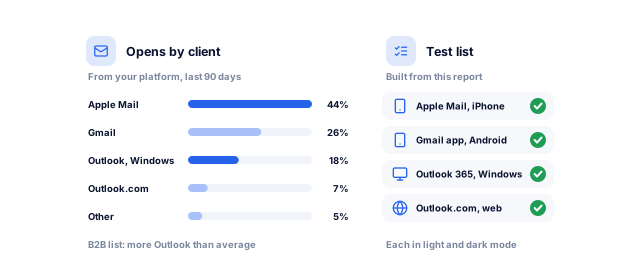
In September 2026, Litmus recorded Apple at 76.56% of opens, Gmail at 16.10% and desktop Outlook at 3.48%. Privacy features inflate Apple's share, so we design from your list's own report.
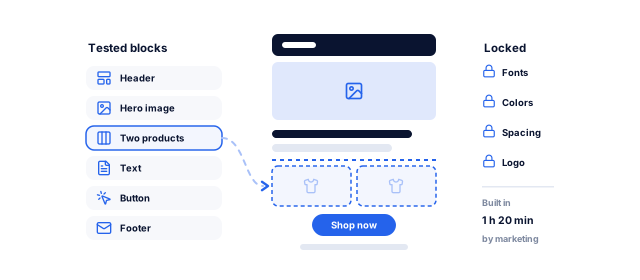
Marketers build a campaign from tested blocks with brand fonts, colors and spacing locked, instead of briefing a designer and developer each time.
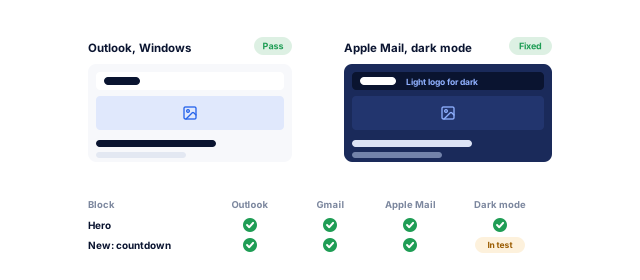
A layout that collapses in Outlook is often found by a customer. Blocks tested once in every major client are safe to reuse.
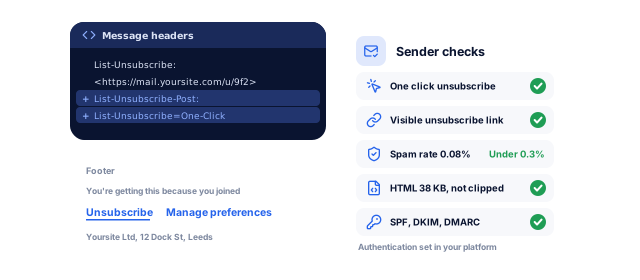
Google requires senders of more than 5,000 messages a day to Gmail to offer one-click unsubscribe and keep spam rates below 0.30%. Our footers and lean code support that.
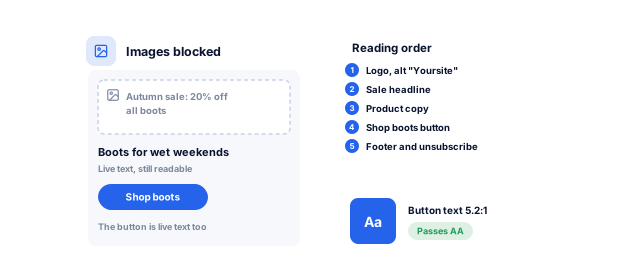
Contrast, live text, alt text and a sensible reading order make an email work with a screen reader or with images blocked.
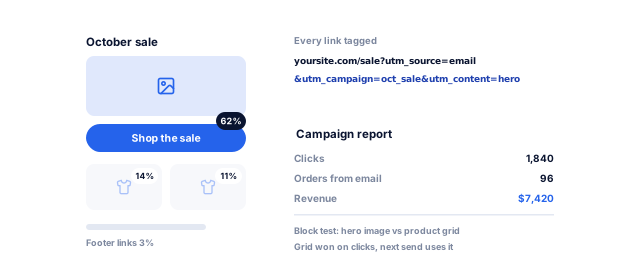
One primary action, UTM-tagged links and blocks you can A/B test. Our conversion rate optimization team fixes the landing page too.
Send us your current template or a recent campaign. We preview it across real email clients and send a written plan for what to fix or rebuild, with a price range and timeline.
Four steps, each ending in something you approve.
Book a strategy callWe review your templates, pull the email client report from your platform and map the blocks your campaigns and flows need.
Mobile and desktop components with dark previews and WCAG 2.2 contrast checks. Two rounds of revisions before you approve.
Hand-coded HTML with Outlook fallbacks, set up in your platform as editable blocks with locked styles.
Litmus or Email on Acid previews and seed tests to real inboxes, then a usage guide, recorded walkthrough and live training.
Modules and testing change with what you send most.
Welcome, abandoned cart, post-purchase and win-back flows plus campaigns, from one Klaviyo block library with product, price and review blocks. Our Shopify website team can improve the store too. See our ecommerce work.
Onboarding, product updates and newsletters sent from HubSpot or Salesforce Marketing Cloud to corporate inboxes, where Outlook is common, with modules tied to flows from our marketing automation team.
Receipts, password resets and alerts coded for SendGrid, Postmark or Amazon SES, styled like your marketing emails. Our web app development team wires them in.
Three common ways to get email templates.
Book a strategy call| What matters | Platform's built-in templates | One-off marketplace template | Custom system from improveFX |
|---|---|---|---|
| Upfront cost | Included in your plan | Varies by seller | An email template from $200; systems quoted by module |
| Outlook and dark mode | Handled by the platform, little control | Varies by seller | Designed and tested for both |
| Accessibility | Depends on how you fill it in | Rarely specified | Contrast, alt text and structure built in |
| Testing | Platform preview | Ask for a test report | Litmus or Email on Acid report per module |
| Source files | Stay in the platform | Depends on the seller | Figma, HTML and modules belong to you |
| Best for | Getting started quickly | A single campaign or event | Regular campaigns, flows and several senders |
Your email platform subscription is separate.
Shown for a modular system; a single template fits the same steps into 1 to 2 weeks.
Book a strategy callBy the end of week 1, you have approved wireframes and a module list.
By week 3, approved designs are coded and set up in your platform.
By week 6 at the latest, your team builds campaigns from tested blocks.
You approve each stage before the next one starts, and every file we make is yours to keep and edit.
Yours to keep, always. Everything is set up in your name, and if you leave we remove our access and hand over the documentation.
For teams that send often and want every email to look right.
Book a strategy callDesigners and HTML developers work side by side, so what you approve in Figma is what renders. The same team builds your landing pages, so email and page match.
We also run email marketing and email automation, so the library is built around the blocks your team reuses weekly.
You own the Figma files, HTML and modules, set up in your own platform account. Clients rate us 4.9 on Clutch from 221 reviews.
Numbers from our SEO, marketing and software work. Design results come from user testing or comparing two versions.
See all case studies
Eric OriginalsJewelry ecommerce
+1,900%
organic traffic
MastersBuddyStudy abroad consulting
160+
keywords in Google's top 10
AkosMDHealthcare, Arizona
+57%
patient footfall
"From designing a high-converting website to managing our SEO, Google Ads, and Google Business Profile, improveFX delivered exceptional results across every channel."
 Maureen CappalloBroker and founder, Momentus Real Estate Group
"They revolutionized our online presence with a 60% increase in web traffic through strategic e-commerce SEO and content optimization."
 Eric NoahPresident, Eric Originals & Antiques Ltd.
"Visionstar Technologies' online presence transformed significantly with a 40% boost in customer engagement, all thanks to their exceptional website structuring and SEO tactics."
"Their strategic approach to our website and SEO resulted in a 60% increase in local inquiries, revolutionizing our automobile service business."
"Their SEO strategy helped us achieve top search rankings, while their Facebook Ads campaigns drove a steady flow of qualified prospects."
 Amita NaithaniCo-founder, Amita Naithani Resort Wear
Ask us anything else, or ask for a free sample email in your brand.
An email template from $200. Our design projects run from under $500 to $10,000+, depending on scope.
One template for one platform sits at the low end. Many modules, several platforms, a deeper test matrix and team training cost more; stock images or extra fonts may cost extra. To check the look first, we design one email in your brand as a free sample before you pay.
A single template usually takes 1 to 2 weeks from brief to tested code. A modular system with platform setup usually takes 3 to 6 weeks.
Most of that time goes into design reviews and testing, not coding. Fast feedback on the Figma designs is the biggest factor you control, and having final brand assets and example copy ready at the start saves several days.
Yes. Every template is coded and tested for classic Outlook for Windows, the new Outlook, Outlook for Mac, mobile apps and Outlook.com.
Classic Outlook for Windows uses Microsoft Word to render email, so it ignores much modern CSS. We use table-based layouts, VML for buttons and background images, and fallbacks that keep the design intact. Some effects look simpler there by design.
Yes. We design for clients that apply your dark styles and for clients that invert colors themselves, and we meet the WCAG 2.2 contrast minimum.
Logos get a subtle outline or padded background so they stay visible on dark backgrounds. In the code we set the language attribute, mark layout tables as presentational, use live text and real links for buttons, and write meaningful alt text.
Yes. Templates are set up as editable blocks in Klaviyo, editable content areas in Mailchimp and custom modules in HubSpot, so your team changes text, images and links without touching code.
Brand styles are locked, so edits cannot break the layout. We also support Salesforce Marketing Cloud and other platforms that accept custom HTML, and confirm the setup in your account during testing.
Yes. We use Litmus or Email on Acid previews across major email clients and devices, in light and dark mode, and share the report with you.
We also check links and tracking parameters, alt text, file size and images-off rendering, preview inside your email platform, and send seed tests to real Gmail, Outlook and Apple Mail inboxes before you sign off.
Yes. If you already have approved designs, we code them into responsive HTML email templates and set them up in your platform.
Before coding, we flag anything that does not translate to email, such as web fonts without fallbacks, text inside images or effects classic Outlook cannot render, and suggest small adjustments. Testing and the client report are included, as always.
Built-in templates get you sending quickly. Once you send weekly, run automated flows or have several people building emails, a tested custom system saves time and broken sends.
If you send now and then, we can restyle a single template to your brand. If you send often, we build the modular system. For strategy and sending too, see our email marketing services.
Tell us what you need designed, or book a strategy call with our team.


 A specialist replies personally 4.9 from 566 client reviews