


















Chatbot development services for AI assistants that resolve, not deflect

Our AI chatbot development services build assistants that answer customer and staff questions from your own help center, policies, product data and systems, with sources, limits and a clear route to a person. We use large language models with retrieval over your knowledge, connect the assistant to your CRM or helpdesk, and deploy it on your website, WhatsApp, Slack or Microsoft Teams.

  • 170+projects delivered
  • 25+in-house specialists
  • 4.9
    221 reviews
Support assistantLive

Can I change my delivery date?

Yes, up to 24 hours before dispatch. Open Orders, pick the order and choose a new slot.

Source: Delivery policy, section 3
Talk to a person
Built in
  • Answers only from your own content
  • Hands over to a person when unsure
  • Every answer logged for review

120+ businesses chose us for their digital growth

  • AkosMD Hospital
  • Amita Naithani Resort Wear
  • Momentus Real Estate Group
  • CleverBoss
  • MastersBuddy
  • Foley Mansfield
  • Pomegranate Health
  • Trunk Box Baby
  • Hunt Ortmann
  • Immigration Desk
  • Urology Partners
  • Jodi Carlton
  • Ecom Fashion
  • Eye on Security
  • Disability Solutions
  • One400
  • Eric Originals
  • Sabulski Window Tinting
  • History of Soccer

Chatbot development services at a glance

Chatbot development services cover the design, build and running of conversational AI assistants for websites, messaging apps and internal tools. A modern build connects a large language model to your own knowledge through retrieval, adds guardrails, integrations and human handoff, and measures answer quality.

  • Retrieval over your own content matters more than which model you pick.
  • Measure answers against a test set of real questions before launch and after every change.
  • Every assistant needs a fast, obvious route to a person.
  • Use paid API tiers whose terms exclude your data from model training.
Best for
Support, sales and internal teams answering many varied questions from documents, policies and system data
What you get
Knowledge pipeline, assistant, guardrails, integrations, channel deployment, evaluation set, monitoring and handoff to your team
Typical timeline
A focused assistant on one channel in about 4 to 8 weeks. Multi-channel assistants with system actions usually take 3 to 6 months.
Pricing
Our AI projects run from under $5,000 to $100,000+, depending on scope. A fixed-price proof of concept on your own data starts from $3,000, so you see results before you commit to a build. Model usage and hosting are billed monthly on top. We quote after a free test on your content.
Your data
A signed NDA before you share anything, a data processing agreement when you need one, a BAA for US patient data, and your data never trains any model outside your project.

What our chatbot development services include

The model is one of six parts. Most custom chatbot development work goes into the knowledge, limits and measurement around it.

Get a free proposal

Knowledge base and retrieval (RAG)

We collect your help articles, PDFs, policies, product data and past tickets, clean them and index them for vector and keyword search in pgvector, Pinecone or a similar store. The RAG chatbot answers from the most relevant passages with source links, and the index refreshes as content changes.
Model choice and conversation design

We test your questions on models from OpenAI, Anthropic (Claude) and Google (Gemini), or an open-weight model such as Llama in your cloud, and choose on accuracy, speed, cost and data terms. Then we write the assistant's role, tone, scope, refusal rules and fallbacks in your brand's voice.

Chatbot guardrails

We design against the OWASP Top 10 for LLM Applications, starting with prompt injection, data disclosure and excessive agency: topic limits, retrieval limited to what each user may see, personal data redaction in logs, output checks, and confirmation or a person for refunds, bookings and record changes.

System integrations and actions

Answers improve when the assistant can look things up: order status in Shopify, a ticket in Zendesk or Freshdesk, a contact in HubSpot or Salesforce, a calendar slot. Our API development team exposes each as a narrow tool with its own permissions.

Human handoff

The assistant hands over when a customer asks, when confidence is low, when the topic is sensitive or a question repeats, and the agent gets the full transcript in their helpdesk. In a SurveyMonkey study of 2,017 US adults in December 2025, 79% said they strongly prefer a human over an AI agent.

Evaluation and monitoring

Before launch we build a test set of 100 or more real questions with expected answers and score every version for correctness, grounding, refusals and handoffs. After launch we review live conversations weekly and add every failure to the test set so it cannot quietly return.

What a well-built customer support chatbot changes

Fewer repetitive tickets and faster answers, without losing the customers who need a person.

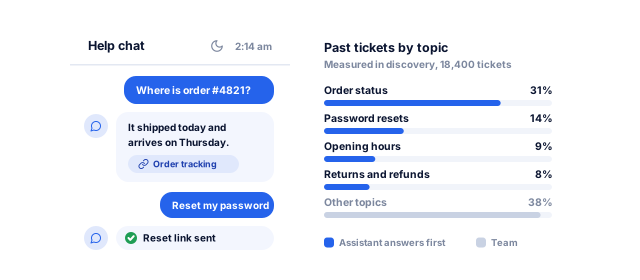
A help chat at 2:14 am answering an order status question with a link to its source and sending a password reset, beside the ticket topics measured from past tickets that the assistant now answers first

Repetitive questions answered at any hour

Order status, opening hours, pricing, eligibility and policy questions often make up a large share of tickets. We measure your share from past tickets and build the assistant to resolve those topics first, with a source link in every answer, so your team keeps the cases that need judgment.

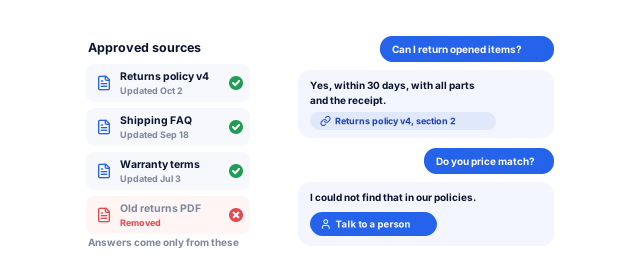
Approved documents with their update dates and an old PDF removed, and an assistant answering a returns question with the policy section it used, then saying it cannot find a price match policy and offering a person instead

Answers that match your current policy

A generic AI tool answers from what it learned on the internet. A retrieval-based assistant answers from the documents you approve, so a policy change reaches every answer once the page is updated. When it has no answer, it says so and offers a person.

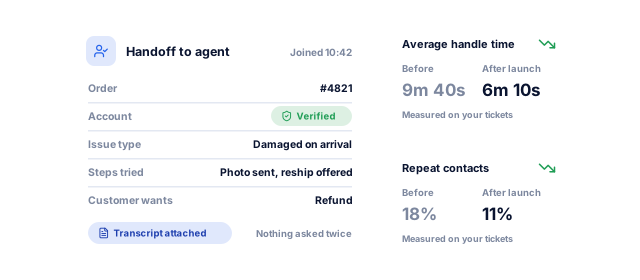
An agent receiving a chat handoff with the order number, verified account, issue type, steps already tried and the transcript attached, beside handle time and repeat contacts measured before and after launch

Better handoffs, shorter conversations for agents

When the assistant has already collected the order number, account, issue and steps tried, the agent starts with context instead of a blank chat. We measure handle time and repeat contacts before and after launch to show whether handoffs help.

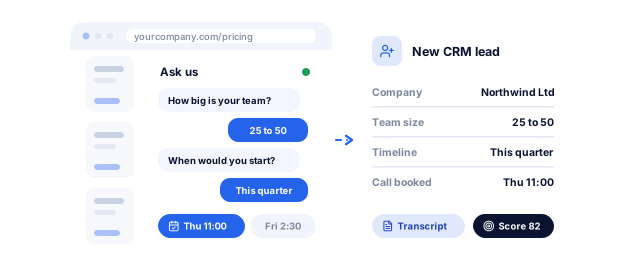
A chat on a pricing page asking a visitor about team size and timing and offering call times, then creating a CRM lead with the answers, the booked call, the transcript and a lead score

Leads qualified while visitors are still on the page

On sales pages, the assistant answers product questions, asks your qualifying questions, and books a call or creates a CRM record with the conversation attached. Our lead generation automation team handles the follow-up, and lead scoring can rank the leads it creates.

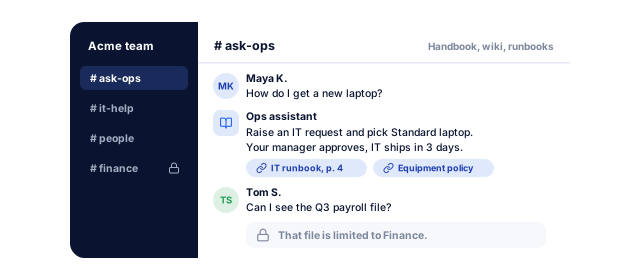
A team chat channel where an internal assistant answers a laptop question from the IT runbook and equipment policy, and declines to open a payroll file because it is limited to Finance

Staff who find internal answers in seconds

An internal assistant in Slack or Microsoft Teams answers HR, IT and process questions from your handbook, wiki and runbooks, and respects document permissions, so finance files stay with finance and new hires stop interrupting colleagues.

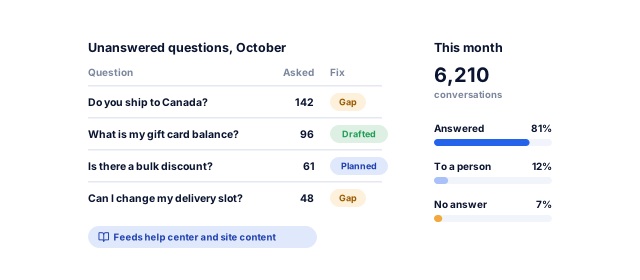
A monthly report of the questions customers asked that had no answer, how often each was asked and whether a help article is planned or drafted, beside how the month of conversations ended

A record of what customers actually ask

Every conversation shows what customers want to know and where your content falls short. We report the top unanswered questions monthly, and our NLP solutions team can classify topics and sentiment across thousands of conversations.

Worried a chatbot will make things up?

Tell us what you need. We look at your content, channels and the questions customers ask most, and send a written plan for the assistant to build first, with a price range, a timeline and how we would keep its answers accurate.

What do you need?

Free, with no obligation. Rather talk? Book a 30-minute call

Our chatbot development process

  1. Discovery and use cases

    We analyze past tickets, chats and emails to find the questions worth automating, agree what the assistant must never do, and choose the route: scripted flows, a helpdesk AI agent we configure, or a custom LLM build.

    • Question and intent analysis
    • Scope and no-go list
    • Recommended route and price range
    A clear, measurable scope
  2. Knowledge preparation

    We clean the source content, resolve contradictions with your team and set up the pipeline that keeps the index current. Gaps found here often improve your help center too.

    • Content inventory and cleanup
    • Retrieval index
    • Content gap list
    Knowledge the assistant can trust
  3. Prototype and evaluation set

    We build a working prototype and a test set of real questions, then compare models and retrieval settings on it. You see scores and actual answers, failures included, before going further.

    • Working prototype
    • Evaluation set and scorecard
    • Model comparison
    Quality you can see before you buy
  4. Build, integrate and secure

    We add guardrails, integrations, helpdesk handoff, redacted logging and the channel interfaces, then test prompt injection and check that users only retrieve content they may see.

    • Production assistant and integrations
    • Guardrail and security tests
    • Handoff workflow
    Safe to put in front of customers
  5. Pilot and launch

    We launch on one channel or a share of traffic, review conversations daily for two weeks and fix what the test set missed, then widen the rollout.

    • Pilot report
    • Agent training for handoffs
    • Rollout plan
    A controlled launch
  6. Monitor and improve

    Each month we review conversations, resolution and handoff rates and model costs, re-run the test set after every change, test new model versions before switching and update content and prompts.

    • Monthly quality report
    • Regression testing
    • Content and prompt updates
    Answers that improve over time

AI chatbots for every channel and use case

Each channel has its own rules; the knowledge, guardrails and evaluation behind them stay the same.

01 / 05

Website and customer support

A website chatbot answers product, order and policy questions, collects details, and hands off to live chat or opens a ticket, without slowing your pages. Well-structured help content also helps you appear in AI search through our answer engine optimization service.

02 / 05

WhatsApp chatbot development

On the WhatsApp Business Platform, a 24-hour customer service window opens when a user messages you; outside it, only approved template messages can be sent, according to Meta's documentation. Meta's terms also prohibit general-purpose AI assistants where AI is the primary function, so we build assistants for your own services, such as bookings, orders and support, with opt-in and template flows designed in.

03 / 05

Slack and Microsoft Teams assistants

Internal assistants answer HR, IT, sales enablement and process questions where staff already work, only from files each person could open, with the source cited. Unanswered questions become tickets for the right team through workflow automation.

04 / 05

Healthcare and clinics

Clinic assistants handle booking, opening hours, preparation instructions and billing questions, and refuse to give diagnoses. Patient data stays out of model prompts unless a compliant setup is agreed, and clinical questions go to staff. We also build the Nabhaya Clinic product and work with healthcare organizations.

05 / 05

Sales, ecommerce and voice

Shopping assistants recommend products from your live catalog, check stock and answer sizing or compatibility questions, then pass the cart or lead on. The same knowledge can power phone calls through our calling automation service, and every conversation syncs to your CRM.

Rule-based chatbot vs AI chatbot platform vs custom LLM assistant

Three ways to put a chatbot in front of customers, and what improveFX does in each.

Book a strategy call
FactorRule-based or intent-based botAI chatbot platformCustom LLM assistant
ExamplesMenu flows in your chat tool, or intents built in Rasa, Dialogflow or Amazon LexAI agents inside helpdesks such as Intercom or ZendeskAn LLM API from OpenAI, Anthropic or Google, with retrieval over your content
Handles varied questionsPoorly; anything off-script failsWell, within the platform's featuresWell, including multi-step tasks in your systems
CostLow; usage-based on Dialogflow and Amazon LexA monthly subscription set by the vendorA one-off build, plus model usage and hosting each month
Time to launchDays to weeksDays to weeksAbout 4 to 8 weeks for one channel
Data and model controlReplies fixed in advance; nothing generatedVendor's models, hosting and termsYour choice of provider, region and retention
Best forA few predictable flowsStandard support contentVaried questions, system actions, strict data rules or several channels
What improveFX doesBuilds the flows, or adds an LLM for open questionsSets it up, connects your systems and tests its answersBuilds, hosts, tests and monitors the assistant

Rasa, Dialogflow and Amazon Lex now add language-model features, and we build in them when your team already runs one. Custom assistants also pay the model provider per token, which depends on traffic.

Your chatbot project, week by week

A focused assistant on one channel; larger assistants follow the same phases over 3 to 6 months.

Book a strategy call
  1. 1Weeks 1 to 2

    Questions and content

    • Past tickets and chats analyzed for the top questions
    • Scope, no-go topics and handoff rules agreed
    • Content cleaned and the retrieval index set up
    • From you: help content, ticket exports and a decision owner

    By week 2, you know which questions the assistant will answer, and from which sources.

  2. 2Weeks 3 to 8

    Prototype, test set and build

    • Test set of real questions with expected answers
    • Answers scored for accuracy against your sources
    • Guardrails, integrations and helpdesk handoff built
    • Guardrails tested with prompt injection and off-topic questions
    • From you: system access and reviewers to check answers

    By week 8, you have seen the assistant's scores, wrong answers included.

  3. 3Weeks 9 to 10

    Pilot and launch

    • Live on one channel or a share of traffic
    • Conversations reviewed daily; misses added to the test set
    • Agents trained on handoffs
    • From you: agent feedback and launch sign-off

    By week 10, the assistant is live, with monthly quality reporting in place.

What you sign off, step by step

You approve each stage before the next one starts, and nothing goes live until it beats the agreed baseline on data it has never seen.

Along the way you get

  • A test set of real questions before launch
  • Answers checked against your own sources
  • Guardrails tested with hard and off-topic questions
  • A person to hand over to when the assistant is unsure
Assistant go-live checklistSample
  1. 1Use cases and test questionsApproved
  2. 2Knowledge sources connectedDone
  3. 3Answer accuracy on the test setPassed
  4. 4Guardrails and refusalsTested
  5. 5Handoff to a personTested
  6. 6Privacy and security reviewPassed
  7. 7Channels liveLive
  8. 8Monitoring and answer reviewSet up
A sample of the checklist. Every project gets its own, signed off with you.

Yours to keep, always. Everything is set up in your name, and if you leave we remove our access and hand over the documentation.

  • Source code and repository
  • Trained models and prompts
  • Your data and its labels
  • Cloud and model provider accounts
  • Documentation and evaluation reports

Who chatbot development from improveFX is for

We build assistants for teams that answer the same questions every day.

Book a strategy call

A good fit if

  • Support teams answering repeat questions on chat, email and messaging
  • Sales teams that want leads qualified and booked while visitors browse
  • Companies with help content, policies or product data to answer from
  • Internal teams fielding HR, IT and process questions in Slack or Teams

We can also help when

  • Thin or outdated help content: we clean it and fill the gaps before launch
  • A helpdesk AI agent covers most of it: we set it up, connect it and build only what is missing
  • You run a Rasa, Dialogflow or Amazon Lex bot: we keep its working flows and add an LLM for open questions
  • Patient or other sensitive data: it stays out of model prompts unless a compliant setup is agreed

Why choose improveFX as your AI chatbot development company

01

We show you the wrong answers too

Every proposal includes scores from a test on your own questions, with the answers the prototype got wrong and why. That test set stays with you. Where scripted flows or a helpdesk AI agent do the job, we set those up and connect them, and build custom only where it pays back.

02

AI, integrations and content in one team

Our 25+ in-house specialists cover AI engineering, APIs, cloud hosting, automation and content, so the people who build your assistant also fix the help articles it relies on and connect it to your CRM through CRM automation.

03

Your data stays under your terms

We use paid API tiers whose published terms exclude your inputs and outputs from model training by default, as OpenAI, Anthropic and Google's paid Gemini API state. You own the code, prompts, index, test set and logs, on rolling agreements with monthly reporting. Clients rate us 4.9 on Clutch from 221 reviews.

Results we can put numbers on

Numbers from our client work, measured in each client's own analytics. For your assistant, the first numbers come from a test on your own questions, before you commit to a build.

See all case studies
MastersBuddyStudy abroad consulting

160+

keywords in Google's top 10

A new consultancy broke into one of India's most competitive markets

Read the case study
AkosMDHealthcare, Arizona

+57%

patient footfall

An Arizona hospital became the first call for urgent care

Read the case study
Eric OriginalsJewelry ecommerce

+1,900%

organic traffic

A struggling jewelry website became a steady source of buyers

Read the case study

What our clients say

"From designing a high-converting website to managing our SEO, Google Ads, and Google Business Profile, improveFX delivered exceptional results across every channel."
210%more qualified leads
185%organic and local traffic growth
92%keywords on page one
Maureen CappalloBroker and founder, Momentus Real Estate Group
"They revolutionized our online presence with a 60% increase in web traffic through strategic e-commerce SEO and content optimization."
60%more organic traffic
47%more sales
Eric NoahPresident, Eric Originals & Antiques Ltd.
"Visionstar Technologies' online presence transformed significantly with a 40% boost in customer engagement, all thanks to their exceptional website structuring and SEO tactics."
+40%qualified leads
32%lower cost per acquisition
Thomas MorelFounder, Visionstar Technologies
"Their strategic approach to our website and SEO resulted in a 60% increase in local inquiries, revolutionizing our automobile service business."
60%more local inquiries
87%more organic traffic
Mike SteffanFounder, Sabulski Window Tinting
"Their SEO strategy helped us achieve top search rankings, while their Facebook Ads campaigns drove a steady flow of qualified prospects."
55%more organic traffic
4.7xreturn on ad spend
75%keywords on page one
Amita NaithaniCo-founder, Amita Naithani Resort Wear

Chatbot development services questions, answered

Not seeing yours? Ask us directly and a specialist will reply personally.

How much do chatbot development services cost?

Our AI projects run from under $5,000 to $100,000+, depending on scope. A fixed-price proof of concept on your own data starts from $3,000, so you see results before you commit to a build. A focused assistant on one channel, answering from content in good shape, sits toward the lower end; more channels, actions in your systems, extra languages and strict compliance move it higher.

Running costs are separate: model usage priced per token by the provider, hosting, monitoring and monthly improvement. Our quote shows build and running costs separately, after a free test on your content.

How long does it take to build an AI chatbot?

A focused assistant on one channel typically takes about 4 to 8 weeks. Multi-channel assistants that take actions in your systems usually take 3 to 6 months.

Content cleanup and integrations take the most time, not the model. A pilot on part of your traffic adds about two weeks of monitoring before full launch, and it is worth it.

What is the difference between a rule-based chatbot and an AI chatbot?

A rule-based chatbot follows fixed menus and keyword rules. An AI chatbot uses a language model to understand free-text questions and answer, ideally from your own content.

Rule-based bots are cheap and predictable for a few flows such as booking or order tracking. AI chatbots handle varied questions but need retrieval, guardrails and testing. Many good assistants combine both: AI for questions, fixed flows for payments or bookings.

How do you stop the chatbot from making things up?

By making it answer from retrieved passages of your content, show sources, and say it does not know when nothing relevant is found.

Every version is scored on a test set of real questions for correctness and grounding before release, and every wrong answer found in live conversations becomes a new test. No language model is perfect, so sensitive topics and actions go to people.

Which AI models do you use?

We work with models from OpenAI, Anthropic and Google through their APIs, and with open-weight models such as Llama when data must stay inside your own cloud.

We pick by testing your questions on several models and comparing accuracy, speed, cost and data terms. The assistant is built so the model can be swapped later without rebuilding the knowledge base, integrations or tests.

Is our data used to train AI models?

No. Your data is never used to train any model outside your project, and the paid API tiers we use back this up: OpenAI, Anthropic and Google's paid Gemini API each state that business inputs and outputs are not used for training unless you opt in.

We redact personal data from logs, limit what each user can retrieve and can run open-weight models in your own cloud. Builds are designed for GDPR and UK GDPR, HIPAA for US patient data and India's DPDP Act, and EU users are told they are talking to an AI, as the EU AI Act requires. Every project starts with a signed NDA, we sign a data processing agreement when you need one and a BAA for US patient data, and retention is agreed in writing.

Can the chatbot integrate with our CRM and helpdesk?

Yes. We connect assistants to CRMs such as HubSpot and Salesforce, helpdesks such as Zendesk, Freshdesk and Intercom, ecommerce platforms and your own systems through their APIs.

Each integration is a narrow tool with its own permissions, and actions that change records or money need confirmation or a person. Our custom CRM development team can also build a CRM around the assistant.

What happens after the chatbot launches?

We monitor answer quality, resolution and handoff rates, model costs and errors, and update content, prompts and integrations on a rolling agreement.

Models and provider APIs change, and so do your products and policies. Re-running the test set after every change catches regressions before customers do. Each month you get a report with what we changed and the top unanswered questions.

Ready to put AI to work?

Tell us what you want AI to do with your data, or book a strategy call with our team.

  • What AI can do with your data, and how to measure it
  • A fixed-price proof of concept on your data, from $3,000
  • A call with a specialist to plan the next steps, no obligation
Vikash Kumar PalRoshan Kumar JhaAbhishek Kumar Jha A specialist replies personally 4.9 from 566 client reviews
What do you need help with?

Pick all that apply.

Next, a few details about your business on our contact page. It takes about a minute.

Prefer to talk now? Book a strategy call