
Sales pipeline automation
Deals move when something real happens: a meeting booked, a contract signed. Stuck deals alert the owner and their manager before the forecast call.
Our CRM automation services keep HubSpot, Salesforce or Zoho CRM accurate without manual updates. We automate deal stages and tasks, keep records free of duplicates, and connect your CRM to marketing, billing and support tools, so the pipeline shows what is really happening.
 4.9
 Written by Abhishek Kumar, Content Writer
















CRM automation uses rules and integrations inside a customer relationship management system to move deals between stages, create tasks, keep records clean and sync data with other tools. CRM automation services design, build and maintain those rules, so the CRM stays accurate without manual updates.
Six areas, scoped to your CRM. Data hygiene comes first.
Get a free proposalDeals move when something real happens: a meeting booked, a contract signed. Stuck deals alert the owner and their manager before the forecast call.
Stage changes create the next task with an owner and due date, closed deals hand onboarding a task list, and renewal tasks appear early.
We standardize fields and merge duplicates on agreed rules. HubSpot dedupes contacts by email, but not companies created through the API, so integrations get checks.
Forms and ad lead forms feed the CRM with source data intact, and closed deals return to Google Ads and Meta as conversions. Lead generation automation handles first response.
A closed-won deal creates the customer and invoice in Stripe, QuickBooks, Xero or Zoho Books, and payment status flows back. See invoice and billing automation.
Tickets from Zendesk, Freshdesk or Intercom show on the CRM record, and accounts with repeated tickets alert their manager. Churn prediction can rank them.
Within weeks: cleaner data, fewer dropped tasks and a forecast managers can defend.
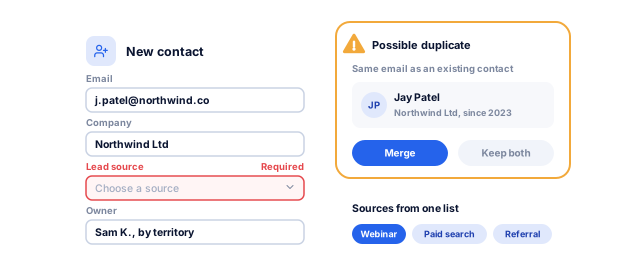
Only 35% of sales professionals fully trust their organization's data, per Salesforce's 2024 State of Sales research. Required fields and duplicate rules fix that where data enters.
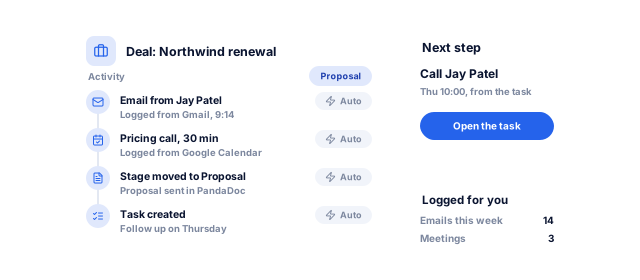
In the same research, reps reported spending 70% of their time on non-selling tasks. Automatic logging and next tasks remove much of that admin.
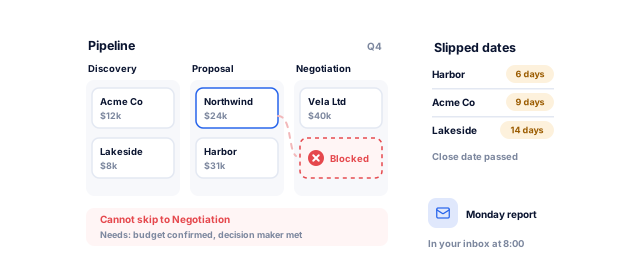
Stages with exit criteria make pipeline reports describe reality. Our report and analytics automation turns them into dashboards that refresh themselves.
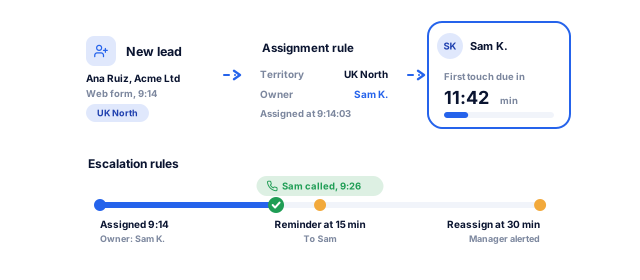
In a Workato test of 114 B2B companies, firms with lead routing replied in 3 hours 32 minutes on average, against nearly 13 hours without. Assignment rules give every lead an owner at once.
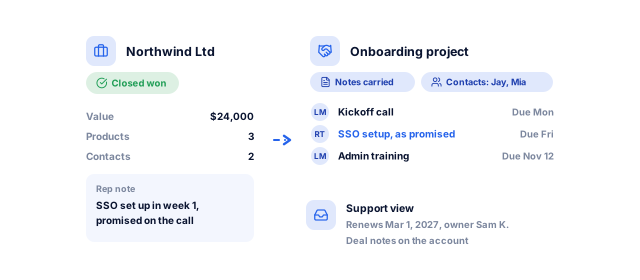
Automated handoffs carry deal notes and contacts to onboarding and support, so customers never repeat themselves.
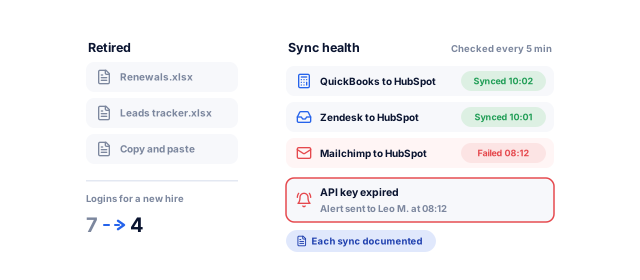
Billing, support and marketing sync with the CRM, and every failed sync alerts a named person, so nothing breaks silently.
Tell us what you need. We look at your CRM's duplicates, empty fields, stale deals and broken workflows, and send a written plan for what to fix and automate first, with a price range and timeline.
We measure duplicates, empty fields and stale deals, and list every workflow and integration.
We agree stages, exit criteria, owners and handoffs, signed off before any build.
After a full backup, we merge duplicates. Nothing is deleted without approval; every merge is logged.
Native tools first (HubSpot workflows, Salesforce Flow, Zoho Blueprint), then Zapier, Make, n8n or APIs, in a sandbox.
Your team tests real cases, we train each role and launch in stages.
A monthly report covers data quality, runs and failures. Support plans start from $99 a month.
Stages and integrations differ by business model, so we start from how you sell.
We automate proposal follow-ups, conflict checks, engagement handoffs and invoicing triggers. See our work with professional services firms.
We sync plans from Stripe, product usage and tickets, then create tasks for stalled trials, upgrades and renewals. Sales automation handles outreach.
We automate referrals, follow-ups and recall reminders, keeping protected health information where HIPAA allows. For records and billing together, see Nabhaya Clinic.
We link contacts to properties and viewings, route inquiries to each listing's agent and keep portal sources. See our real estate work.
We sync Shopify or WooCommerce orders to customer records and create tasks for large orders and lapsed buyers. Our email automation team runs win-back campaigns.
Native tools should do most of the work. How the main CRMs compare, and where connector tools or a custom CRM come in:
Book a strategy call| Option | Native automation | Best fit | What we do with it |
|---|---|---|---|
| HubSpot | Workflows, sequences, duplicate management; workflows need Professional or Enterprise | One platform for marketing, sales and service, no full-time admin | Switch on what your tier includes |
| Salesforce | Flow, approval processes, assignment, matching and duplicate rules | Complex processes, many teams, strict permissions | Build in a sandbox and document every Flow |
| Zoho CRM | Workflows, Blueprint, Cadences and Journey Orchestration | Cost-conscious teams, especially on other Zoho apps | Map rules across modules so they stay maintainable |
| Connector tools (Zapier, Make, n8n, Power Automate) | Join the CRM to apps without a native integration | Billing, support or niche tools | Add alerts and retries; pick the cheapest tool to run |
| Custom CRM | Whatever you build | Processes no platform fits, or per-seat costs that no longer add up | Build it through custom CRM development |
Feature names and plan requirements from HubSpot, Salesforce and Zoho documentation, checked October 2026; we confirm your plan during the audit.
Timed for a focused project of 2 to 5 weeks; a full clean-up plus several integrations takes 8 to 12 weeks.
Book a strategy callBy week 2, you know what is broken and what gets automated first.
By week 4, clean data and working automations sit in your sandbox.
By week 5, your team works in a CRM that updates itself.
You approve each stage before the next one starts, and nothing goes live until it has run cleanly on your real records.
Yours to keep, always. Everything is set up in your name, and if you leave we remove our access and hand over the documentation.
For teams that want a CRM the whole company trusts.
Book a strategy callWhere your current plan already does the job, we set it up before building anything new. Where it cannot, we build the integration or the CRM itself.
CRM problems cross departments. One team fixes the form, writes the API integration and builds the report, then supports it.
Every workflow, field, script and integration lives in accounts in your name, documented so another team can run it. Clients stay 1.6 years on average and rate us 4.8 on Google from 189 reviews, with no lock-in contracts.
These numbers come from our SEO, marketing and software work, measured in each client’s own analytics. For automation, your first numbers come from test runs on your own records before anything goes live.
See all case studies
AkosMDHealthcare, Arizona
+57%
patient footfall
MastersBuddyStudy abroad consulting
160+
keywords in Google's top 10
Eric OriginalsJewelry ecommerce
+1,900%
organic traffic
"From designing a high-converting website to managing our SEO, Google Ads, and Google Business Profile, improveFX delivered exceptional results across every channel."
 Maureen CappalloBroker and founder, Momentus Real Estate Group
"They revolutionized our online presence with a 60% increase in web traffic through strategic e-commerce SEO and content optimization."
 Eric NoahPresident, Eric Originals & Antiques Ltd.
"Visionstar Technologies' online presence transformed significantly with a 40% boost in customer engagement, all thanks to their exceptional website structuring and SEO tactics."
"Their strategic approach to our website and SEO resulted in a 60% increase in local inquiries, revolutionizing our automobile service business."
"Their SEO strategy helped us achieve top search rankings, while their Facebook Ads campaigns drove a steady flow of qualified prospects."
 Amita NaithaniCo-founder, Amita Naithani Resort Wear
Not seeing yours? Ask us directly and a specialist will reply personally.
Our automation projects run from under $2,000 to $50,000+, depending on scope, and a fixed-price first automation, one workflow mapped, built, tested and handed over, starts from $500. Data cleanup, integrations, custom code and compliance push cost up. Running costs are separate: your CRM tier (HubSpot workflows need Professional or Enterprise) and connector fees such as Zapier tasks. Support plans start from $99 a month.
Most repetitive work: lead assignment, stage changes, tasks, reminders, data entry, duplicate checks and syncing with other tools. Examples include a follow-up task after every demo, a deal that moves when a contract is signed, an alert when a deal stalls, an invoice when a deal closes, and a renewal flag on accounts with open tickets. Discounts and other judgment calls go to a person.
Focused projects, such as one pipeline with tasks and alerts, usually take 2 to 5 weeks. A full clean-up plus several integrations usually takes 8 to 12 weeks. Timelines depend mostly on data quality and how quickly decisions about stages and rules get made. We launch in stages, so the most useful automations go live first instead of waiting for the whole project to finish.
It depends on complexity and who maintains it. HubSpot is quickest for teams without an admin, though its workflows need a Professional or Enterprise plan. Salesforce Flow handles the most complex processes but needs a trained admin. Zoho CRM automation through Workflows and Blueprint offers strong features at lower cost. If you are happy with your CRM, we automate it rather than suggest a move.
Usually we automate the one you have, because most problems come from setup and data rather than the platform. When your process does not fit, per-seat costs have outgrown the value, or several CRMs should be one, we plan the migration or build a custom CRM. Either way, the audit sets out the reasons and the cost of each route in writing before you decide.
Yes. We back up everything first, agree merge rules with you, test them on a sample and log every merge so it can be reversed. Prevention rules stop duplicates returning through forms and imports. The build is designed for the privacy rules you work under, such as GDPR and UK GDPR, HIPAA for patient data and India's DPDP Act, with role-based access.
CRM automation keeps the system accurate and connected: records, stages, tasks, data quality and integrations. Sales automation uses that system to sell faster with outreach sequences, lead scoring and quote-to-cash. The order matters, because sales automation built on a messy CRM sends the wrong messages to the wrong people. Most clients start here, then add sales automation and marketing automation.
Either your team or ours. Every workflow is documented so an internal admin can take over, and all accounts and connections stay in your name. Our support plans, from $99 a month, cover monitoring, fixes when a connected tool changes and small changes. Failed syncs alert a named person, and a monthly report covers data quality. You can end support anytime and keep everything.
Tell us what your team does by hand today, or book a strategy call with our team.


 A specialist replies personally 4.9 from 566 client reviews