
Well-Architected reviews
Each workload checked against the five pillars of the Azure Well-Architected Framework, with Advisor findings in one ranked fix list.
Our Azure managed services run the daily operations of your Microsoft Azure environment: monitoring, identity, security, patching, backups and cost control. Certified engineers manage Azure together with the Microsoft 365 tenant and on-premises servers it shares, work through access you can remove at any time, and respond to critical incidents 24x7.
 4.9
 Written by Abhishek Kumar, Content Writer



















Azure cloud management is the ongoing work of running Microsoft Azure safely and efficiently. Azure managed services cover Azure Monitor, Microsoft Entra ID, Microsoft Defender for Cloud, patching, backups, cost management and Well-Architected reviews.
Six workstreams on Microsoft's own tooling. Identity and security posture usually come first.
Get a free proposalEach workload checked against the five pillars of the Azure Well-Architected Framework, with Advisor findings in one ranked fix list.
Alert rules and Application Insights per workload, routed to Teams or your paging tool. Critical incidents get an engineer 24x7, other issues business hours. See infrastructure monitoring.
MFA through Conditional Access, legacy sign-in blocked and admin rights moved to Privileged Identity Management. The same controls protect Microsoft 365.
Free Foundational CSPM gives a secure score; paid Defender plans go only where the risk justifies them. Cloud security and compliance maps controls for SOC 2, ISO 27001, HIPAA or PCI DSS.
Budgets, anomaly alerts, auto-shutdown and Azure Hybrid Benefit, then reservations or a savings plan. Deeper work sits with cloud cost optimization.
Azure Update Manager for Windows and Linux, Azure Backup with restore tests, and Azure Site Recovery drills planned by our disaster recovery team.
Azure estates in Microsoft-centric businesses share the same weak spots. These are the ones we look for first.
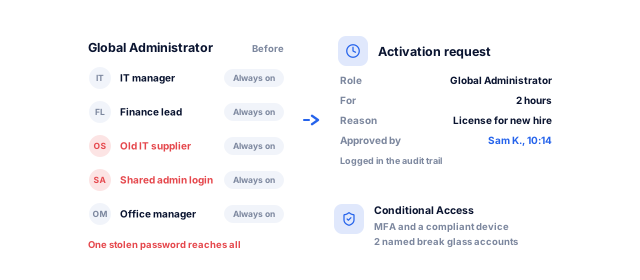
Permanent admin rights across Azure and Microsoft 365 let one stolen password reach everything. PIM grants them only when needed, with approval.
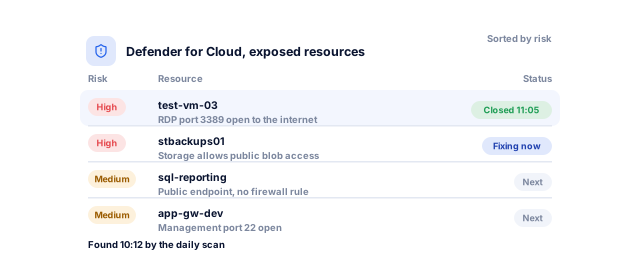
Defender for Cloud flags public endpoints and open ports. We close them in risk order, so a forgotten test VM is not the way in.
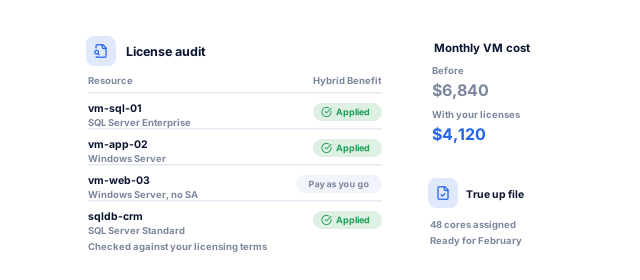
Licenses with Software Assurance can apply to Azure through Azure Hybrid Benefit. We audit every VM and database for it.
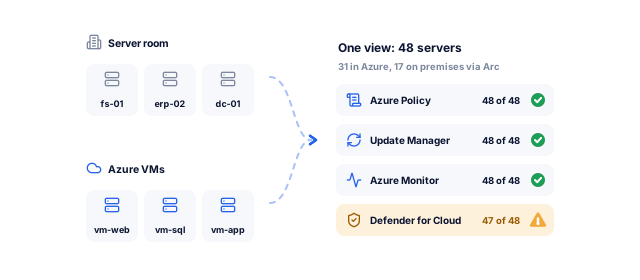
Azure Arc puts on-premises servers under the same policy, patching and monitoring as your VMs, so one report covers everything.
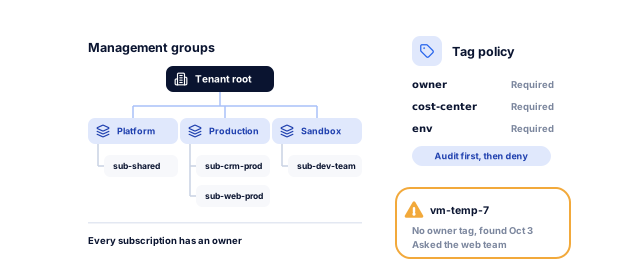
Management groups, tags and policy come in gradually, without breaking what runs, so every resource has an owner.
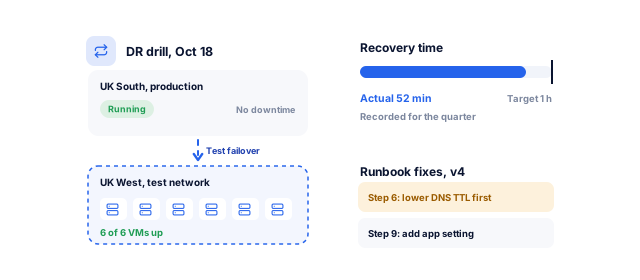
Azure Site Recovery drills fail over copies of your VMs while production runs, and record the real recovery time.
Give us read-only access. We will review your secure score, admin roles, backups and spend, and send a written, risk-ranked report you can act on with or without us.
Reader roles only: a Well-Architected assessment, secure score, privileged Entra ID roles, backups and 12 months of spend.
A clear picture of your estateDelegated access scoped to the subscriptions and roles you approve. Every action shows in your activity log, and you can remove it at any time.
Access you controlConditional Access, PIM, break-glass accounts and the Defender plans you approve, tested with a pilot group first.
Identity locked down firstAlert rules and workbooks per workload, action groups to your tools, runbooks and an escalation list.
Problems seen and handledIdle resources removed, VMs rightsized, Hybrid Benefit applied, then reservations or a savings plan for steady usage.
Spend that matches real useA report on incidents, secure score, patching, backup and DR tests and spend, plus a review call.
Decisions you can explainManaged Azure looks different depending on what else you run on Microsoft.
Your Entra ID tenant is the front door to both. We secure it first, then build file servers, apps and remote desktops on top. Our workflow automation team connects Microsoft 365 data to other systems.
With Azure Arc, on-premises servers get the same policy, patching, monitoring and Defender coverage as your VMs. When a server is ready to move, our cloud migration team plans it.
We close the gaps Defender CSPM finds and design for HIPAA, PCI DSS, GDPR and UK GDPR, PIPEDA, Australia's Privacy Act and India's DPDP Act, keep data in the regions you choose, and sign a BAA or DPA when needed. See our healthcare work.
Azure's discounts stack, but in the wrong order they lock you into capacity you later remove, so rightsizing comes first.
Book a strategy call| Lever | How it works | Microsoft's published saving | Best for | Watch out for |
|---|---|---|---|---|
| Rightsizing and auto-shutdown | Smaller VM sizes; non-production stopped out of hours | Depends on how oversized resources are | Every environment, first | Test performance after each change |
| Azure Hybrid Benefit | Apply Windows Server and SQL Server licenses you own | Up to 80% for Windows Server VMs with reservations | Businesses with eligible Microsoft licenses | Licensing terms and true-up records |
| Azure Reservations | Commit to a VM family and region for one or three years | Up to 72% versus pay-as-you-go | Stable VMs | Size and region must match |
| Savings plan for compute | Commit to an hourly spend for one or three years | Up to 65% versus pay-as-you-go | Steady spend across changing VMs | Charged even when unused |
| Storage tiers and lifecycle rules | Move rarely read blobs to Cool, Cold or Archive | Depends on data volume and access | Logs, backups and old files | Retrieval and early deletion charges |
Published savings from Microsoft's Reserved VM Instances, savings plan for compute and Azure Hybrid Benefit pages, checked October 2026. Actual savings vary by region and usage.
Onboarding takes 2 to 4 weeks; after that, the work runs month by month.
Book a strategy callBy week 2, you have a ranked risk register and our proposal.
By week 4, critical alerts reach an on-call engineer 24x7.
From the first monthly report, you see incidents, secure score and spend in one place.
You approve each step before we change anything, and everything we set up stays in your accounts.
Yours to keep, always. Everything is set up in your name, and if you leave we remove our access and hand over the documentation.
Any business that runs on Microsoft and wants Azure watched, secured and paid for sensibly.
Book a strategy callAn NDA comes before any access. Tenants, subscriptions and licenses stay in your name; we work through delegations you can remove. Templates, runbooks and diagrams live in your repository, ready for another team.
The alert reaches the on-call engineer, who follows the runbook and keeps you posted. Critical incidents get a response 24x7, other issues business hours, and each ends with a written report.
Gaps sit between systems: a shared admin role, an unpatched server, an undocumented VPN. Our certified engineers treat it as one estate, with developers on hand when the problem is the application.
These numbers come from our SEO, marketing and software work, measured in each client's own analytics. For your cloud, the first numbers come from the free review: what you spend, what is exposed, and how long a restore really takes.
See all case studies
MastersBuddyStudy abroad consulting
160+
keywords in Google's top 10
AkosMDHealthcare, Arizona
+57%
patient footfall
Eric OriginalsJewelry ecommerce
+1,900%
organic traffic
"From designing a high-converting website to managing our SEO, Google Ads, and Google Business Profile, improveFX delivered exceptional results across every channel."
 Maureen CappalloBroker and founder, Momentus Real Estate Group
"They revolutionized our online presence with a 60% increase in web traffic through strategic e-commerce SEO and content optimization."
 Eric NoahPresident, Eric Originals & Antiques Ltd.
"Visionstar Technologies' online presence transformed significantly with a 40% boost in customer engagement, all thanks to their exceptional website structuring and SEO tactics."
"Their strategic approach to our website and SEO resulted in a 60% increase in local inquiries, revolutionizing our automobile service business."
"Their SEO strategy helped us achieve top search rankings, while their Facebook Ads campaigns drove a steady flow of qualified prospects."
 Amita NaithaniCo-founder, Amita Naithani Resort Wear
Not seeing yours? Ask us directly and a specialist will reply personally.
Monitoring and incident response, Entra ID and access management, Defender for Cloud triage, patching, backups, disaster recovery testing, cost management and regular Well-Architected reviews, plus a documented access model, runbooks, a change log and a monthly report.
Migrations, major rebuilds and compliance audits are scoped as separate projects and quoted beside the monthly plan, so you see the whole cost first.
Ongoing cloud management with improveFX runs from under $1,000 to $15,000+ a month, depending on your environment. More subscriptions and workloads, hybrid servers connected through Azure Arc, a second cloud, extra support hours and compliance needs move you toward the higher end.
Your Microsoft bill for Azure usage and licenses is separate from our fee. We quote your fee after the free review.
We sign an NDA before any access is shared. The review needs Reader and Security Reader roles; after that we work through Azure Lighthouse, scoped to the subscriptions and roles you approve, with no permanent Global Administrator rights.
Every action appears in your activity log. Your tenant stays in your name, you can remove our delegation at any time, and templates and runbooks stay in your repository.
Yes. Azure Arc connects on-premises and other-cloud servers to Azure, so Update Manager patches them, Azure Monitor collects their logs and Defender for Servers protects them, just like your Azure VMs.
Physical hardware, networking and on-site work stay with your local IT team or supplier, and we agree the handoffs in writing. When servers are ready to move, we plan the migration.
We manage the identity and security layer Azure shares with Microsoft 365: Entra ID, Conditional Access, admin roles and sign-in policies.
Mailbox, Teams and SharePoint administration can stay with whoever runs it today. We work alongside them and test every sign-in change with a pilot group before it reaches everyone, so security improvements never lock people out of their work.
Yes, for critical incidents. When production is down or data is at risk, an engineer responds 24x7, works from the runbook for that alert and keeps you updated until it is resolved. Other issues are handled in business hours.
We open and manage Microsoft support cases when the platform is at fault, and every incident ends with a written report of cause and fix.
Microsoft publishes savings of up to 72% for reservations and up to 65% for the savings plan for compute, versus pay-as-you-go. Azure Hybrid Benefit adds more for Windows Server and SQL Server if you hold eligible licenses.
Our cost review is free, and you only pay for the optimization work if the savings it finds justify it. We rightsize first, then commit only steady usage.
No. improveFX does not hold Microsoft partner status for Azure, and none is needed to manage a tenant you own; the work is done by certified engineers, with every action in your activity log. We also offer AWS cloud management and Google Cloud managed services on the same principles.
For estates on several providers, multi-cloud management puts them in one report.
Tell us what worries you about your cloud, or book a strategy call with our team.


 A specialist replies personally 4.9 from 566 client reviews