



















WooCommerce website development that stays fast as you grow

Our WooCommerce website development services are for businesses that want the control of WordPress with a store that stays fast, secure and easy to run, from a lean first store to a high-volume catalog. We build custom WooCommerce themes and extensions, set up payments and shipping for your markets, tune hosting for real traffic, connect your back-office systems, and migrate stores from Shopify, Magento, Wix or older WooCommerce setups.

  • 170+projects delivered
  • 4.9
    221 reviews
  • 1.6 yearsaverage client relationship
New arrivalLinen overshirt$68
SML
Add to cart
Checkout3 steps
  • Cart
  • Shipping and tax
  • Payment, with wallets

120+ businesses chose us for their digital growth

  • AkosMD Hospital
  • Amita Naithani Resort Wear
  • Momentus Real Estate Group
  • CleverBoss
  • MastersBuddy
  • Foley Mansfield
  • Pomegranate Health
  • Trunk Box Baby
  • Hunt Ortmann
  • Immigration Desk
  • Urology Partners
  • Jodi Carlton
  • Ecom Fashion
  • Eye on Security
  • Disability Solutions
  • One400
  • Eric Originals
  • Sabulski Window Tinting
  • History of Soccer

WooCommerce website development at a glance

WooCommerce website development is the design, build and configuration of an online store on WordPress using the WooCommerce plugin. It covers theme and extension development, payment and shipping setup, hosting and performance tuning, integrations and migration, while you keep full control of the code and data.

  • WooCommerce itself is free; hosting, paid extensions and maintenance are the real running costs.
  • Hosting, caching and plugin count decide most of a store's speed.
  • Every plugin is code you must keep updated, so fewer and better plugins mean fewer risks.
  • New builds should use High-Performance Order Storage and the block checkout.
Best for
Content-led brands, stores already on WordPress, small stores starting lean, and businesses that need custom features or full control of code and hosting
What you get
Custom theme, extensions, payments and shipping, hosting setup, integrations, migration, QA, launch and maintenance
Typical timeline
About 2 to 4 weeks for a basic store setup. Custom builds and migrations usually take 6 to 12 weeks.
Pricing
Driven by design, catalog size, custom features, integrations and hosting. One published agency price we reviewed started at $10,000 for a WooCommerce build. Our website projects run from under $1,000 to $30,000+, depending on scope. We quote after a free audit.

What our WooCommerce website development services include

New stores need all six workstreams; an existing store often needs only the hosting, speed or extension work.

Get a free proposal

Responsive WooCommerce themes

We build block themes or classic child themes designed for your brand, with mobile-first templates for shop, category, product, cart and account pages. Customizations use WooCommerce's hooks and template overrides, so core updates do not wipe out your work. Product pages carry what buyers ask about: variations, size guides, stock levels, delivery estimates and reviews.
Custom extensions and plugins

When an off-the-shelf extension does too much or not enough, we write a focused custom plugin: pricing rules, product configurators, booking logic, B2B quote requests or ERP sync. Code follows WordPress coding standards, uses WooCommerce's hooks and REST API, and lives in a Git repository you own, so any capable developer can maintain it.

Payments, shipping and tax

We set up WooPayments, Stripe, PayPal, Razorpay or regional gateways, plus Apple Pay and Google Pay, and test each in sandbox mode. Shipping zones, carrier rates, local pickup and tax rules are set for every market you sell to. New stores use the block-based Cart and Checkout, and we confirm every extension is compatible with it.

Hosting, speed and scale

We set up hosting on PHP 8.3 or newer, add page caching and a Redis object cache, enable High-Performance Order Storage, and serve images through a CDN. Large catalogs can move search and filtering to Elasticsearch or Algolia, and our cloud performance team tunes servers for high-traffic stores.

Integrations and automation

We connect WooCommerce to ERPs, inventory and warehouse systems, accounting tools such as Xero and QuickBooks, CRMs and email platforms through extensions, webhooks or the REST API. Where an off-the-shelf connector falls short, our API development team builds one with logging and retries, so orders, stock and customer records stay in step.

Migration and maintenance

We migrate products, customers, orders and subscriptions from Shopify, Magento, Wix or an older WooCommerce install, with trial imports and a full redirect map. After launch, website maintenance covers core, theme and plugin updates tested on staging first, off-site backups, uptime checks and security monitoring.

Problems a properly built WooCommerce store solves

WooCommerce ran on 36% of the ecommerce sites detected by the HTTP Archive Web Almanac in 2024, more than any other platform. Its flexibility is the reason, and also the source of its most common problems.

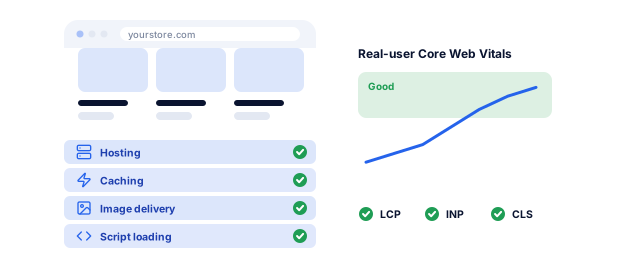
A WooCommerce store rebuilt on a solid foundation of hosting, caching, image delivery and script loading, then tracked with real-user Core Web Vitals

Slow pages on mobile

The same Web Almanac chapter found WooCommerce stores passed the Largest Contentful Paint check on just 34% of mobile sites, behind other major platforms. Cheap shared hosting, heavy page builders and long plugin lists are the usual causes. We fix the foundation first: hosting, caching, image delivery and script loading, then track real-user Core Web Vitals.

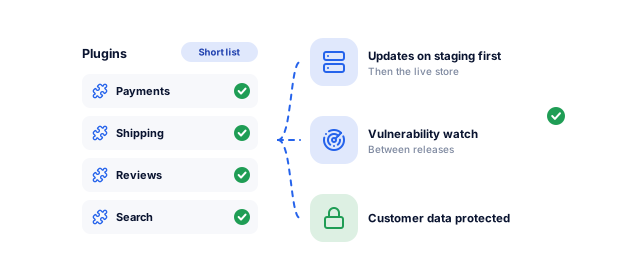
A short list of well-maintained plugins, each update tested on staging first, with known vulnerabilities watched between releases to protect customer data

Security holes in plugins

Patchstack recorded 11,334 new vulnerabilities in the WordPress ecosystem in 2025, 91% of them in plugins, and 46% were not fixed in time for public disclosure. A store holding customer data cannot leave that to chance. We keep the plugin list short, apply updates on staging first and watch for known vulnerabilities between releases.

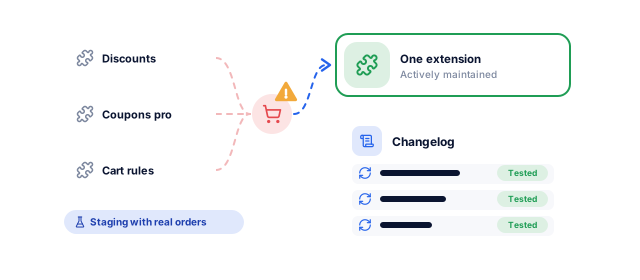
Three overlapping plugins clashing on the checkout replaced by one maintained extension, with updates tested against real order scenarios and logged in a changelog

Plugin conflicts after every update

When several plugins hook into the same checkout or product page, one update can break another. We replace overlapping plugins with one well-maintained extension or a small custom plugin, test updates against a staging copy with real order scenarios, and keep a changelog, so updating stops being a gamble.

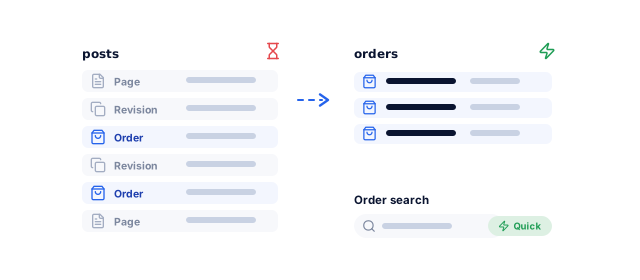
Orders moved out of the shared posts table, where they sat among pages and revisions, into dedicated order tables so admin screens and order searches stay quick

An admin that slows down as orders grow

Older stores keep orders in the WordPress posts tables alongside every page and revision, so admin screens slow as volume grows. High-Performance Order Storage, the default for new installs since WooCommerce 8.2, moves orders into dedicated tables. We migrate existing stores to it after checking every extension for compatibility.

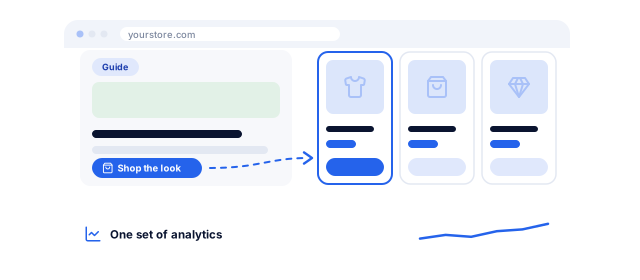
Guides and recipes on the same domain as the products they feature, linking straight to them and measured in one set of analytics

Content and commerce split across two systems

Many brands run a WordPress blog beside a store on another platform, splitting authority and analytics. WooCommerce keeps guides, recipes or lookbooks on the same domain as the products they sell, with links between them and one set of analytics. With WooCommerce SEO, that content can bring in buyers who are still researching.

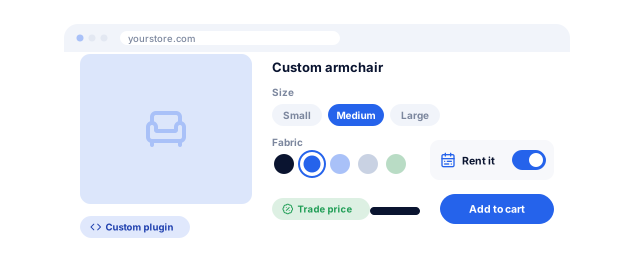
A made-to-order product page with a custom configurator for size, fabric, rental dates and trade pricing, possible because the store gives full access to the code

Features your platform will not allow

Rental pricing, made-to-order configurators, trade accounts with negotiated prices, or memberships tied to products are hard on hosted platforms. WooCommerce gives full access to the code, so custom WooCommerce website development services can model your business exactly. The trade-off is that you also own the upkeep, so we document everything we build.

Is your WooCommerce store slow, fragile or both?

Tell us what you need. We look at your store, plugins, hosting and checkout, and send a written plan for what to fix or rebuild first, with a price range and timeline.

What do you need?

Free, with no obligation. Rather talk? Book a 30-minute call

How we run a WooCommerce website development project

  1. Audit and scope

    For an existing store we review hosting, plugins, theme code, speed, security and analytics. For a new one we document products, features and integrations. Each plugin is marked keep, replace or custom.

    • Plugin and hosting audit
    • Feature and integration list
    • Scope, timeline and budget
    An agreed plan and budget
  2. UX and design

    We plan categories and navigation from your product data, wireframe the shop, product, cart, checkout and account templates, and design them mobile first.

    • Category and navigation plan
    • Wireframes for key templates
    • Approved page designs
    Designs signed off before development
  3. Development on staging

    We build on a staging server with Git version control, write the theme and any custom plugins, and configure only the agreed extensions. Code is reviewed before it is merged, and every feature is tested with your real product data.

    • Staging site you can review
    • Theme and plugin code in your repository
    • Configured extensions
    A working store on staging
  4. Data, integrations and redirects

    Products, customers and orders are migrated in trial runs and checked against the source. Integrations are tested with sample orders, refunds and partial shipments. Every old URL is mapped to a permanent redirect, following Google's site move guidance.

    • Verified data import
    • Tested integrations
    • URL redirect map
    Clean data and no broken links
  5. Performance, security and launch

    We load test with realistic traffic, check Core Web Vitals, add two-factor login and least-privilege roles for admins, and place sandbox orders through every payment method. GA4 ecommerce events are verified, and launch follows a checklist with a rollback plan.

    • Load and speed test results
    • Security hardening checklist
    • Launch and rollback plan
    A fast, secure go-live
  6. Maintenance and growth

    After launch, updates are tested on staging before they reach your live store, backups run off-site, and uptime and security are monitored. A monthly report covers what changed and what to improve next.

    • Staged updates and backups
    • Monthly report
    • Improvement backlog
    A store that stays fast and secure

WooCommerce builds for different kinds of stores

These are the store types we plan for most often.

01 / 05

Content-led and D2C brands

If your brand sells through guides, recipes, reviews or how-to content, WooCommerce keeps that content and your products on one WordPress site. We design templates that link articles to the products they mention, and give editors blocks for shoppable content. Our WordPress website development team builds the content side to the same standard as the store.

02 / 05

Large catalogs and high order volume

Thousands of products and busy sale days expose every weak point. We enable High-Performance Order Storage, add a Redis object cache, run WP-Cron and Action Scheduler jobs from a real server cron, and move search and filters to a dedicated engine. Before big campaigns we load test checkout, so the store holds up when traffic peaks.

03 / 05

B2B and wholesale stores

Trade buyers need accounts, negotiated prices, minimum order quantities, quote requests and payment on terms. We build these with proven extensions or custom code, and connect the store to your ERP so prices, stock and credit limits come from one system. Retail and trade customers can share one store, each seeing their own prices.

04 / 05

Subscriptions, memberships and bookings

WooCommerce Subscriptions, Memberships and Bookings let you sell repeat boxes, gated content or appointments from the same store. We set up recurring payments through gateways that support saved cards, build customer account pages for pausing or switching plans, and connect renewals to your email platform, often with workflow automation for reminders and failed payment follow-ups.

05 / 05

Stores moving to WooCommerce

Brands move to WooCommerce for control of code and hosting, to bring content and commerce together, or to model features a hosted platform will not allow. We migrate catalog, customers and order history, rebuild redirects and keep search visibility in focus. Before any move, we compare running costs on both platforms, so the decision rests on numbers. If you are still deciding, compare options on our ecommerce website development page.

WooCommerce hosting: which level fits your store?

Hosting decides more of a WooCommerce store's speed and reliability than any plugin.

Book a strategy call
FactorShared hostingManaged WordPress hostingCloud or dedicated (AWS, Google Cloud)
Typical storeSmall catalog, low traffic, testing an ideaMost growing storesHigh traffic, large catalogs, heavy integrations
Performance under loadShares resources with other sites; slows at peaksTuned for WordPress, with page caching built inResources sized and scaled for your store
Object caching (Redis)Rarely availableOften included or offered as an add-onConfigured to your needs
Updates and securityMostly on youHost handles the server and often WordPress core; plugins still need careFull control, so someone must manage everything
Sales peaksLittle room to scalePlan upgrades, within the host's limitsAuto-scaling or capacity planned ahead
Best whenVery early stage, low order volumeMost WooCommerce storesDowntime or a slow checkout costs serious money
Main riskSlow checkout caused by other sites on the serverLimits on PHP workers during busy periodsCost and complexity without active management

WordPress recommends PHP 8.3 or greater, MySQL 8.0+ or MariaDB 10.11+, and HTTPS (WordPress.org requirements). Plan limits such as PHP workers, storage and bandwidth vary by host, so check them before you buy.

Your WooCommerce website project, week by week

Timings are for a custom build or migration; a basic store setup takes about 2 to 4 weeks, and larger builds can run to 12.

Book a strategy call
  1. 1Weeks 1 to 2

    Audit and scope

    • Plugin, hosting, speed and security audit
    • Each plugin marked keep, replace or custom
    • Hosting plan, scope, timeline and budget
    • From you: WordPress admin, hosting and analytics access

    By week 2, you have an agreed plan, hosting choice and budget.

  2. 2Weeks 3 to 7

    Design and development on staging

    • Wireframes and mobile-first designs for key templates
    • Theme and custom plugins in your Git repository
    • Agreed extensions configured on a staging site
    • From you: design feedback, product data and content

    By week 7, you can review a working store on staging.

  3. 3Weeks 8 to 10

    Data, testing and launch

    • Products, customers and orders migrated in trial runs
    • Redirect map and tested integrations
    • Load test, security hardening and sandbox orders
    • From you: launch sign-off and a low-traffic launch window

    By week 10, your store is live, with backups and staged updates running.

What you sign off, step by step

You approve each stage before the next one starts, and the project ends with a site you own and the documents to run it.

Along the way you get

  • A sitemap and plan before any design
  • Designs and builds for you to approve, step by step
  • A staging site to test before anything goes live
  • Speed, accessibility and SEO checks before launch
Store launch checklistSample
  1. 1Catalog and collectionsImported
  2. 2Payments and shippingTested
  3. 3Checkout on phonesTested
  4. 4Product schemaValid
  5. 5Core Web VitalsPassed
  6. 6Redirect mapReady
  7. 7Analytics and pixelsFiring
  8. 8Staff trainingBooked
A sample of the checklist. Every project gets its own, signed off with you.

Yours to keep, always. Everything is set up in your name, and if you leave we remove our access and hand over the documentation.

  • Code and repository
  • Domain and hosting accounts
  • CMS admin and content
  • Design files
  • Documentation and logins

Who WooCommerce website development from improveFX is for

WooCommerce suits owners who want control of their store. We size the build, hosting and upkeep to your budget.

Book a strategy call

A good fit if

  • You want full control of code, hosting and store data
  • You publish content and want it on the same site as your products
  • You need features hosted platforms resist, such as configurators or trade pricing
  • You want a store that stays fast and secure after launch, with updates tested on staging

We can also help when

  • You need to sell soon: a basic store setup takes about 2 to 4 weeks, and custom features follow after launch
  • You are starting small: we launch a lean store on a well-built theme and entry-level hosting, then move hosting up as orders grow
  • You want hosting and updates handled for you: we set up managed WordPress hosting and run updates on a maintenance plan, or build on Shopify
  • Your store is slow or fragile but a rebuild is not in the budget: we fix hosting, caching and plugins first

Why choose improveFX as your WooCommerce website development company

01

WordPress, WooCommerce and SEO under one roof

Our 25+ in-house specialists in New Delhi, India cover design, WordPress and WooCommerce development, SEO and paid media. The team that builds your store also plans how it will be found and marketed, so templates, structured data and tracking are ready from launch day.

02

Built to be maintained

Every store we build lives in version control, follows WordPress coding standards and comes with a staging site and written notes on custom code. Updates go to staging before production. That matters most on WooCommerce, where the code is yours to keep healthy.

03

Your store, your code, rolling terms

The code, hosting account, domain, extension licenses and store data are registered to you. Maintenance runs on rolling agreements with transparent monthly reporting, not lock-in contracts. Clients in the US, UK, Canada, Australia, Europe and India rate us 4.9 on Clutch from 221 reviews and 4.8 on Google from 189, and stay with us for 1.6 years on average.

Certified partners on the platforms we manage for you

  • Shopify Partner

Results we can put numbers on

These figures come from completed client work. The Eric Originals result followed a migration to Shopify; we apply the same safeguards when moving a store to WooCommerce.

See all case studies
Eric OriginalsJewelry ecommerce

+1,900%

organic traffic

A struggling jewelry website became a steady source of buyers

Read the case study
Momentus Real Estate GroupReal estate

210%

more qualified leads

Website, SEO, Google Ads and Business Profile working as one

Read the review
MastersBuddyStudy abroad consulting

160+

keywords in Google's top 10

A new consultancy broke into one of India's most competitive markets

Read the case study

What our website clients say

"From designing a high-converting website to managing our SEO, Google Ads, and Google Business Profile, improveFX delivered exceptional results across every channel."
210%more qualified leads
185%organic and local traffic growth
92%keywords on page one
Maureen CappalloBroker and founder, Momentus Real Estate Group
"They revolutionized our online presence with a 60% increase in web traffic through strategic e-commerce SEO and content optimization."
60%more organic traffic
47%more sales
Eric NoahPresident, Eric Originals & Antiques Ltd.
"Visionstar Technologies' online presence transformed significantly with a 40% boost in customer engagement, all thanks to their exceptional website structuring and SEO tactics."
+40%qualified leads
32%lower cost per acquisition
Thomas MorelFounder, Visionstar Technologies
"Their strategic approach to our website and SEO resulted in a 60% increase in local inquiries, revolutionizing our automobile service business."
60%more local inquiries
87%more organic traffic
Mike SteffanFounder, Sabulski Window Tinting
"Their SEO strategy helped us achieve top search rankings, while their Facebook Ads campaigns drove a steady flow of qualified prospects."
55%more organic traffic
4.7xreturn on ad spend
75%keywords on page one
Amita NaithaniCo-founder, Amita Naithani Resort Wear

WooCommerce website development questions, answered

Not seeing yours? Ask us directly and a specialist will reply personally.

How much does WooCommerce website development cost?

Our website projects run from under $1,000 to $30,000+, depending on scope. A basic store on a well-built theme sits at the low end; custom design, custom plugins, integrations and migration move it up. One published agency price we reviewed started at $10,000 for a WooCommerce build.

The WooCommerce plugin is free, but hosting, paid extensions, payment fees and maintenance are ongoing costs. On a small budget, we put the money into reliable hosting, a good theme and a short plugin list, which saves on fixes later. We quote after a free audit, with one-time and monthly costs shown separately.

How long does it take to build a WooCommerce website?

Published agency timelines we reviewed put a basic store setup at about 2 to 4 weeks, and custom builds or migrations at 6 to 12 weeks.

Product data, custom plugins and integrations decide where in that range you land. A clean product spreadsheet and quick design feedback shorten the schedule. If you need to sell soon, we launch the basic store first and add custom features after go-live.

WooCommerce or Shopify: which should I choose?

Choose Shopify if you want hosting, security and checkout run for you for a monthly fee. Choose WooCommerce if you want to own the code and hosting, publish a lot of content, or need features a hosted platform will not allow.

Costs fall differently. WooCommerce is free, but hosting, extensions and maintenance are yours to pay for and manage. Shopify charges a monthly plan and app fees, and customizing its checkout steps needs Shopify Plus. We build on both; see our Shopify website development page for that side.

What do WooCommerce website development services include?

They cover theme design and development, extensions and custom plugins, payments, shipping and tax, hosting setup, integrations, data migration, testing and launch.

Good WooCommerce website development services also plan what comes after launch: a staging site, version control, an update routine, backups and security monitoring. Ask any provider how they test plugin updates before they reach your live store.

Should I hire a WooCommerce website developer or an agency?

A freelance WooCommerce website developer can handle small, clearly defined tasks; an agency suits full builds, migrations and stores that need design, development, hosting and SEO together. We take on both, from a single fix to a full build.

Whichever you choose, ask whether they work on staging with Git, how they handle plugin updates, and who owns the code and hosting account. A WooCommerce website development agency should answer all three without hesitation.

Can WooCommerce handle large catalogs and high traffic?

Yes, with the right setup. Large catalogs and busy stores run well on WooCommerce when hosting, caching, order storage and search are built for scale.

That means High-Performance Order Storage, a Redis object cache, a CDN, background jobs on a real server cron, and a dedicated search engine for large catalogs. We load test checkout before major sales, because peak days reveal problems that normal traffic hides.

How do you keep a WooCommerce store secure?

By keeping plugins few and current, testing updates on staging, and limiting who can log in and what they can change.

We add two-factor login for admins, least-privilege user roles, a web application firewall, off-site backups and vulnerability monitoring. Card payments go through the gateway's hosted fields, so card numbers never sit on your server. Security work continues after launch through maintenance.

Can you migrate my store to WooCommerce?

Yes. We migrate from Shopify, Magento, Wix, BigCommerce or older WooCommerce setups, moving products, customers, orders and, where the gateway allows, subscriptions.

Every old URL gets a permanent redirect, and titles, descriptions and structured data carry across. Google notes rankings can fluctuate for a few weeks after a move, so we monitor Search Console closely after launch and fix any errors quickly.

Do you build custom WooCommerce plugins?

Yes. When existing extensions do not fit, we write custom plugins for pricing rules, configurators, bookings, B2B workflows or integrations.

Custom plugins use WooCommerce's hooks and REST API rather than editing core files, so updates do not break them. You own the code, which lives in your repository with documentation another developer can follow.

Do you offer WooCommerce maintenance after launch?

Yes. Maintenance covers WordPress core, theme and plugin updates tested on staging, backups, uptime and security monitoring, and small changes, on a rolling monthly agreement.

You get a monthly report of what changed and what we found. Stores that skip updates collect risk quickly, given how many plugin vulnerabilities appear each year. See website maintenance or contact us to discuss what your store needs.

Ready to plan your website?

Tell us what you need built, or book a strategy call with our team.

  • What we would build, and on which platform
  • A price range and timeline for your budget
  • A call with a specialist to plan the next steps, no obligation
Vikash Kumar PalRoshan Kumar JhaAbhishek Kumar Jha A specialist replies personally 4.9 from 566 client reviews
What do you need help with?

Pick all that apply.

Next, a few details about your business on our contact page. It takes about a minute.

Prefer to talk now? Book a strategy call