



















POS software development for stores and restaurants that cannot stop selling

Our POS software development team builds checkout systems for retailers, restaurants and service businesses whose counter does not fit a standard app. You get fast billing on the hardware you choose, card and wallet payments kept out of your PCI DSS scope, an offline mode that keeps selling when the internet drops, and stock that syncs across every store and your online shop.

  • 120+clients served
  • 4.9
    221 reviews
  • 1.6 yrsaverage client relationship
Counter 2: order #318Paid
Flat whiteOat milk2 x $4.50
Almond croissantBakery$4.75
Loyalty reward120 points$1.35 offApplied
TotalCard, tap to pay$12.40Paid
Keeps selling offline
  • Sales saved on the device
  • Stock updated across stores
  • End-of-day report by counter

120+ businesses chose us for their digital growth

  • AkosMD Hospital
  • Amita Naithani Resort Wear
  • Momentus Real Estate Group
  • CleverBoss
  • MastersBuddy
  • Foley Mansfield
  • Pomegranate Health
  • Trunk Box Baby
  • Hunt Ortmann
  • Immigration Desk
  • Urology Partners
  • Jodi Carlton
  • Ecom Fashion
  • Eye on Security
  • Disability Solutions
  • One400
  • Eric Originals
  • Sabulski Window Tinting
  • History of Soccer

POS system development at a glance

POS software development is the design and build of the point-of-sale system a business uses to ring up sales, take payments, issue receipts and update stock. It covers checkout screens, payment terminal integration, hardware, offline mode, reporting and links to inventory and accounting, so every sale is recorded correctly in every store.

  • If Square, Shopify POS or Toast fits your counter, we set it up and connect it. Custom pays off when workarounds and fees keep growing.
  • Semi-integrated card terminals keep card data out of your POS software.
  • Cash and returns must work offline. Offline cards depend on your processor.
  • Pilot in one store, with the old system ready for the first weekend.
Best for
Retail chains, restaurants, franchise groups and service counters with workflows, hardware or volumes that standard POS apps handle poorly
What you get
Checkout app, payment and hardware integration, offline mode, back office, inventory and accounting sync, pilot rollout and support
Typical timeline
Discovery in 2 to 3 weeks. A pilot store live in about 3 to 4 months. Rollout to more stores in waves after the pilot.
Pricing
Driven by platforms, hardware, payments and integrations. Our software projects run from under $5,000 to $100,000+, depending on scope. Hardware and card processing fees are separate.

What our POS software development covers

Six areas that decide whether a counter keeps moving on your busiest day, scoped around how your staff sell.

Get a free proposal

Checkout and billing

Items are added by scan, search or a favorites grid, with modifiers, bundles, discounts and promotion rules managers change themselves. Split payments, returns against the original receipt and exchanges take a few taps. Receipts follow local GST, VAT or sales tax rules, printed or sent by email or SMS.
Payments kept out of PCI scope

We integrate semi-integrated terminals such as Stripe Terminal, Adyen or Square Terminal: the POS sends the amount, the terminal reads and encrypts the card, and only the result comes back. Your software never sees card numbers. The PCI Security Standards Council notes that merchants using PCI-listed P2PE solutions have fewer applicable PCI DSS requirements.

Offline mode that keeps selling

The checkout keeps a local database of products, prices and open orders. Offline, cash sales, returns and kitchen tickets carry on, each with a unique ID created on the device. On reconnect the server applies each sale once, merges stock as movements rather than overwriting totals, and flags true conflicts, such as one gift card spent twice, for a manager. Offline card payments follow your processor's store-and-forward limits.

Hardware that works on day one

Receipt printers from makers such as Epson and Star Micronics, cash drawers, barcode scanners, scales, customer displays, label printers, kitchen display screens and your processor's card terminals, on iPad, Android tablets or Windows. We test on the exact devices you will buy, in a busy-hour simulation, because a printer driver problem on launch day closes a till.

Inventory and online store sync

Each sale and return updates stock at that location as it happens, and Shopify or WooCommerce orders reserve the same stock. Transfers, receiving and counts run from the POS or a dedicated inventory management system. Sales, tax and payments post to QuickBooks Online, Xero or Zoho Books as daily summaries.

Multi-store control and reporting

Products, menus and prices are managed centrally, with store-level overrides. Shifts open and close with a counted float, and Z reports, cash variances, voids and discounts are reported by store and staff member. Owners see sales by hour, item and location live, or on a custom dashboard.

What a POS built around your counter changes

Good POS software development shows up in queue times, cash-ups and stock accuracy. We scope for these outcomes.

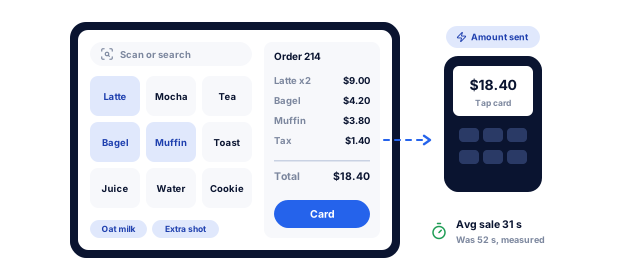
A counter POS with best sellers one tap away, scan-first entry and modifiers, sending the order total straight to the card terminal, with the average sale time measured before and after

Shorter queues at peak times

Most checkout time is lost searching for items, keying modifiers and waiting for the card terminal. Screens built around your best sellers, scan-first entry and terminals that receive the amount automatically remove steps. We time real transactions at your counter before the build and after the pilot.

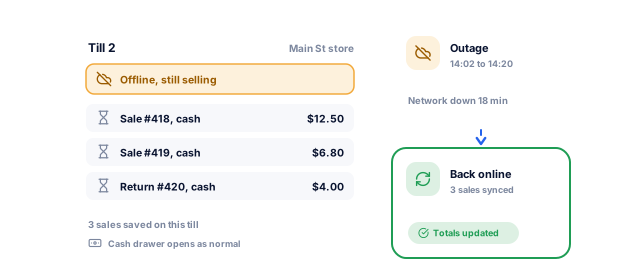
A till that loses its network connection and keeps selling and taking returns in cash, saving each sale on the device, then syncing all of them when the connection comes back

Selling through an outage

Cash still matters at the counter. The Federal Reserve's 2026 Diary of Consumer Payment Choice found that cash made up 14% of US consumer payments in 2025, and four in five consumers had used cash in the previous 30 days. A POS that handles cash and returns offline keeps trading when the network fails.

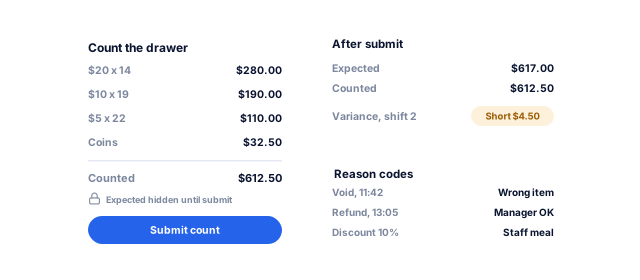
A blind cash-up where staff count the drawer before seeing the expected total, then a variance of $4.50 short, with reason codes on voids, refunds and manual discounts

Cash-ups that balance

Blind cash-ups, where staff count the drawer before seeing the expected total, and reason codes on voids, refunds and manual discounts make shrinkage visible by shift and person. Managers review exceptions, not every receipt, and we report cash variance per store each week.

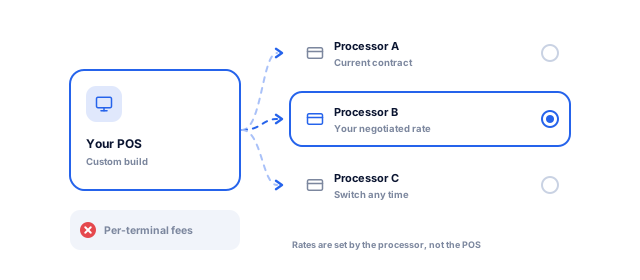
A custom POS connected to the card processor you negotiated with, with other processors available to switch to later, and no per-terminal subscription fees

Freedom to choose your processor

Many packaged POS apps work best, or only, with their own card processing. A custom POS can integrate the processor you negotiate with, or switch later. Processing fees are set by the processor and acquirer, not the software, so the saving comes from negotiating power and no per-terminal subscriptions.

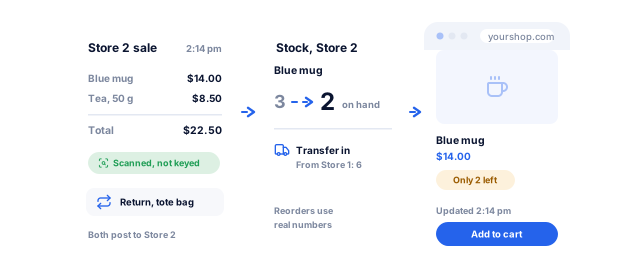
A scanned sale at one store taking stock for that location from 3 to 2, a transfer in from another store, and the online shop showing the same two left within the minute

Stock that matches the shelf

When every sale, return and transfer posts to stock at the right location, reorders use real numbers and online stores stop selling items the shop sold an hour ago. Screens that favor scanning over keying keep it accurate, and we track count variances by store after go-live.

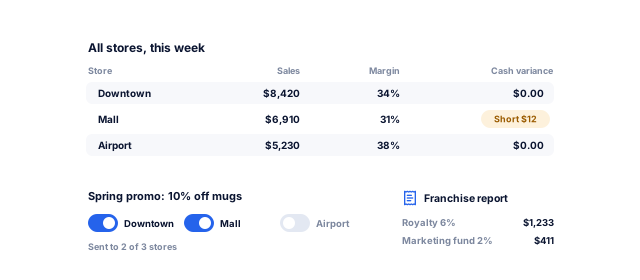
Sales, margin and cash variance for every store in one table, a promotion pushed to the stores you choose, and royalty and marketing fund figures for a franchise group from the same data

One view across every store

Owners and area managers see sales, margins, staff performance and cash by store in one place, without exporting files from each site. Price changes and promotions go to every store at once, or to the ones you choose, and franchise royalty reporting comes from the same data.

Would Square, Shopify POS or Toast do the job?

Tell us what you need. We look at your counters, stock and payment setup, and tell you in writing whether an off-the-shelf POS set up by us will do or a custom one pays back, with a price range and timeline.

What do you need?

Free, with no obligation. Rather talk? Book a 30-minute call

Our POS system development process

Six steps of POS software development, from watching your counter at rush hour to rolling out store by store.

Book a strategy call
  1. Counter observation and requirements

    We watch real transactions at peak time, list every exception staff handle (returns, split bills, overrides, loyalty) and collect reports and hardware details. Tax, receipt and fiscal rules for each country are confirmed, such as Germany's KassenSichV.

    • Transaction timings
    • Workflow and exception list
    • Country rules checklist
    Requirements based on the real counter
  2. Build or buy and payment design

    We compare your needs against packaged POS products. If one fits, we set it up and connect it. If not, we choose the processor and terminal with you, keep card data out of your software, and map what stays in PCI DSS scope.

    • Options comparison
    • Payment architecture
    • PCI DSS scope notes
    A clear route and a smaller compliance burden
  3. Hardware selection and prototype

    We shortlist devices and peripherals, then prototype the checkout on the actual hardware. Cashiers try it with real products before development starts, when changing a screen costs least. You then get a fixed quote for the pilot.

    • Hardware bill of materials
    • Clickable checkout prototype
    • Fixed quote for the pilot
    Screens cashiers are fast on
  4. Build and device testing

    We build the checkout, back office and integrations in two-week sprints, with staging demos. Every release is tested on target devices with payments in test mode, printers, drawers and offline cases such as pulling the network cable mid-sale.

    • Fortnightly demos
    • Device and offline test reports
    • Processor certification support
    Fewer surprises at the counter
  5. Pilot store and rollout

    One store goes live first, on a quiet weekday, with our team on call and the old system ready. After two to four weeks of fixes, the rest roll out in waves, with catalog, loyalty and gift card balances migrated and reconciled before each switch.

    • Migrated catalog and balances
    • Pilot review
    • Rollout schedule
    A launch that does not close tills
  6. Support and updates

    After launch we monitor errors, sync queues and terminal failures, with support cover for your trading hours, including weekends and peaks. Updates ship outside trading hours and can be rolled back.

    • Support plan for trading hours
    • Monitoring and alerts
    • Release and rollback plan
    A counter that keeps working

POS software for retail, restaurants and service counters

The checkout looks similar everywhere. The rules behind it differ by business, and that is where custom POS software development earns its cost.

01 / 05

Retail stores and chains

Retail POS work centers on fast scanning, promotions, returns and stock by store. We build mix-and-match offers, gift cards, customer accounts, special orders and endless aisle ordering. If you sell online too, our Shopify development team keeps storefront and stores on one catalog and stock figure.

02 / 05

Restaurants, cafes and quick service

Restaurant POS work is about speed between order and kitchen. We build table and seat management, modifiers and coursing, kitchen displays that route each item to the right station, split bills and tips, and QR ordering. Delivery platform orders join the same queue where the platform offers an API or integration partner.

03 / 05

Salons, spas and studios

Service counters sell time as well as products. The POS links to bookings, records who delivered each service for commission, sells packages and memberships, and draws down prepaid sessions. Bookings can come from your website through our appointment scheduling software work, so the calendar and the till agree.

04 / 05

Clinic and pharmacy counters

For clinics in India with a pharmacy counter, our Nabhaya Clinic product already handles counter billing, GST invoices, UPI QR, card machines, batches, expiry and a blind cash-up, with no custom build. For hospital pharmacies and multi-site groups with their own pricing or approval rules, we build custom; see our healthcare work.

05 / 05

Franchises and multi-brand groups

Franchise groups need central control with local freedom: one menu or catalog, regional prices, franchisee reporting and royalty calculations. Head office, area managers and franchisees each see what they should, and promotions go to selected stores on a schedule. When the POS should also drive purchasing and finance, our business management software work extends it.

Off-the-shelf POS vs custom POS software

Three routes, and we deliver all three: we set up and connect a retail or restaurant POS app, or build custom where they fall short.

Book a strategy call
FactorRetail POS apps (Shopify POS, Square, Lightspeed)Restaurant POS apps (Toast, Square for Restaurants, Petpooja)Custom POS software
Best fitStandard retail with common hardwareStandard table service, counter service and deliveryUnusual workflows, hardware, volumes or many integrations
Upfront costLow: hardware and setupLow to medium: hardware and setupHigh: discovery, build, testing and rollout
Ongoing costSubscription per location or register, plus processing feesSubscription per location or terminal, plus processing feesHosting and support, plus processing fees; no subscription
PaymentsOften tied to the vendor's processing or a short partner listUsually tied to the vendor's processingAny processor and terminal you choose
Offline modeAvailable, within limits the vendor setsAvailable, within limits the vendor setsDesigned around your rules and your processor's limits
IntegrationsApp store and APIsPartner integrations and APIsBuilt to your systems from the start
OwnershipVendor owns the software and roadmapVendor owns the software and roadmapYou own the code, data and hosting accounts

Products, plans and payment options differ by country and change often, so check current terms with each vendor. Card processing fees apply on every route.

Your POS project, week by week

A pilot store is usually live in about 3 to 4 months, with more stores following in waves.

Book a strategy call
  1. 1Weeks 1 to 3

    Counter study and payment design

    • Transaction timings and a list of every exception
    • Tax, receipt and fiscal rules per country
    • Packaged options compared; processor and terminal chosen
    • From you: a store at peak time and current reports

    By week 3, you have a route, a payment design and a hardware list.

  2. 2Weeks 4 to 12

    Prototype, build and device tests

    • Checkout prototype tried by cashiers on real hardware
    • Fixed pilot quote, then two-week sprints with demos
    • Offline, printer and payment tests on target devices
    • From you: test devices, processor sandbox and catalog data

    By week 12, the checkout passes device and offline tests on staging.

  3. 3Weeks 13 to 16

    Pilot store live

    • Catalog, customers, loyalty and gift card balances migrated
    • Staff training in practice mode
    • Pilot store live with our team on call
    • From you: a pilot store, cashiers and launch sign-off

    By week 16, your pilot store sells on the new POS, with rollout waves scheduled.

What you sign off, step by step

You approve each stage before the next one starts, and the project ends with software you own and the documents to run it.

Along the way you get

  • A process map and clickable prototype before any build
  • Working software to review every sprint
  • A rehearsed data migration before go-live
  • Training for each role before launch
Go-live checklistSample
  1. 1Process map and requirementsApproved
  2. 2Data model and integrations planApproved
  3. 3Clickable prototypeApproved
  4. 4Automated testsPassing
  5. 5Data migration rehearsalDone
  6. 6User acceptance testingSigned off
  7. 7Roles and security reviewPassed
  8. 8Training and handoverBooked
A sample of the checklist. Every project gets its own, signed off with you.

Yours to keep, always. Everything is set up in your name, and if you leave we remove our access and hand over the documentation.

  • Source code and repository
  • Your database and all your data
  • Cloud and hosting accounts
  • Design files
  • Documentation and admin logins

Who POS software development from improveFX is for

Businesses whose counter, hardware or store count has outgrown a standard POS app.

Book a strategy call

A good fit if

  • Retail chains and franchise groups with central pricing and store reporting
  • Restaurants needing kitchen routing, coursing or QR ordering
  • Businesses that want to choose, and switch, their card processor
  • Counters with scales, label printers or other special hardware

We can also help when

  • Square, Shopify POS or Toast covers most of it: we set it up and connect it to your inventory, accounting or ERP
  • You run one store today: we pilot there first and add stores in waves as you open them
  • Your current POS cannot go dark for a day: we migrate catalog, loyalty and gift card balances and keep the old system as a fallback
  • You run a clinic pharmacy counter in India: Nabhaya Clinic already bills with GST and UPI

Why choose improveFX as your POS development company

01

The right POS, set up or built by us

Discovery may recommend Square, Shopify POS, Toast or another packaged product. If so, we set it up and build the integrations that make it fit; as a Shopify Partner, we connect Shopify POS to your other systems. When the numbers and workflows support custom POS software, we build it.

02

Counter software we already run

Our own Nabhaya Clinic product includes a pharmacy counter with GST billing, UPI QR, card machines and a blind cash-up, and our team builds, hosts and supports it for clinics every day. Counter software has to work during the rush, and we design and test every POS that way.

03

Your code, your data, rolling terms

You own the source code, database, documentation and cloud accounts, with no per-terminal fees to us. Support runs on rolling agreements with monthly reporting. Clients rate us 4.9 on Clutch from 221 reviews and 4.8 on Google from 189, and stay 1.6 years on average. Read our case studies.

Results we can put numbers on

Results from our case studies and client reviews, including custom hospital software and Shopify ecommerce work.

See all case studies
AkosMDHealthcare, Arizona

+57%

patient footfall

An Arizona hospital became the first call for urgent care

Read the case study
MastersBuddyStudy abroad consulting

160+

keywords in Google's top 10

A new consultancy broke into one of India's most competitive markets

Read the case study
Eric OriginalsJewelry ecommerce

+1,900%

organic traffic

A struggling jewelry website became a steady source of buyers

Read the case study

What our clients say

"From designing a high-converting website to managing our SEO, Google Ads, and Google Business Profile, improveFX delivered exceptional results across every channel."
210%more qualified leads
185%organic and local traffic growth
92%keywords on page one
Maureen CappalloBroker and founder, Momentus Real Estate Group
"They revolutionized our online presence with a 60% increase in web traffic through strategic e-commerce SEO and content optimization."
60%more organic traffic
47%more sales
Eric NoahPresident, Eric Originals & Antiques Ltd.
"Visionstar Technologies' online presence transformed significantly with a 40% boost in customer engagement, all thanks to their exceptional website structuring and SEO tactics."
+40%qualified leads
32%lower cost per acquisition
Thomas MorelFounder, Visionstar Technologies
"Their strategic approach to our website and SEO resulted in a 60% increase in local inquiries, revolutionizing our automobile service business."
60%more local inquiries
87%more organic traffic
Mike SteffanFounder, Sabulski Window Tinting
"Their SEO strategy helped us achieve top search rankings, while their Facebook Ads campaigns drove a steady flow of qualified prospects."
55%more organic traffic
4.7xreturn on ad spend
75%keywords on page one
Amita NaithaniCo-founder, Amita Naithani Resort Wear

POS software questions, answered

Not seeing yours? Ask us directly and a specialist will reply personally.

How much does POS software development cost?

Our software projects run from under $5,000 to $100,000+, depending on scope. One store on one platform, with cash, a card terminal and a receipt printer, sits at the low end; several platforms and processors, offline card rules, integrations and many stores push it higher.

Hardware, card processing, hosting and support are separate, but there is no per-location or per-terminal subscription, which matters more as you add stores. We give a fixed quote for the pilot after discovery.

How long does POS system development take?

A pilot store is usually live in about three to four months, including two to three weeks of discovery. Rollout to further stores follows in waves after two to four weeks of pilot fixes.

Timelines stretch with new hardware, terminal certification by the processor, fiscal rules in some countries and the number of integrations, so we order test devices and start processor onboarding early.

Should we use Square, Shopify POS or Toast instead of a custom POS?

Often, yes, if your counter works like most retail stores or restaurants. A packaged POS is faster to start, and we set it up and connect it to your inventory, accounting or ERP.

Custom is worth it when you need hardware or workflows the products do not support, when integrations keep breaking, when you want your own processor, or when per-location subscriptions across many stores cost more than owning the system.

How do you handle PCI DSS compliance for a custom POS?

We design so your POS software never handles card data. Semi-integrated terminals read and encrypt the card and talk to the processor directly; the POS only sends amounts and receives results.

That keeps your application largely out of PCI DSS scope, and a PCI-listed P2PE solution reduces your requirements further. You still complete the self-assessment your acquirer asks for, with our payment flow documentation. We never store card numbers.

Does the POS keep working offline?

Yes. Cash sales, returns, kitchen tickets and stock changes continue offline and sync automatically when the connection returns.

Each offline sale gets a unique ID on the device, so it posts once even if sync retries, and stock syncs as movements, so two tills never overwrite each other. Card payments offline depend on your processor's store-and-forward rules. True conflicts, such as one gift card used twice, go to a manager under rules agreed in advance.

Which payment processors and terminals can you integrate?

Any processor with a documented terminal or payments API. Stripe Terminal, Adyen and Square Terminal are common choices, and in India we add UPI QR and local card machines through the provider's integration.

We prefer semi-integrated terminals. The choice usually comes down to your countries, the fees you can negotiate, available terminal models and how the processor handles refunds, tips and offline acceptance.

What POS hardware does the software support?

The common counter set: receipt printers, cash drawers, barcode scanners, scales, customer displays, label printers, kitchen display screens and card terminals, on iPad, Android or Windows.

We confirm exact models before development and test on them throughout. Where you already own hardware, we check whether it can be reused. Buying a few spare printers and scanners for the pilot store is cheap insurance.

Can the POS sync inventory with our online store?

Yes. Store sales and returns update stock as they happen, and Shopify or WooCommerce orders reserve stock from the same pool, so items are not sold twice.

For multiple warehouses, transfers and purchasing, the POS can connect to a dedicated inventory management system rather than holding everything itself. Each sync is logged, retried on failure and reconciled nightly.

Can you replace our current POS without closing the store?

Yes. We pilot in one store with the old system ready as a fallback, then roll out in waves outside peak trading.

Before each switch we migrate products, prices, customers, loyalty points and gift card balances and check totals against the old system. Staff train on a practice mode with real products, and stores switch at opening on a quiet weekday, with our team on call.

Who owns the POS code, and are we locked in?

You own the source code, data, documentation and hosting accounts, and you choose the payment processor, so neither we nor the processor lock you in.

If you move development in-house or to another team, you take everything, including deployment scripts and device setup guides. Ownership is written into the agreement. Our mobile app development team can add a customer or staff app when you need one.

Ready to plan your software?

Tell us how the work runs today, or book a strategy call with our team.

  • What we would build first, or what to buy and configure
  • A price range and timeline for your budget
  • A call with a specialist to plan the next steps, no obligation
Vikash Kumar PalRoshan Kumar JhaAbhishek Kumar Jha A specialist replies personally 4.9 from 566 client reviews
What do you need help with?

Pick all that apply.

Next, a few details about your business on our contact page. It takes about a minute.

Prefer to talk now? Book a strategy call