
Assessment and data classification
Data mapped by size, owner, age, sensitivity and use: active, rarely touched, kept for legal reasons, or safe to delete.
Our cloud storage solutions are designed, set up and run by improveFX inside your own AWS, Azure or Google Cloud accounts. We map your data and how often it is used, move it off file servers and NAS boxes, and add lifecycle rules that cut costs as data ages.
 4.9
 Written by Abhishek Kumar, Content Writer



















Cloud storage solutions are the services and designs a business uses to keep data on platforms such as Amazon S3, Azure Blob Storage and Google Cloud Storage, cloud disks and shared file systems. improveFX picks the type and tier, then sets up lifecycle rules, security, residency and migration in your accounts.
The assessment comes first, because every choice depends on how your data is used.
Get a free proposalData mapped by size, owner, age, sensitivity and use: active, rarely touched, kept for legal reasons, or safe to delete.
Object storage (S3, Blob, Cloud Storage) for files and backups, block storage for databases, file storage (EFS, FSx, Azure Files, Filestore) for shared drives.
Lifecycle rules or automatic tiering move data to cheaper tiers as it ages, with minimum periods and retrieval fees modeled first.
Public access blocked, encryption with your keys, roles, versioning and object lock, checked by our cloud security and compliance team.
DataSync, Azure File Sync, AzCopy or Storage Transfer Service, with permissions intact. Larger moves join a cloud migration plan.
Storage tagged by owner, with budgets, alerts and monthly growth reviews, and wider savings through cloud cost optimization.
Most storage problems are about cost, access, retention and risk, not capacity.
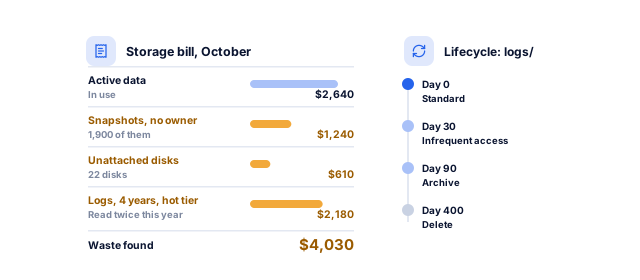
Respondents to the Flexera 2026 State of the Cloud Report estimated 29% of their cloud spend was wasted, and 85% named managing cloud spend as a top challenge. In storage, waste hides in old snapshots, orphaned disks and hot-tier logs.
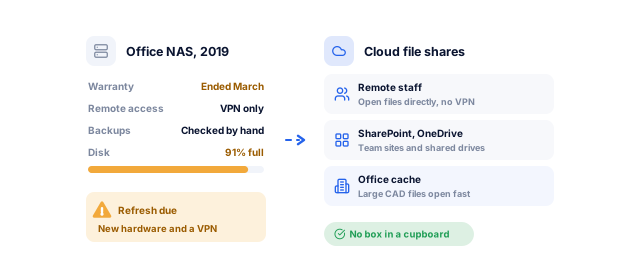
Cloud file shares or SharePoint and OneDrive remove the hardware refresh and the VPN, with a local cache where large files need it.
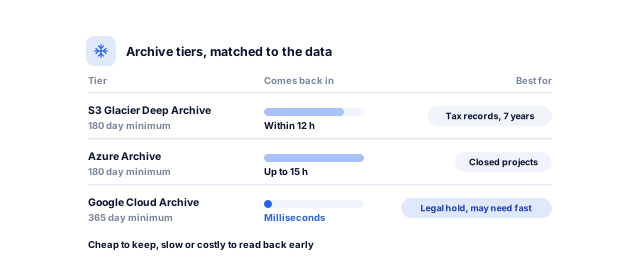
Amazon S3 Glacier Deep Archive restores within 12 hours, Azure's archive tier can take up to 15 hours to rehydrate, and Google's Archive class returns data in milliseconds with a 365-day minimum. We match the tier to how fast you might need it.
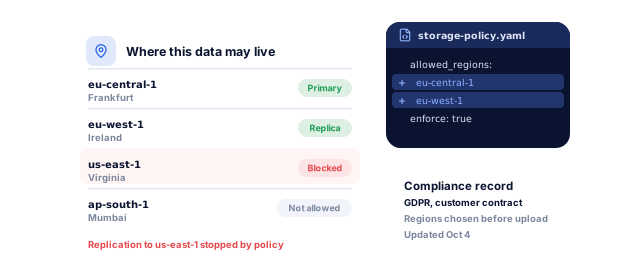
GDPR and UK GDPR restrict transfers out of Europe without safeguards, and India's DPDP Act lets the government restrict transfers to certain countries. We pick regions before upload and document the setup.
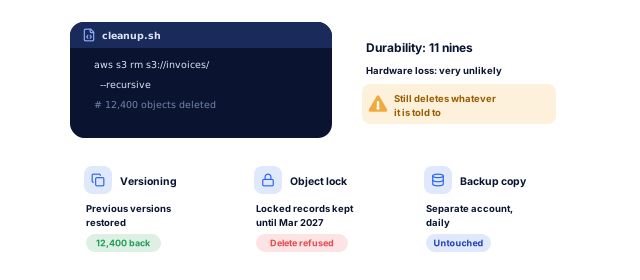
Amazon S3 is designed for 99.999999999% durability, but it deletes whatever a person, script or attacker tells it to. Versioning, object lock and separate backups cover that risk.
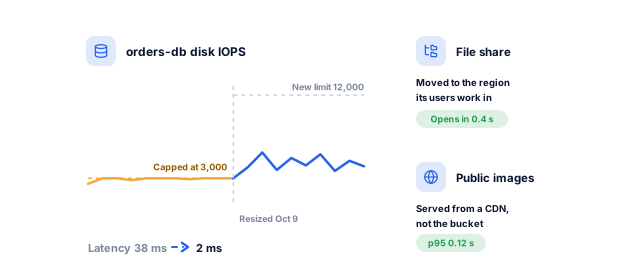
A slow disk or a file share far from its users drags a fast app down. We size disk performance, place shares near users and put a CDN in front of media.
Share read-only access to your storage accounts. We will send a free review of where your data sits, what it costs, and which lifecycle rules would cut the bill without putting anything you need at risk.
How much data you hold, where, who uses it and how often, with regulated and deletable data flagged.
You know what you storeTypes, tiers, regions and access per data set, with a monthly estimate including requests and transfer.
A design priced before you commitA representative sample moved first to check permissions, apps, speed and how users find files.
No surprises at scaleBulk copy in the background, a final sync at cutover, and old storage kept read-only for an agreed period.
Data moved, nothing lostLifecycle, versioning, encryption and guardrails tested; orphaned disks and snapshots removed.
Lower cost, tighter controlGrowth, cost by tier and risky settings reported monthly, with lifecycle rules reviewed as access changes.
Storage that stays in shapeThe design depends on what the data is, who opens it and how long you keep it.
SharePoint, OneDrive or Google Drive for documents; Azure Files or Amazon FSx for apps that expect a drive letter, with Azure File Sync caching hot files in the office for hybrid cloud storage.
Product photos and video in object storage behind a CDN, resized at the edge, with originals moved to cooler tiers. Our ecommerce website development team connects it to your store.
Records and imaging encrypted, with per-user access logs, in services covered by a BAA where HIPAA applies, around systems such as clinic management software.
Enterprise cloud storage for user uploads: per-tenant paths, short-lived signed URLs, malware scanning and lifecycle rules, with structured data handled by our cloud database management team.
Archive tiers for data written once and rarely read, with legal retention, locked copies and tested retrieval times.
Colder tiers cost less per GB but charge to read, so access decides the tier.
Book a strategy call| Access pattern | Amazon S3 | Azure Blob Storage | Google Cloud Storage |
|---|---|---|---|
| Frequent access | S3 Standard, no minimum period | Hot tier, no minimum period | Standard, no minimum period |
| Infrequent access | S3 Standard-IA, 30-day minimum | Cool tier, 30-day minimum | Nearline, 30-day minimum |
| Rarely accessed, still fast | S3 Glacier Instant Retrieval, 90-day minimum | Cold tier, 90-day minimum | Coldline, 90-day minimum |
| Long-term archive | S3 Glacier Deep Archive, 180-day minimum | Archive tier, 180-day minimum | Archive, 365-day minimum |
| Archive retrieval time | Deep Archive restores within 12 hours | Rehydration can take up to 15 hours | Milliseconds, with higher access costs |
| Automatic tiering | S3 Intelligent-Tiering | Smart tier (hot, cool and cold) | Autoclass |
From Amazon S3 storage classes, Azure Blob access tiers and Google Cloud Storage classes, checked October 2026. Deleting data before the minimum period is charged as if it stayed. Prices vary by region.
Design and price first; the move takes days or weeks.
Book a strategy callBy week 3, you have approved a priced design.
After cutover, your data is moved and verified.
Costs fall as data ages, and new data follows the same design.
You approve each step before we change anything, and everything we set up stays in your accounts.
Yours to keep, always. Everything is set up in your name, and if you leave we remove our access and hand over the documentation.
For businesses whose data has outgrown a server or a budget.
Book a strategy callWe measure access before choosing tiers, and every design comes with a monthly estimate including requests, retrieval and transfer, so the bill matches the one you approved.
Certified engineers pilot on real data and check permissions before the bulk move, and our developers update any website or app that reads the storage.
Data stays in your accounts, encrypted with your keys, in regions you choose, under an NDA signed before access. Critical incidents reach an engineer 24x7.
These numbers come from our SEO, marketing and software work, measured in each client’s own analytics. For your cloud, the first numbers come from the free review: what you spend, what is exposed, and how long a restore really takes.
See all case studies
MastersBuddyStudy abroad consulting
160+
keywords in Google's top 10
AkosMDHealthcare, Arizona
+57%
patient footfall
Eric OriginalsJewelry ecommerce
+1,900%
organic traffic
"From designing a high-converting website to managing our SEO, Google Ads, and Google Business Profile, improveFX delivered exceptional results across every channel."
 Maureen CappalloBroker and founder, Momentus Real Estate Group
"They revolutionized our online presence with a 60% increase in web traffic through strategic e-commerce SEO and content optimization."
 Eric NoahPresident, Eric Originals & Antiques Ltd.
"Visionstar Technologies' online presence transformed significantly with a 40% boost in customer engagement, all thanks to their exceptional website structuring and SEO tactics."
"Their strategic approach to our website and SEO resulted in a 60% increase in local inquiries, revolutionizing our automobile service business."
"Their SEO strategy helped us achieve top search rankings, while their Facebook Ads campaigns drove a steady flow of qualified prospects."
 Amita NaithaniCo-founder, Amita Naithani Resort Wear
Not seeing yours? Ask us directly and a specialist will reply personally.
Our cloud storage solutions include a storage assessment, architecture design, storage class and lifecycle rules, security and access settings, migration of existing data, and optional monthly management. improveFX designs, sets up and runs it all in your own AWS, Azure or Google Cloud accounts, plus SharePoint, OneDrive or Google Drive when collaboration is the goal. Each design comes with a cost estimate before anything moves.
Object storage keeps files as objects with metadata, reached over the web, and suits media, documents, backups and data lakes. Block storage is a virtual disk attached to a server, for databases and operating systems. File storage is a shared drive many users or servers open at once, for shared folders and apps that expect a network drive. Most businesses use all three.
Usually the platform your other systems already run on, because moving data between providers costs money and adds complexity. Microsoft 365 users often fit Azure Files and SharePoint; teams on AWS or Google Cloud keep storage there. We compare tiers, regions and transfer costs for your data first, and our AWS, Azure and Google Cloud management teams run it day to day.
Ongoing cloud management with improveFX runs from under $1,000 to $15,000+ a month, depending on your environment. A single file share sits at the low end; more data sets, accounts, environments and clouds, longer support hours or retention and compliance rules move it up. Storage, requests, retrieval and data transfer appear on your cloud bill from AWS, Microsoft or Google, which is separate from our fee.
Yes. AWS DataSync, Azure File Sync and AzCopy can carry folder structures and NTFS permissions across, and we verify them in a pilot before the bulk move. Moving to SharePoint or Google Drive is different, because their sharing model does not match folder permissions one to one, so we map old groups to new sites or shared drives with you and test access with real users.
No. Cloud storage is where your working data lives; a backup is a separate, point-in-time copy you can restore if that data is deleted, corrupted or encrypted by ransomware. Syncing or replicating storage copies mistakes and deletions too. We use versioning and object lock for protection, and keep independent copies in a separate account through our backup and disaster recovery service.
Usually, yes. AWS, Azure and Google Cloud let you choose the region where data is stored, and we restrict replication and backups to approved regions. Some services store metadata or logs elsewhere, so we document where each data set lives, which helps with GDPR, UK GDPR, India's DPDP Act, Canada's PIPEDA, Australia's Privacy Act and customer contracts. Your legal team confirms what applies.
For everyday documents and team collaboration, often yes, and we can set up SharePoint or Google Drive for you. Infrastructure storage such as Amazon S3, Azure Blob Storage or S3-compatible services like Wasabi and Backblaze B2 fits other jobs: application uploads, media libraries, backups, archives and large data sets. Most businesses need both, so we design how they fit together.
Tell us what worries you about your cloud, or book a strategy call with our team.


 A specialist replies personally 4.9 from 566 client reviews