
Well-Architected reviews
Each workload checked against the Google Cloud Well-Architected Framework, with findings in a ranked fix list and a repeat review after major changes.
Our Google Cloud managed services run the daily operations of your Google Cloud environment: IAM, Cloud Monitoring, Security Command Center findings, GKE clusters, BigQuery spend, backups and patching. Certified engineers keep it secure, reliable and affordable for data and product teams, in projects that stay in your name, with a response to critical incidents 24x7.
 4.8
 Written by Abhishek Kumar, Content Writer



















Google Cloud management is the ongoing work of running workloads on Google Cloud safely and efficiently: IAM, monitoring, security findings, GKE, BigQuery and compute cost, backups and Well-Architected reviews.
Six workstreams on Google Cloud's own tooling. On data-heavy estates, BigQuery cost and IAM come first.
Get a free proposalEach workload checked against the Google Cloud Well-Architected Framework, with findings in a ranked fix list and a repeat review after major changes.
Folders by team, roles granted to groups, service account keys and public IPs blocked by policy, and unused permissions removed each quarter using the IAM recommender.
Dashboards, uptime checks, SLOs and alerting per service. Critical incidents get an engineer 24x7, other issues business hours. See infrastructure monitoring.
Standard tier free, Premium where risk justifies it, every finding triaged. Cloud security and compliance designs for SOC 2, ISO 27001, HIPAA, PCI DSS, GDPR and India's DPDP Act.
Release channels and maintenance windows, right-sized requests, Workload Identity and regional control planes for production. Deeper work sits with Kubernetes management.
Byte limits, quotas, partitioning, budgets and rightsizing, then committed use discounts for the steady base. Deeper work sits with cloud cost optimization.
Google Cloud estates built by product and data teams share the same blind spots. These come first.
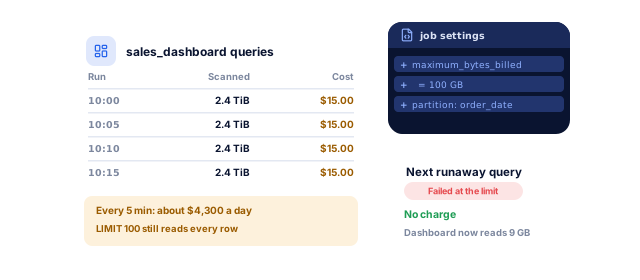
On-demand queries cost $6.25 per TiB scanned after the first free TiB a month (BigQuery pricing). Maximum bytes billed makes runaway queries fail without charge.
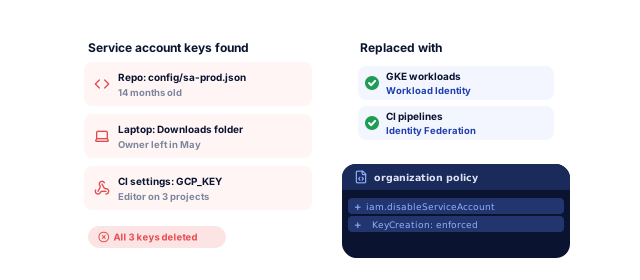
Downloaded JSON keys end up in repositories and CI settings. We replace them with Workload Identity Federation, then block new keys by organization policy.
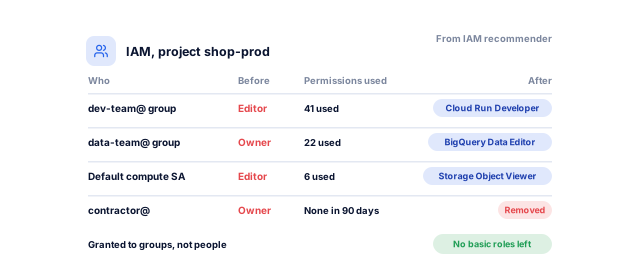
Basic roles reach almost everything in a project. Predefined roles granted to groups, guided by what people actually use, shrink what one compromised account can do.
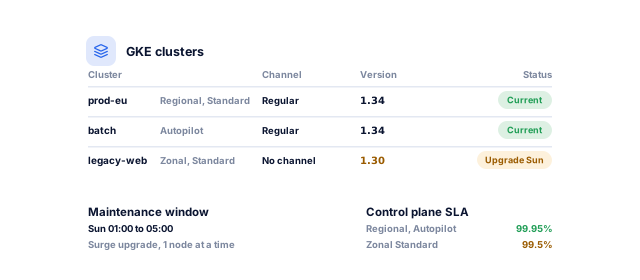
Release channels and maintenance windows make upgrades routine. Google states a 99.95% control plane SLA for regional clusters against 99.5% for zonal ones, so production runs regional.
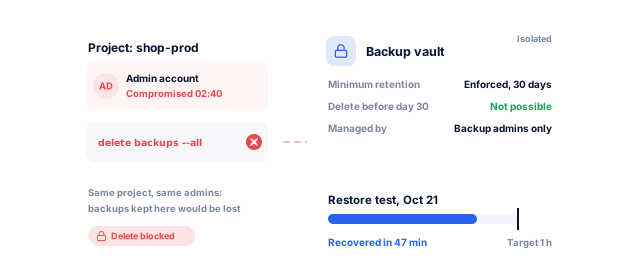
Backup and DR Service keeps backups in isolated vaults that cannot be deleted early, and we test restores on a schedule.
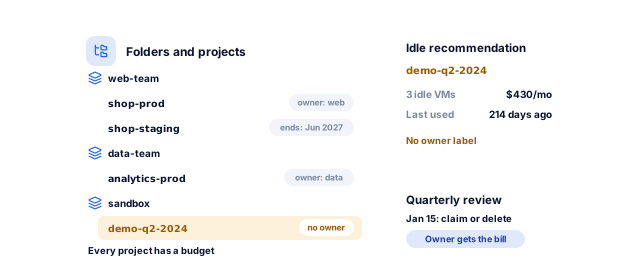
Labels, folders by team, budgets per project and a quarterly idle resource review give every experiment an owner and an end date.
Give us read-only access. We will review your IAM, Security Command Center findings, GKE clusters and query spend, and send a written, risk-ranked report you can act on with or without us.
Viewer roles only: a Well-Architected review, security findings, IAM and a year of billing data.
A clear picture of your estateOur engineers join a Google group you own. Audit logs, organization policies, labels and budgets go in before workloads change.
Every action we take is loggedDashboards, uptime checks and alerts per service, connected to your tools, with runbooks and an escalation list.
Problems seen and handledPublic buckets, service account keys, basic roles and missing backups, fixed in order of impact through Terraform.
The biggest risks closed firstByte limits, query fixes, rightsizing, then commitments for steady usage, agreed with you.
Spend that matches real useA report on incidents, findings, GKE versions, backup tests and spend, plus a review call.
Decisions you can explainGoogle Cloud managed services change with what you built and why you chose Google.
BigQuery, Dataflow, Pub/Sub and Looker need pipelines that run on time and a bill that does not surprise finance. We watch freshness and failures and review the costliest queries monthly. Our predictive analytics team builds on the data.
We decide with you which services belong on Cloud Run and which need GKE, run both, and deploy through a pipeline instead of manual changes, built by our DevOps and CI/CD team.
We review Firestore rules, authentication, Cloud Functions permissions and usage costs, and set budgets before growth becomes a bill shock. Our mobile app development team handles the app. See our SaaS work.
Most Google Cloud overspend comes from a few billing models, with Google's published prices.
Book a strategy call| Cost area | How it is billed | Published price or discount | Controls we put in place |
|---|---|---|---|
| BigQuery on-demand queries | Per TiB scanned | $6.25 per TiB after the first free TiB a month (US) | Byte limits, quotas, partitioning, clustering |
| BigQuery capacity (editions) | Per slot-hour | By edition, with one- and three-year commitments | Reservations sized to measured slot use |
| BigQuery storage | Per GiB a month | Long-term rate after 90 days unmodified | Expiry on staging and temporary data |
| GKE clusters | Management fee plus compute | $0.10 per cluster per hour; $74.40 monthly free tier credit | Fewer shared clusters; Autopilot where it fits |
| Compute Engine VMs | Per second, by machine type | Sustained use up to 20% or 30%; committed use up to 55%, or 70% memory-optimized | Rightsizing first, then commitments |
| Idle and forgotten resources | For as long as they exist | No discount | Labels, budgets and quarterly reviews |
From Google's BigQuery pricing, GKE pricing, committed use discounts and sustained use discounts pages, checked October 2026.
Onboarding takes 2 to 4 weeks; after that, the work runs month by month.
Book a strategy callBy week 2, you have a ranked risk register and our proposal.
By week 4, critical alerts reach an on-call engineer 24x7.
From the first monthly report, you see incidents, findings and spend in one place.
You approve each step before we change anything, and everything we set up stays in your accounts.
Yours to keep, always. Everything is set up in your name, and if you leave we remove our access and hand over the documentation.
Any team that built on Google Cloud and wants it kept secure, reliable and affordable.
Book a strategy callAn NDA comes before any access. Organizations, projects and billing accounts stay in your name; our access is group membership you can remove. Terraform, runbooks and diagrams live in your repository, ready for another team.
The alert reaches the on-call engineer, who follows the runbook and keeps you posted. Critical incidents get a response 24x7, other issues business hours, and each ends with a written report.
On Google Cloud, cost problems are often query or code problems. Our certified engineers work beside developers and data engineers, so the expensive query gets fixed at the source, not just capped.
These numbers come from our SEO, marketing and software work, measured in each client's own analytics. For your cloud, the first numbers come from the free review: what you spend, what is exposed, and how long a restore really takes.
See all case studies
MastersBuddyStudy abroad consulting
160+
keywords in Google's top 10
AkosMDHealthcare, Arizona
+57%
patient footfall
Eric OriginalsJewelry ecommerce
+1,900%
organic traffic
"From designing a high-converting website to managing our SEO, Google Ads, and Google Business Profile, improveFX delivered exceptional results across every channel."
 Maureen CappalloBroker and founder, Momentus Real Estate Group
"They revolutionized our online presence with a 60% increase in web traffic through strategic e-commerce SEO and content optimization."
 Eric NoahPresident, Eric Originals & Antiques Ltd.
"Visionstar Technologies' online presence transformed significantly with a 40% boost in customer engagement, all thanks to their exceptional website structuring and SEO tactics."
"Their strategic approach to our website and SEO resulted in a 60% increase in local inquiries, revolutionizing our automobile service business."
"Their SEO strategy helped us achieve top search rankings, while their Facebook Ads campaigns drove a steady flow of qualified prospects."
 Amita NaithaniCo-founder, Amita Naithani Resort Wear
Not seeing yours? Ask us directly and a specialist will reply personally.
IAM and organization policy management, Cloud Monitoring and incident response, Security Command Center triage, GKE operations, BigQuery and compute cost control, backups and regular Well-Architected reviews, plus a documented access model, runbooks, a change log and a monthly report.
Migrations, data platform builds and compliance audits are scoped as separate projects and quoted beside the monthly plan, so you see the whole cost first.
Ongoing cloud management with improveFX runs from under $1,000 to $15,000+ a month, depending on your environment. More projects and GKE clusters, a larger data platform, a second cloud, extra support hours and compliance needs move you toward the higher end.
Your Google Cloud bill is separate from our fee. We quote your fee after the free review of your billing data.
We cap what queries can scan, fix the queries that cost the most and make tables cheaper to read. Maximum bytes billed makes an oversized on-demand query fail without charge.
We also set custom daily quotas, partition and cluster large tables, expire temporary data and rank queries and dashboards by cost. For heavy, steady workloads we compare on-demand with BigQuery editions.
Autopilot suits most teams that want Google to manage nodes, and general-purpose workloads are billed on Pod resource requests. Standard suits workloads that need specific node configurations and bills the nodes you run.
Both carry the $0.10 per cluster per hour fee, and the free tier credit covers one Autopilot or zonal cluster a month. We often run a mix, decided per workload.
We sign an NDA before any access is shared. The review needs viewer and security reviewer roles; after that our engineers join a Google group you own, with least-privilege roles and no exported service account keys.
Cloud Audit Logs record every change. Your organization stays in your name, removing us from the group ends all access at once, and Terraform stays in your repository.
Yes, for critical incidents. When production is down or data is at risk, an engineer responds 24x7, works from the runbook for that alert and keeps you updated until it is resolved. Other issues are handled in business hours.
We open and manage Google Cloud support cases when the platform is at fault, and every incident ends with a written report.
Google lists hardware commitment discounts of up to 55% for most machine series and up to 70% for memory-optimized machines, for one- or three-year terms. Sustained use discounts apply automatically without any commitment.
Our cost review is free, and you only pay for the optimization work if the savings it finds justify it. We rightsize first, then commit only the steady base.
No. improveFX does not hold Google Cloud partner status, and none is needed to manage an organization you own; the work is done by certified engineers, with every change in your audit logs. We also offer AWS cloud management and Azure managed services.
Multi-cloud management puts several providers in one report. Ask any provider for its access model and a sample monthly report before you sign.
Tell us what worries you about your cloud, or book a strategy call with our team.


 A specialist replies personally 4.9 from 566 client reviews