
Flow strategy and mapping
A spec per flow (trigger, delays, branches, exit rule, goal), ranked by value, with frequency caps across the program.
Our email automation services set up, fix and run the emails that send themselves: welcome, cart reminders, onboarding, renewals and win-back. We build in Klaviyo, Mailchimp, HubSpot, ActiveCampaign, Customer.io or Braze, inside your own account, and each flow fires on a real store, app or CRM event and stops when the customer acts.
 4.8
 Written by Abhishek Kumar, Content Writer



















Email automation sends emails triggered by a customer's actions, dates or data rather than a campaign calendar. Email automation services plan, build and test these flows and protect deliverability.
Newsletters sit with our email marketing team, on shared frequency rules.
Get a free proposalA spec per flow (trigger, delays, branches, exit rule, goal), ranked by value, with frequency caps across the program.
Shopify, WooCommerce, Stripe, your CRM or app, connected by connector, webhook or API, with every payload validated.
Welcome, cart, post-purchase, replenishment, back in stock and win-back. Back-in-stock emails converted best of any automation (6.46%) in Omnisend's 2026 report.
Onboarding tied to activation, trial expiry, renewals and failed payments, linked to our billing automation.
Seed profiles test every branch, and templates are checked across inboxes and dark mode by our email template design team.
SPF, DKIM, DMARC, one-click unsubscribe and sunset flows, with spam rates kept under the 0.3% in Google's sender guidelines.
Where flows earn more than scheduled campaigns can.
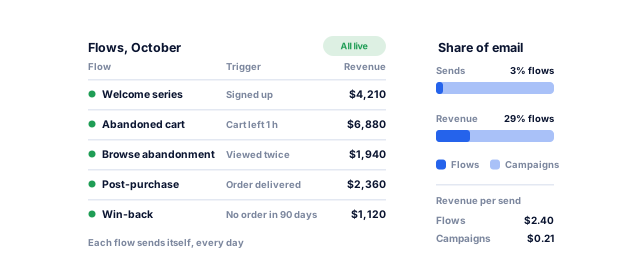
In Omnisend's 2026 report on 150,000 brands, automations were 2% of sends but 30% of email revenue: $2.87 per send against $0.18 for campaigns.
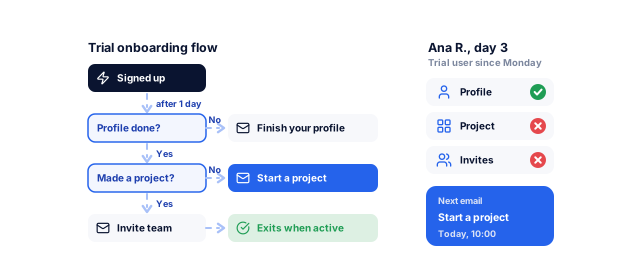
Onboarding flows react to what someone has not done yet, such as finishing a profile, and pick up where they stopped.
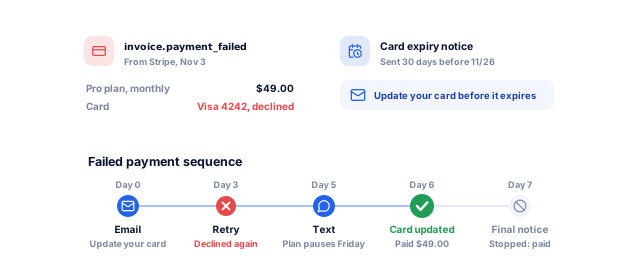
Card expiry notices and failed payment sequences linked to billing win back subscriptions nobody meant to cancel.
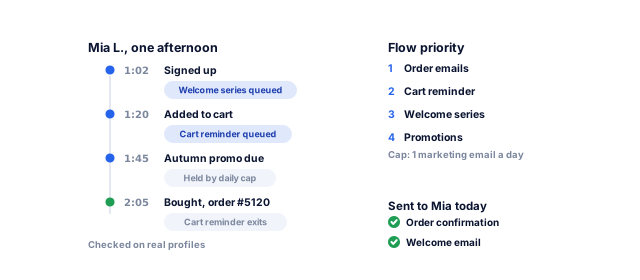
Priority, exit rules and frequency caps stop a welcome discount, cart reminder and promotion landing together.
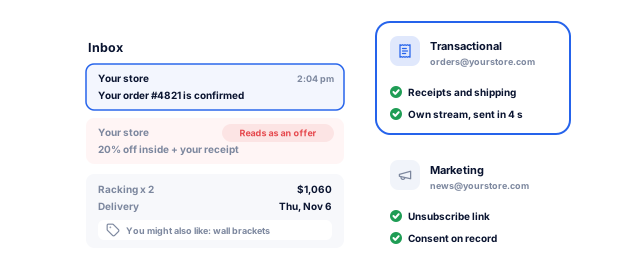
The FTC treats a receipt with an offer-style subject line as commercial under CAN-SPAM, so receipts get their own fast stream.
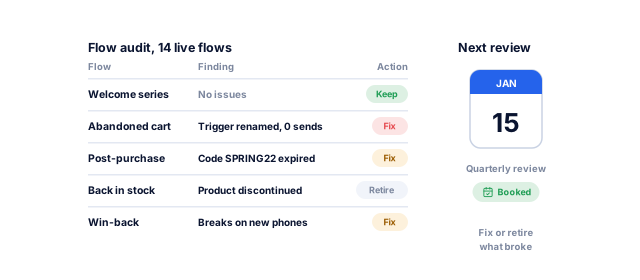
Renamed triggers, expired codes, deleted products. We audit every live flow, fix or retire what is broken, then monitor it.
Tell us what you need. We check your live flows for broken triggers, overlaps and missed revenue, and send a written plan for what to fix and build first, with a price range and timeline.
Live flows and events reviewed; broken triggers, overlaps and gaps listed.
Trigger, filters, delays, exit rule, goal and holdout written for each flow.
Store, billing, app or CRM events connected, with consent fields mapped.
Copy, modular templates and flows built in your own platform account.
Seed profiles run every branch; flows launch one at a time.
Monthly results against holdouts; failed syncs alert a named person.
Triggers and goals change with how customers buy.
Views, carts and orders drive every flow. As a Shopify Partner we connect store data directly, and our ecommerce team fixes checkout issues.
Usage events such as integration connected drive onboarding and alert your team to churn signals. See SaaS development.
Renewals, pause and skip, failed payments and win-back, timed to each plan. Scoring sits with marketing automation.
Reminders and recalls on the transactional stream, with clinical details kept out. Nabhaya Clinic sends booking reminders on WhatsApp.
Inquiry, application and onboarding emails that stop when the student acts. Our Moodle team connects your courses.
Most programs start with three or four.
Book a strategy call| Flow | Trigger | Typical timing | Main metric |
|---|---|---|---|
| Welcome series | New subscriber | At once, then 2 to 4 over two weeks | First order or activation |
| Cart and browse abandonment | Checkout or view, no order | Within hours, 2 to 3 messages | Recovered revenue |
| Post-purchase | Order shipped or delivered | Tips, then a review request | Repeat purchase rate |
| Onboarding | Milestones hit or missed | Across the trial or first 30 days | Trial-to-paid rate |
| Renewal and failed payment | Renewal near or card declined | Before renewal and during retries | Recovered payments |
Judged on revenue and retention, not opens, with holdouts where volume allows.
Forms, consent fields and suppression lists are designed for each market you mail; your legal adviser signs off the wording.
A valid postal address, honest subject lines and an opt-out honored within 10 business days, per the FTC. Opt-out links must work for 30 days.
Express or implied consent first. Implied consent lasts two years from a purchase and six months from an inquiry, so we store each consent's source and date.
Individuals need consent, or the soft opt-in for existing customers buying similar products where national rules allow, with an opt-out in every email. Consent records are timestamped, and withdrawing is as easy as giving.
Consent, clear sender identification and an unsubscribe honored within five working days.
Core flows go live in 3 to 6 weeks; your data sets the exact pace.
Book a strategy callBy week 2, you have a signed-off plan for which flows come first.
By week 6, your core flows are live and sending on real customer events.
Each month, you see what every flow earned and which one comes next.
You approve each stage before the next one starts, and nothing goes live until it has run cleanly on your real records.
Yours to keep, always. Everything is set up in your name, and if you leave we remove our access and hand over the documentation.
For businesses with customer events worth acting on.
Book a strategy callMost flow problems are data problems. Our marketers and engineers work as one team, so whoever writes your emails can add the event they need.
Monthly reports by flow. Support plans from $99 a month cover monitoring, fixes when a connected tool changes, and small changes.
Flows, templates, integrations and API keys stay in your account. Documentation lets any team run them. See our case studies.
These numbers come from our SEO, marketing and software work, measured in each client’s own analytics. For automation, your first numbers come from test runs on your own records before anything goes live.
See all case studies
AkosMDHealthcare, Arizona
+57%
patient footfall
MastersBuddyStudy abroad consulting
160+
keywords in Google's top 10
Eric OriginalsJewelry ecommerce
+1,900%
organic traffic
"From designing a high-converting website to managing our SEO, Google Ads, and Google Business Profile, improveFX delivered exceptional results across every channel."
 Maureen CappalloBroker and founder, Momentus Real Estate Group
"They revolutionized our online presence with a 60% increase in web traffic through strategic e-commerce SEO and content optimization."
 Eric NoahPresident, Eric Originals & Antiques Ltd.
"Visionstar Technologies' online presence transformed significantly with a 40% boost in customer engagement, all thanks to their exceptional website structuring and SEO tactics."
"Their strategic approach to our website and SEO resulted in a 60% increase in local inquiries, revolutionizing our automobile service business."
"Their SEO strategy helped us achieve top search rankings, while their Facebook Ads campaigns drove a steady flow of qualified prospects."
 Amita NaithaniCo-founder, Amita Naithani Resort Wear
Not seeing yours? Ask us directly and a specialist will reply personally.
Email automation services plan, build and run the emails that send themselves when a customer acts: signs up, abandons a cart, misses an onboarding step or nears a renewal date.
The work covers flow strategy, event tracking, copy, testing, deliverability and reporting. Newsletters are email marketing; most businesses need both, on one platform with shared frequency rules, so nobody gets too much mail.
Our automation projects run from under $2,000 to $50,000+, depending on scope. A fixed-price first automation, one flow mapped, built, tested and handed over, starts from $500.
Custom events, languages, data cleanup and compliance work push a project up. To run it, you pay your email platform (priced by contacts or sends), any SMS credits and a transactional sending service. Support plans start from $99 a month.
For stores: welcome, cart abandonment and post-purchase. For SaaS: onboarding and trial expiry. For subscriptions: renewal and failed payment recovery.
These catch customers at their moment of highest intent. Win-back, replenishment and sunset flows follow once the core flows are measured and stable. On a tight budget, start with one flow at the fixed price and add more as results come in.
Core flows usually go live in 3 to 6 weeks. A full lifecycle program with custom events takes 2 to 4 months.
Data sets the pace: a Shopify store with a native connector is quick, while new product events from your developers take longer. Flows launch one at a time, so the first ones earn while the rest are built.
Klaviyo, Mailchimp, HubSpot, ActiveCampaign, Customer.io, Braze and Salesforce Marketing Cloud, with Postmark, SendGrid or Amazon SES for transactional email.
If you already pay for a platform, we fix and extend the setup you have, inside your own account, so nothing is lost. If it cannot handle your events or volume, we migrate flows, templates, subscribers and consent records to one that can.
Not when they are set up and monitored well. Triggered emails are expected, which helps engagement; trouble comes from mailing inactive contacts, missing authentication or overlapping flows.
We authenticate domains with SPF, DKIM and DMARC, add the one-click unsubscribe Google requires of bulk senders, run sunset flows that pause inactive contacts, and watch complaint rates in Postmaster Tools every month.
Yes. Most projects start with an audit of your live flows, and the quickest wins often come from fixing what already exists.
Common fixes are triggers broken by a platform or store change, missing exit rules, overlapping flows, expired codes and templates that render badly on mobile. We fix the urgent issues first, then rebuild the flows that still need it.
Alerts for failed syncs and for flows that stop sending go to a named person on your team and to us, and we check send logs each month.
Most breaks come from an app update that renames an event, an expired code or a changed API. A support plan from $99 a month covers monitoring, fixes when a connected tool changes, and small changes.
Tell us what your team does by hand today, or book a strategy call with our team.


 A specialist replies personally 4.9 from 566 client reviews