Swift app development services for native iOS and Apple apps
Our Swift app development services are for businesses that have chosen native iOS, and for teams whose Swift or Objective-C code needs a modern foundation. We build in Swift and SwiftUI on Apple's own frameworks, for iPhone, iPad, Apple Watch, Mac and Vision Pro.
Swift app development is building native apps for iPhone, iPad, Mac, Apple Watch and Vision Pro in Swift, Apple's open-source language, usually with SwiftUI. Swift app development services cover architecture, UI, Apple framework integration, testing, App Store release and modernizing older Objective-C or UIKit code.
Swift 6 can check for data races at compile time; plan the migration of older code rather than rushing it.
SwiftUI is the default for new screens; UIKit still earns its place in some complex views.
Objective-C and Swift run side by side, so modernization can happen module by module.
Since April 28, 2026, App Store uploads must be built with Xcode 26 or later.
Best for
Businesses committed to iOS, apps that rely on Apple-only features, and teams modernizing Objective-C or UIKit code
What you get
Architecture, a SwiftUI build, Apple framework integrations, automated tests, App Store release and support
Typical timeline
Discovery in 1 to 3 weeks. A focused MVP in about 2 to 4 months. Migrations run in stages alongside normal releases.
Pricing
Driven by scope, the Apple platforms covered and integrations. Published agency rates we reviewed run from about $60 an hour in Eastern Europe to $90 to $160 for senior US developers. Our app projects run from under $5,000 to $80,000+, depending on scope. We quote after a free discovery call.
What our Swift app development services include
Six workstreams for new apps and existing codebases; most projects combine two or three.
New apps are SwiftUI-first, with Observation for state, SwiftData or Core Data for storage, and views kept apart from models and services. Where SwiftUI falls short, such as complex collection layouts or rich text editing, we embed UIKit views.
Swift 6 concurrency and code health
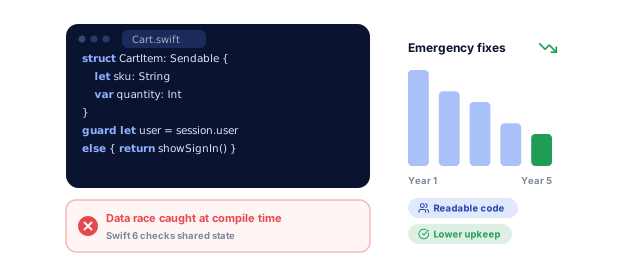
We adopt the data-race checking described in the Swift 6 announcement target by target: warnings, then actors and Sendable types, then strict mode, so the compiler catches threading bugs before users do. Swift 6.4, released in September 2026, is our baseline.
Apple frameworks and system features
WidgetKit, Live Activities, App Intents for Siri and Spotlight, StoreKit 2, Sign in with Apple, Apple Pay, HealthKit, Core Location and Core Bluetooth reach native code first. Planned from the start, they put your app on the lock screen, in search and in Siri.
Objective-C and UIKit modernization
We map the codebase, add tests around risky flows, then move module by module: Objective-C to Swift, UIKit screens to SwiftUI where it pays off, CocoaPods to Swift Package Manager, while releases keep shipping. Larger rebuilds follow our legacy system modernization approach.
Every Apple platform from shared code
Shared Swift packages hold business logic and data models, while each platform gets its own interface: an iPad layout, a Watch app, a Mac app or a visionOS window. Our app UI/UX design team designs each one to Apple's Human Interface Guidelines.
Testing, release and yearly upkeep
Swift Testing and XCTest cover the code, XCUITest the UI flows, and builds ship through Xcode Cloud or GitHub Actions with Fastlane to TestFlight. Each June we test against Apple's new betas.
Where native Swift pays off, and what we build when it does not
Here is where native iOS repays its extra cost over a cross-platform build, and what we build when it would not.
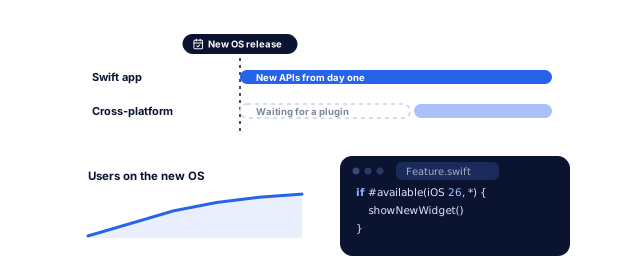
Swift apps adopt new Apple APIs the day they ship; cross-platform frameworks often wait for plugins. And as of June 7, 2026, 79% of iPhones that transacted on the App Store ran iOS 26, according to Apple, so new features reach most users within months.
Performance and battery life
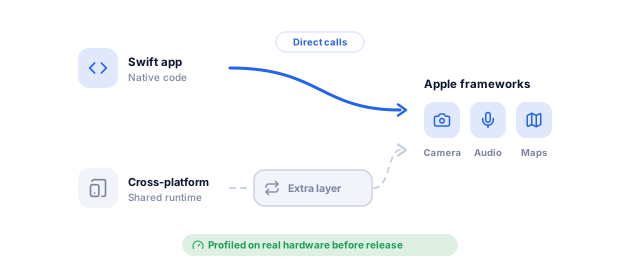
Swift compiles to native code and calls Apple's frameworks directly, with no bridge or separate rendering engine, which matters for camera, audio, maps and long lists. Before each major release we profile on real hardware with Instruments for hangs and memory growth.
Safer code that costs less to maintain
Optionals, value types and strict typing expose mistakes at compile time, and Swift 6 does the same for many threading bugs, so fewer emergency fixes keep maintenance costs down while the app is live.
A large market that pays for apps
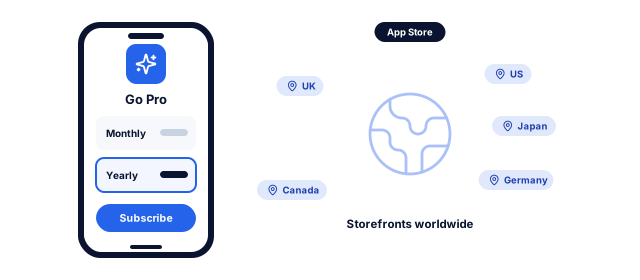
The App Store ecosystem facilitated over $1.4 trillion in developer billings and sales in 2025, according to an Analysis Group study published by Apple, with over 850 million average weekly users in 175 countries and regions. For many subscription products, iOS is the platform to get right first.
Privacy and security on Apple's own tools
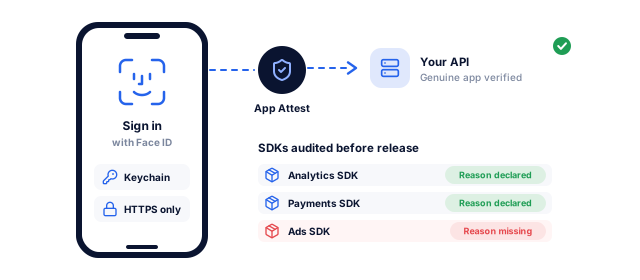
Credentials go in the Keychain, Face ID runs through LocalAuthentication, and App Attest checks that requests come from your genuine app. Apple requires approved reasons in privacy manifests for certain APIs, including in third-party SDKs, so we audit every dependency before each release.
iOS and Android at launch on one budget
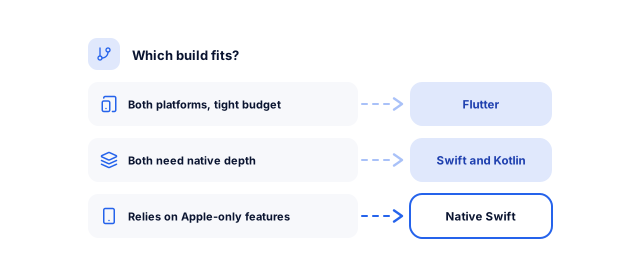
If the app does not need Apple-only features, one cross-platform codebase usually costs less, and our Flutter app development team builds both platforms from it. If both need native depth, we pair Swift with Kotlin app development. Swift has an official Android SDK, but Kotlin remains the practical choice for Android.
Building or modernizing an iOS app?
Tell us what you need. We look at your idea or your repository, its Swift and Xcode versions and its dependencies, and send a written plan with a price range, a timeline and what we would do first.
Your free app planFor what you need
1What we would build firstYour idea, your users and the features that matter first
2A price range and timelineFor the budget you pick, with an MVP option
3The stack we would useAnd how your team runs it after launch
New apps start with workshops on users, features and goals; existing apps with a review of the code, Swift and Xcode versions, dependencies and crash reports. You get a scope, a risk list and an estimate before any build.
Scope and feature list
Technical risk register
Estimate and release plan
Decisions made on evidence
Architecture and design
We agree the module structure, data layer (SwiftData, Core Data or your API), navigation and concurrency model in short decision notes. Designers produce a clickable prototype to Apple's Human Interface Guidelines.
Architecture decision notes
Clickable prototype
Design components
A plan your team can review
Project setup and CI
Everything lives in your Git and Apple Developer accounts from day one: Swift packages, staging and production configurations, code signing and CI that tests every pull request.
Repository and Swift packages
CI with automated tests
Signing and environments
Builds that are repeatable
Sprint development
Two-week sprints, each ending with a demo and a TestFlight build you can install. Every feature ships with tests, and on migrations each sprint also converts a defined part of the old code.
TestFlight build every sprint
Tests with each feature
Written change log
Progress you can install
Testing and App Store release
We test on real iPhones and iPads, check VoiceOver, Dynamic Type and dark mode, and profile with Instruments. Then we prepare the listing, App Store privacy details and review notes with a demo account, and release in phases.
Device and accessibility report
App Store listing and privacy details
Phased release plan
A clean first review
Yearly OS cycle and new features
After launch we monitor crashes, update dependencies and test each iOS beta from June, so your app is ready when Apple ships in the fall. New features follow the same sprint rhythm.
Crash and performance monitoring
OS beta readiness checks
Feature roadmap
An app that stays current
Swift app development for your starting point
Our Swift app development services start from where your app is today.
01 / 05
New native iOS apps
We design the first release around the features that prove value, build SwiftUI-first with Swift 6 checks on, and use shared packages so iPad or Watch versions need no restart. Need Android too? Our mobile app development team plans both platforms together.
Rewriting a working app is the riskiest way to modernize it. We convert Objective-C one module at a time behind tests, and each module ships in a normal release, so users never notice and your roadmap never stops.
Paywalls and subscriptions run on StoreKit 2. Our API development team verifies transactions on your server and handles App Store Server Notifications for renewals, refunds and grace periods, so entitlements survive device switches and restored purchases.
HealthKit data needs explicit permission for each data type. We design consent screens, protect stored files, and keep identifiable details out of logs and notifications. improveFX runs its own healthcare product line, Nabhaya; see our work for healthcare businesses.
Have an iOS lead but not enough hands? Hire Swift developers from our in-house team to work inside your sprints, tools and code review, with StoreKit, widget or CI specialists joining only for the weeks you need them.
SwiftUI-first, Swift 6 mode from day one, shared Swift packages
An oversized first release
Objective-C app
Code map and tests around critical flows
Convert module by module through bridging headers
Breaking flows that have no tests
UIKit app in Swift 5
Dependency and concurrency audit
New screens in SwiftUI, strict concurrency checks target by target
Threading bugs surfacing during the switch
Flutter or React Native app going native
Feature parity list and data plan
Rebuild the iOS app in Swift, keep the backend and APIs
Lost sessions or data at switchover
App built by another team
Code audit and account access check
Stabilize, add tests, then add features
Missing certificates or undocumented services
Project stuck on an old Xcode
Build on current Xcode, list deprecated APIs
Upgrade in steps, release after each
Updates blocked until the app is rebuilt
Build rules from Apple's upcoming requirements, checked October 25, 2026: uploads must use Xcode 26 or later, and iOS and iPadOS apps must target iOS 13 or later.
Your Swift app project, week by week
A focused MVP takes about 2 to 4 months, from discovery to the App Store.
We build in all three, so our advice follows your product, not our stack. If your app does not need Apple-only features, we show what one Flutter codebase would save and build that instead.
02
Engineering and growth in one team
A launch needs more than a binary in the App Store. The same team can build your landing pages, set up analytics and deep links, and plan the campaigns that bring in your first users.
03
Your code, accounts and certificates
The Git repository, Apple Developer account, bundle ID, certificates and App Store Connect access are yours from day one; we join as team members on rolling agreements with monthly reporting. Clients rate us 4.9 on Clutch from 221 reviews and 4.8 on Google from 189, and stay 1.6 years on average.
Results we can put numbers on
Results from client case studies and reviews, with the full story behind each number.
"From designing a high-converting website to managing our SEO, Google Ads, and Google Business Profile, improveFX delivered exceptional results across every channel."
210%more qualified leads
185%organic and local traffic growth
92%keywords on page one
Maureen CappalloBroker and founder, Momentus Real Estate Group
"They revolutionized our online presence with a 60% increase in web traffic through strategic e-commerce SEO and content optimization."
60%more organic traffic
47%more sales
Eric NoahPresident, Eric Originals & Antiques Ltd.
"Visionstar Technologies' online presence transformed significantly with a 40% boost in customer engagement, all thanks to their exceptional website structuring and SEO tactics."
+40%qualified leads
32%lower cost per acquisition
Thomas MorelFounder, Visionstar Technologies
"Their strategic approach to our website and SEO resulted in a 60% increase in local inquiries, revolutionizing our automobile service business."
60%more local inquiries
87%more organic traffic
Mike SteffanFounder, Sabulski Window Tinting
"Their SEO strategy helped us achieve top search rankings, while their Facebook Ads campaigns drove a steady flow of qualified prospects."
Our app projects run from under $5,000 to $80,000+, depending on scope, and we quote after a free discovery call.
An iPhone-only app on an existing backend sits at the low end; several user roles, payments or HealthKit, a new backend, iPad or Watch versions, or a large Objective-C codebase push it higher. After launch, budget for the Apple Developer Program at $99 a year, hosting, third-party services and updates for each new iOS release.
How long does it take to build a native iOS app in Swift?
A focused MVP usually takes 2 to 4 months, including one to three weeks of discovery. Larger apps with several roles, offline sync or multiple Apple platforms take 6 months or more.
Migrations run in stages alongside normal releases, so what matters is how many modules move per sprint, not one big switch. App Store review adds a few days to any release date.
How is this different from your iOS app development services?
Our iOS app development services cover the whole product: strategy, budget, design, launch and Apple Intelligence features. This page focuses on the Swift engineering underneath.
Choose this service if you already want native Swift, need to modernize Objective-C or UIKit code, want to extend an app to Watch, Mac or Vision Pro, or need Swift developers inside your team. The same in-house mobile team delivers both.
Can you migrate our Objective-C app to Swift?
Yes, module by module behind tests, so the app keeps shipping without disruption. Working Objective-C code needs no urgent rewrite, but new code should be Swift: SwiftUI, SwiftData and Swift Testing cannot be used from Objective-C.
We test critical flows such as sign-in and payments first, then convert the modules that change most, with bridging headers letting both languages call each other and CocoaPods dependencies moving to Swift Package Manager.
SwiftUI or UIKit: which do you use?
SwiftUI for new screens, with UIKit where it still does a job better, such as some complex collection layouts and rich text editing.
Apple designed SwiftUI to work alongside UIKit and AppKit, so it can be adopted gradually: new SwiftUI screens inside an existing UIKit app, or specific UIKit views wrapped inside a SwiftUI app. Your minimum iOS version also decides which SwiftUI features you can use.
Should we build in Swift or Flutter?
Choose Swift if iOS is your main platform or your app depends on Apple-only features such as widgets, Live Activities, HealthKit or visionOS. Choose Flutter for iOS and Android together on one budget.
Some companies start with Swift and add Kotlin for Android later; others launch both with Flutter. We build all three and compare them for your feature list in discovery. See Flutter app development for the cross-platform option.
What is Swift 6, and do we need to migrate to it?
Swift 6 introduced an opt-in language mode that checks for data races at compile time. You need not adopt it at once, but planning the move reduces hard-to-reproduce threading crashes.
We turn on concurrency checks as warnings target by target, fix issues with actors and Sendable types, then switch each target to Swift 6 mode. Swift 6.4, the current compiler, was released on September 15, 2026, according to Swift.org.
Which iOS versions should our app support?
Usually the current and previous major versions, adjusted to your analytics. Apple reports that 79% of iPhones transacting on the App Store ran iOS 26 as of June 7, 2026.
Older versions widen your audience slightly but limit which SwiftUI and framework features you can use without workarounds. Apple requires iOS apps to target iOS 13 or later; most new apps set a much higher minimum.
Can we hire dedicated Swift developers?
Yes. You can hire Swift developers from our in-house team to work in your sprints, tools and code review, for a fixed period or on a rolling basis.
This suits teams with an iOS lead who need more capacity or skills such as SwiftUI migration, StoreKit or CI. Code stays in your repository, our developers follow your standards, and the team scales up or down with your roadmap.
Ready to plan your app?
Tell us what you want to build, or book a strategy call with our team.
What we would build first, and on which platforms
A price range and timeline for your budget
A call with a specialist to plan the next steps, no obligation
A specialist replies personally 4.9 from 566 client reviews