Legacy system modernization services without the big-bang rewrite
Our legacy system modernization services are for businesses running on software that still works but is hard to change, costly to host or no longer supported: an old PHP application, an on-premise server, a process held together by spreadsheets, or a monolith nobody wants to touch. We assess what you have, choose the right path for each part, and replace it in stages while the business keeps running.
Customer recordsCOBOL files to PostgreSQLDoneMigrated
Billing engineRewritten as a serviceWeek 3In testing
Order entryGreen screen to webBoth liveParallel run
Batch reportsNightly jobsPhase 3Next
No big-bang switchover
Old and new systems run side by side
Data reconciled every night
A rollback plan for each step
120+ businesses chose us for their digital growth
Legacy system modernization at a glance
Legacy system modernization is updating or replacing outdated software, infrastructure and data so a business can operate safely and change faster. The services include assessment, a path for each component (rehost, replatform, refactor, rearchitect, rebuild, replace or retire), data migration, testing and cutover, in controlled stages.
Start with an assessment: code health, data, integrations, users and support deadlines decide the path.
Different parts of one system often need different paths, so the roadmap assigns one to each.
The strangler fig pattern replaces a system piece by piece, with a way back at each step.
Data migration needs its own plan, rehearsals and reconciliation before any cutover.
Best for
Businesses whose core system is unsupported, slow to change, costly to run, or blocking integrations and cloud adoption
What you get
Assessment, a roadmap by component, staged modernization, data migration, testing, cutover and support
Typical timeline
Assessment in 2 to 6 weeks. Published timelines we reviewed: 3 to 6 months for a rehost or replatform, 12 to 24 months for a large rearchitecture or rebuild, delivered in phases.
Pricing
Our software projects run from under $5,000 to $100,000+, depending on scope. For modernization, scope means system size, data volume, integrations and the path chosen. The assessment is quoted first, then each stage separately, after a free initial review.
What our legacy system modernization services include
Applied component by component. The assessment decides which workstreams your system needs and in what order.
We inventory every component: code, frameworks, runtime and operating system versions, databases, integrations, scheduled jobs and who uses what. Each part is scored on business value, technical health and support end date, and the roadmap gives each one a path, a cost and a phase.
Choosing the right path for each component
A customer portal may need a rebuild while the billing engine only needs a replatform and an old reporting tool can be retired. AWS guidance calls refactoring the most complex and costly migration strategy, so we often move systems first and restructure them once they are stable.
Incremental migration with the strangler fig pattern
A façade sits in front of the old system and routes each request to old or new code. We move one feature at a time, so users keep the same interface while the new system grows. An anti-corruption layer keeps legacy conventions out of the new design, as described in Microsoft's Azure Architecture Center.
Legacy data migration and reconciliation
We profile the data first: duplicates, broken references, free-text fields that hide structure, and records kept for legal reasons. Mapping rules are agreed in writing. An initial load moves history, change data capture keeps old and new in sync, and rehearsals end with reconciliation counts your team signs off before cutover.
Legacy code modernization and upgrades
When the code is worth keeping, we add characterization tests that record what it does today, then upgrade runtimes and libraries in steps. Unsupported PHP is the case we see most; our PHP development services team handles version upgrades with static analysis and automated refactoring, releasing after each step.
Cloud migration, containers and DevOps
Modernized components usually move to AWS, Azure or Google Cloud, often in containers, with infrastructure in Terraform and releases through CI/CD. Our cloud migration consulting team plans landing zones, cutover windows and running costs, so the new platform is cheaper to run.
Why modernize now, and the cost of waiting
Legacy application modernization is rarely urgent until it suddenly is. These pressures usually start the conversation.
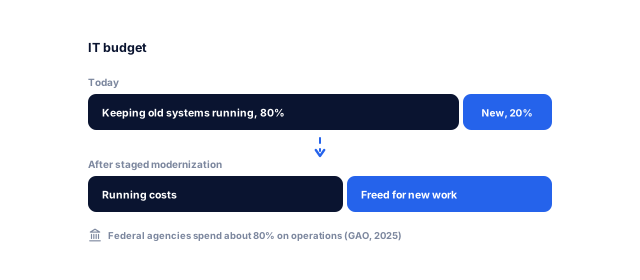
Old systems absorb money just to stand still. The US Government Accountability Office reported in July 2025 that federal agencies typically spend about 80% of their more than $100 billion annual IT budget on operating and maintaining existing IT, according to GAO-25-107795. Modernization frees that budget for new work.
Support deadlines that do not move
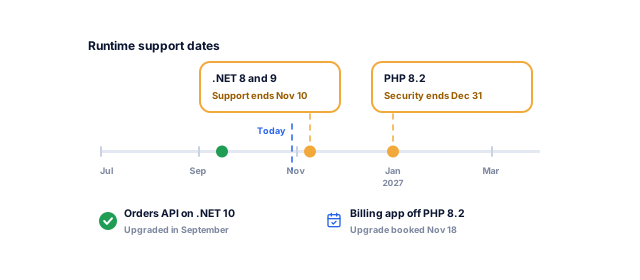
When a runtime reaches end of life, vulnerabilities stop being patched. Security support for PHP 8.2 ends on December 31, 2026, according to php.net, and Microsoft ends support for .NET 8 and .NET 9 on November 10, 2026, according to its .NET support policy. We plan upgrades around these dates.
Knowledge that walks out the door
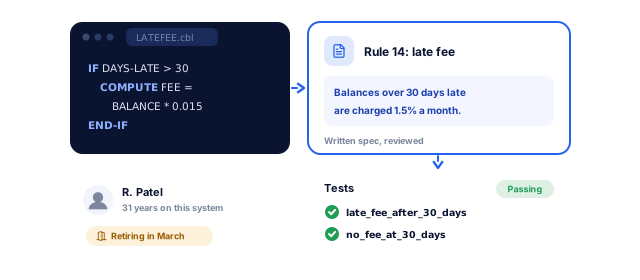
Many legacy systems depend on one or two people who understand them, and on languages fewer developers learn. GAO found that eight of the 11 most critical federal legacy systems use outdated languages such as COBOL. We write business rules into tests and specifications as we modernize, not one person's memory.
Integrations that are slow or impossible
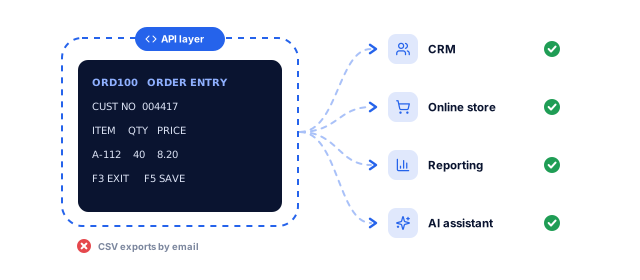
Old systems often have no API, so data moves by CSV exports, re-keying and email, which blocks CRM, ecommerce, reporting and AI projects. We add APIs around the core early, often the first visible win, through our API development and workflow automation teams.
Security and compliance gaps
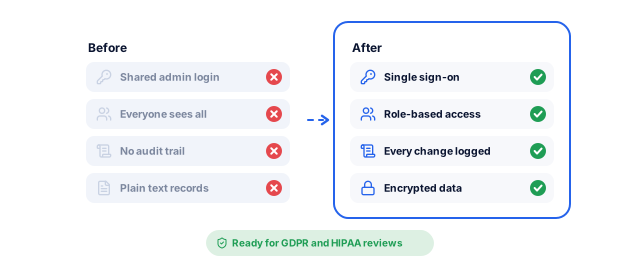
Unsupported operating systems, shared logins, missing audit trails and unencrypted personal data are hard to defend in a GDPR or HIPAA review. Modernization brings single sign-on, role-based access, encryption and logging up to current expectations, with our cloud security and compliance team covering infrastructure.
Big rewrites take longer than planned
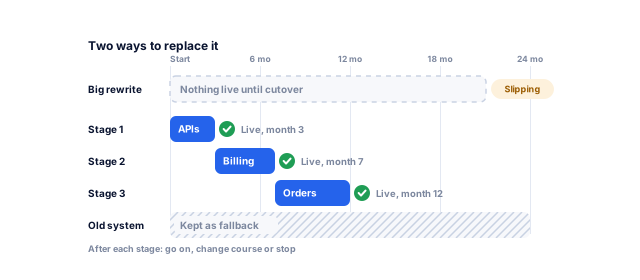
Large one-shot replacements take years. GAO identified the 10 most critical federal legacy systems in 2019; by February 2025, modernization of only three had been completed. Staged modernization puts improvements in front of users within months and keeps the old system as a fallback.
Not sure whether to fix, move or replace your system?
Tell us what your system does and what depends on it. We send a written plan, price range and timeline, then fix, move or replace it in phases while the business runs.
Your free software planFor what you need
1What we would build firstYour system, its data and what depends on it
2A price range and timelineFor the budget you pick, phased so nothing stops
3Build, buy or configureAnd how your team runs it after launch
We interview the people who use and support the system, read the code, map integrations and jobs, profile the data and check support status. Assessment takes two to six weeks, depending on size.
System inventory and dependency map
Risk and support deadline report
First business rules catalog
A clear picture of what you have
Roadmap and business case
Each component gets a path, an estimate and a place in the sequence, starting where value is high and risk manageable. We agree success measures such as release frequency, hosting cost, incidents or manual hours saved.
Path chosen per component
Phased roadmap with costs
Agreed success measures
A plan you can fund in stages
Safety net before change
Before touching anything, we add characterization tests around critical flows, record a performance and error baseline, and prove backups can be restored, so every later step is reversible.
Characterization tests
Monitoring baseline
Tested backup and restore
Changes you can undo
Build and migrate in slices
We put the strangler fig façade in place and move one capability at a time: build it, sync its data, route a share of traffic, compare results, then switch fully. Each slice is a normal release with its own go or no-go decision.
Façade and routing rules
New component per slice
Data sync and comparison
Progress users can see
Data migration and cutover
Final data moves are rehearsed until they run cleanly within the agreed window, and reconciliation reports compare counts, totals and samples. Cutover follows a written runbook with named owners and a rollback point.
Migration rehearsals
Reconciliation report
Cutover and rollback runbook
A cutover with no surprises
Decommission and run
Once nothing depends on the old component, we archive its data to meet retention rules and switch it off, which is where hosting and license savings appear. You get documentation, runbooks and optional support.
Decommission checklist
Data archive
Runbooks and support plan
Old costs actually removed
Modernization for the systems we see most
Our legacy system modernization services cover web applications, servers, spreadsheets, business systems and mainframes.
01 / 06
Old PHP and custom web applications
Custom PHP applications from the 5.x and 7.x era still run many portals, booking systems and internal tools. We keep the business logic, upgrade the runtime in steps, move to Laravel module by module, and rebuild the screens where users struggle. Our PHP development services page covers support dates.
Servers in an office cupboard or an aging data center contract are a common trigger. Rehosting or replatforming to AWS, Azure or Google Cloud is often the fastest first step; our cloud migration consulting team plans the move, cost model and cutover window, and modernization follows.
Many critical processes run on shared spreadsheets, Microsoft Access databases or desktop programs. We turn them into secure web applications with user roles, audit trails and backups, keeping the workflow people rely on, with reporting in custom dashboards that update themselves.
For standard processes such as accounting or HR, a packaged product is often cheaper than a rebuild: we choose it with you, migrate the data and connect it to your other systems. Where your process is genuinely different, we rebuild it as custom ERP software or a custom CRM, data and integrations included.
Patient and financial systems add privacy rules, audit trails and validation to every step. For AkosMD in Arizona, we built a custom HIPAA-compliant hospital information system that brought two hospitals onto one system (AkosMD case study). See our hospital management system work.
We first assess what the mainframe runs and what depends on it. Then we build an integration layer: APIs that feed mainframe data to new web and mobile front ends and a cloud warehouse. New services take over one function at a time, strangler-style. Where COBOL itself is converted with specialist tools, we work alongside that vendor and build everything around it.
The system moves to new servers or the cloud as it is
Low
Hardware or a hosting contract is ending and speed matters
Old problems move with it, and cloud bills can rise
Replatform
Small changes to run on managed services, containers or a newer runtime
Low to medium
The code is sound but the platform is out of support
Scope quietly growing into a refactor
Refactor
Code is restructured without changing what it does
Medium
The system works but every change is slow and risky
Behavior changes slipping through without tests
Rearchitect
The design changes, for example monolith to microservices
High
Scaling or release speed is the real bottleneck
Distributed complexity; deliver it in strangler fig slices
Rebuild
The system is rewritten, keeping its scope and data
High
The code is beyond repair but the business rules are well understood
Undocumented rules lost in the rewrite
Replace
A SaaS or packaged product takes over the job
Medium
The process is standard, such as accounting, HR or email
Data migration, customization limits and license costs
Retire
The system is switched off after its data is archived
Low
Few users, or another system already does the job
Hidden dependencies and data retention duties
AWS uses a different 7 Rs list for cloud migration (retire, retain, rehost, relocate, repurchase, replatform, and refactor or re-architect); see AWS Prescriptive Guidance. Retain, keeping a part as it is for now, is also valid.
Your legacy modernization project, week by week
How the first stage usually runs; larger systems repeat the last phase, slice by slice, across the roadmap.
Every engagement starts with an assessment, and the roadmap can say retire, replace or wait as readily as rebuild. Whatever it says, we deliver it: a packaged product configured and migrated, a staged rebuild, or a cloud move. Our 25+ in-house specialists in New Delhi build in PHP and Laravel, Node.js, Python and React, on AWS, Azure and Google Cloud.
02
Software, cloud and design in one team
Modernization fails when the new system is technically better but harder to use. Our engineers, cloud specialists and designers work together, and a UX audit of the old system shows which workflows people depend on before anything is redesigned.
03
Your code, data and infrastructure
Repositories, cloud accounts, databases and admin logins sit in your name from day one, with documentation at handover; we are given access, never the other way round. Rolling agreements with monthly reporting let you pause between stages. Clients rate us 4.9 on Clutch from 221 reviews and stay 1.6 years on average.
Results we can put numbers on
Results from client case studies and reviews, including custom software, with the full story behind each number.
"From designing a high-converting website to managing our SEO, Google Ads, and Google Business Profile, improveFX delivered exceptional results across every channel."
210%more qualified leads
185%organic and local traffic growth
92%keywords on page one
Maureen CappalloBroker and founder, Momentus Real Estate Group
"They revolutionized our online presence with a 60% increase in web traffic through strategic e-commerce SEO and content optimization."
60%more organic traffic
47%more sales
Eric NoahPresident, Eric Originals & Antiques Ltd.
"Visionstar Technologies' online presence transformed significantly with a 40% boost in customer engagement, all thanks to their exceptional website structuring and SEO tactics."
+40%qualified leads
32%lower cost per acquisition
Thomas MorelFounder, Visionstar Technologies
"Their strategic approach to our website and SEO resulted in a 60% increase in local inquiries, revolutionizing our automobile service business."
60%more local inquiries
87%more organic traffic
Mike SteffanFounder, Sabulski Window Tinting
"Their SEO strategy helped us achieve top search rankings, while their Facebook Ads campaigns drove a steady flow of qualified prospects."
How much do legacy system modernization services cost?
Our software projects run from under $5,000 to $100,000+, depending on scope. A rehost of one application with clean data sits at the low end. Many integrations, large or messy data, several user roles, compliance rules such as HIPAA or GDPR, and a rearchitecture or rebuild push a program toward the high end.
We quote after a free initial review and price each stage separately, starting with the assessment, so you see results before funding the next stage. Budget for hosting, licenses and support after launch too; switching off old components is where savings appear.
How long does legacy system modernization take?
Assessment takes two to six weeks. Published timelines we reviewed put a rehost or replatform at 3 to 6 months and a large rearchitecture or rebuild at 12 to 24 months, delivered in phases.
With a staged approach, what matters is the time to the first visible improvement, usually weeks or a few months: an API around the old core, a rebuilt busy screen, or one module in the cloud.
What are the 7 Rs of legacy modernization?
They are the main options for each part of a legacy system: rehost, replatform, refactor, rearchitect, rebuild, replace and retire. They range from moving the system as it is to switching it off.
Most roadmaps mix several Rs across components. AWS publishes a slightly different 7 Rs list for cloud migration that adds retain, relocate and repurchase. The table above compares effort, risk and fit for each option.
What is the strangler fig pattern?
It replaces a system gradually: a façade routes each request to old or new code, and features move to the new system one at a time until the old one can be switched off.
Users keep the same interface, and each step can be rolled back. Microsoft's guidance notes it does not suit small systems, requests that cannot be intercepted, or a fast decommission. There we plan a direct replacement with a rehearsed cutover.
Should we rebuild from scratch or modernize step by step?
Step by step, in most cases. Rebuilds suit small systems or code that is truly beyond repair, where the business rules are well understood.
Large rewrites run for months or years without delivering value and tend to lose rules nobody wrote down. Staged modernization keeps the old system as a fallback and delivers improvements continuously. Where a rebuild is right, we still release it in slices rather than one switchover.
How do you migrate legacy data without losing it?
By profiling and cleaning the data first, agreeing mapping rules in writing, rehearsing the migration, and reconciling counts and totals before cutover.
An initial bulk load plus change data capture keeps old and new in sync until the switch. Your team signs off reconciliation reports, legacy data stays intact until the new system is validated, and records with retention duties are archived, not deleted.
Will our business have downtime during modernization?
Most of the work happens with no downtime, because new components run alongside the old system. Final data cutovers may need a short, planned window in your quietest hours.
We rehearse each cutover until it fits the window, agree a rollback point in advance, and tell your users the timings. Window length depends on data volume and how much syncs beforehand, so we confirm it after rehearsals.
Is cloud migration the same as modernization?
No. Cloud migration moves where a system runs; modernization changes how it is built. A rehost to the cloud is a legacy system migration, not a modernization by itself.
Moving first and modernizing once the system is stable in the cloud is a common sequence, and AWS recommends it for large migrations. Our cloud migration consulting services cover the move; this service covers the code, data and architecture.
How do you modernize a system nobody fully understands?
By observing what it does before changing it. We read the code, watch real usage, interview users, and record current behavior in characterization tests.
Logs and database activity show which features are actually used, which often shrinks the scope. Business rules found in the code are written down and confirmed with your team, so the new system does what the business needs, not just what the old code did.
Do you work with mainframe or COBOL systems?
Yes. We assess what the mainframe runs, build APIs and an integration layer around it, and add web and mobile front ends and data pipelines into a cloud warehouse.
New services then take work off the core one function at a time, which is often the most practical first phase of mainframe modernization. Where core COBOL conversion uses a specialist vendor's tools, we work alongside that vendor and deliver everything around the core.
Ready to plan your software?
Tell us how the work runs today, or book a strategy call with our team.
What we would build first, or what to buy and configure
A price range and timeline for your budget
A call with a specialist to plan the next steps, no obligation
A specialist replies personally 4.9 from 566 client reviews