Custom project management software development for teams that outgrew Jira and Asana
improveFX builds project management systems for your own business, around how you plan, staff, deliver and bill client work. Our custom project management software development service suits agencies, consultancies, construction and engineering firms whose work does not fit a standard board: your own workflows and approvals, resource planning by skill and capacity, time tracking that flows into invoices, and a client portal, connected to the tools you already use.
Project management software development is the design and build of a system for planning, staffing and tracking projects around an organization's own workflow: tasks and dependencies, resource planning, time tracking, budgets, client collaboration and integrations, so delivery, finance and clients see the same status.
When Jira, Asana, Monday.com or ClickUp fits, we configure it and connect it; when it does not, we build.
Extending your current tool through its API often costs less than replacing it; we build those extensions too.
Custom pays off when resourcing, billing or client workflows are what make your business different.
Good project management software development services start from your delivery data.
Best for
Agencies, consultancies, construction, engineering and product teams running projects across several tools
What you get
Workflow design, web app (mobile where needed), resource planning, time and budget tracking, client portal, integrations and support
Typical timeline
Discovery in 2 to 3 weeks. A first release with projects, tasks and time in about 3 to 4 months. Resource planning and portals follow in phases.
Pricing
Our software projects run from under $5,000 to $100,000+, depending on scope. Workflows, user roles, integrations and data migration set where yours falls. Fixed quote per phase after a free discovery call; extensions to Jira or Asana usually cost far less than a full build.
What our project management software development includes
Six capability areas on one project record. We build the ones your current tools handle badly and connect the rest.
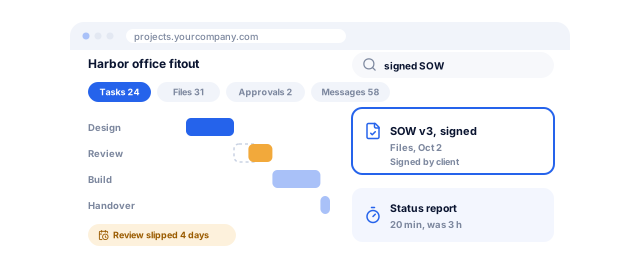
Projects follow your own stages, from inquiry and estimate to delivery, sign-off and invoice, with approvals at each gate. Templates create a full project with tasks, roles and budgets in one step, and rules notify the right person, so status meetings stop being the only way to learn what is late.
Planning, dependencies and Gantt
Tasks carry estimates, dependencies and milestones, shown as a board, list or Gantt chart. When a dependency slips, the plan shows which dates move and whether the deadline is at risk, and baselines compare it with what was agreed.
Resource and capacity planning
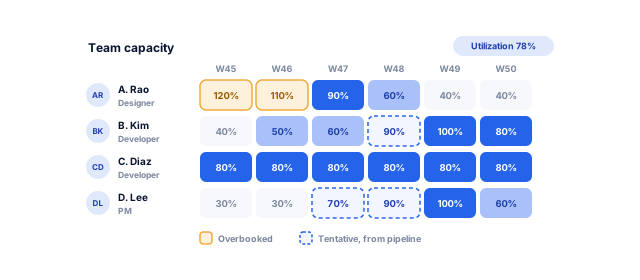
People are booked by skill, role and weekly hours, with tentative bookings for work not yet won. Capacity views show who is overbooked next month and which skills are short. Leave can come from your HR management system so availability is real.
Time tracking, budgets and billing
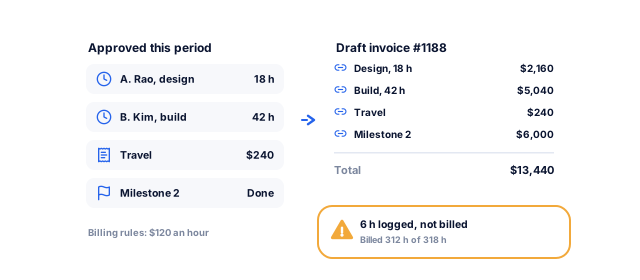
Staff log time from a timer, timesheet or phone, and managers approve it. Approved time updates budgets and margins as it happens, and billable hours become draft invoices for fixed-fee, time-and-materials or retainer work, synced to QuickBooks Online or Xero, with reminders from our invoice and billing automation team.
Client portal and collaboration
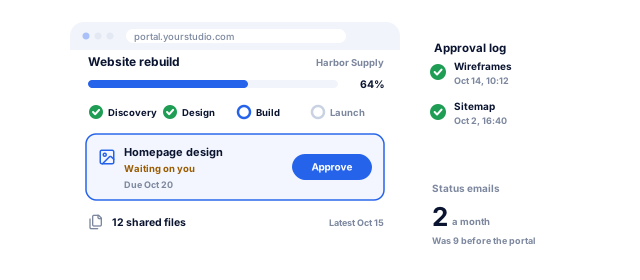
Clients log in to a branded portal to see progress, approve deliverables, share files and raise requests, without seeing internal comments or margins. Access is controlled by role and project, with single sign-on for larger clients and an audit trail of every approval.
Integrations and reporting
Projects connect to your CRM so won deals become projects, to Jira or Git for engineering, and to accounting for invoices. Portfolio reports show utilization, margin, budget burn and late milestones, and our custom dashboard development service puts them beside sales and finance.
What changes when projects run on one system
A project management system should give back hours and margin, not add another place to update.
Atlassian's State of Teams 2025, a survey of 12,000 knowledge workers and 200 executives, found that leaders and teams waste 25% of their time searching for answers. With tasks, files, approvals and client messages on the project record, the answer is one search away. We measure status-report time before and after go-live.
Fewer tools to keep in sync
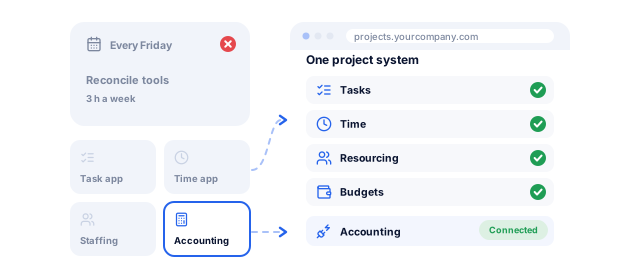
Many firms run tasks in one app, time in another, resourcing in a spreadsheet and invoices in accounting. MuleSoft's 2026 benchmark found the average organization manages 957 applications and only 27% are connected, as reported by CIO Dive. We cut duplicate tools and connect the rest.
Staffing decisions made early
Overbooked and idle people often exist in the same week because nobody sees capacity across projects. Resource planning shows bookings against availability weeks ahead, including tentative work. Utilization becomes a weekly number, not a quarterly surprise, and hiring rests on data.
Margin visible while it can still be saved
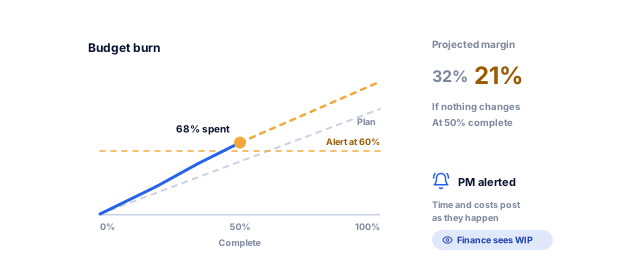
When approved time and costs post to the project as they happen, budget burn and margin are live. A project heading over budget shows up at 50% complete, not after the final invoice. Managers get alerts at your thresholds; finance sees work in progress without chasing timesheets.
Billing that does not leak
Hours that never reach an invoice are lost revenue. Linking approved time, expenses and milestones to billing rules means draft invoices are ready each period, every line traceable to the work behind it. We compare billed against logged billable hours monthly to show what still leaks.
Clients who chase less
A client portal with live progress, pending approvals and shared files replaces most status emails and calls. Timestamped approvals settle scope discussions quickly, and account managers spend their time on the work. We track status requests per project before and after launch.
Could Jira or Asana do the job with a few changes?
Tell us how your projects run today. We send a written plan, price range and timeline, then configure and extend Jira or Asana, or build the custom system that fits your work.
Your free software planFor what you need
1What we would build firstYour users, workflows and the systems it connects to
2A price range and timelineFor the budget you pick, with a phased option
3Build, buy or configureAnd how your team runs it after launch
A specialist walks you through it on a call
Our project management tool development process
From how your projects really run to a system people choose to use.
We follow a few recent projects from sale to final invoice, interview project managers, planners and finance, and export data from your tools, noting where status is re-typed and time goes unbilled.
Project lifecycle map
Tool and data inventory
Pain points ranked by cost
A clear view of where time and margin go
Configure, extend or build
We compare three routes: configure your current tool, extend it through its API, or build custom project management software, each with an estimate and its risks. If configuration solves it, we configure it and connect it to your other systems.
Options comparison
Cost estimate per route
Written recommendation
The lowest-cost route that works
Workflow design and prototype
We define stages, roles, permissions, billing rules and integrations, then prototype the daily screens: my work, plan, resources, timesheet and client portal. Project managers test it before you get a fixed quote for phase one.
Workflow and role design
Clickable prototype
Fixed quote for phase one
Screens your team agrees on
Build in two-week sprints
Core project, task and time features come first, then resource planning, billing and the client portal. Demos on staging every two weeks let your team try real projects early.
Fortnightly demos
Release notes
Updated backlog
Working software early
Migration and rollout
Open projects, tasks, time entries and files move from Jira, Asana, Monday.com or spreadsheets through exports and APIs, checked against the source. One team goes first; the rest follow.
Migrated projects and history
Pilot team review
Role-based training
Adoption without a big-bang switch
Support and improvement
After launch we monitor errors and performance, review usage monthly, and find where people still work around the system. Those findings set the next features.
Support plan
Monthly usage review
Roadmap for the next phase
A system that keeps fitting how you work
Project management software for how your industry delivers
Tasks and timelines look similar everywhere. What differs is how work is staffed, approved and billed.
01 / 05
Agencies and creative studios
Agencies juggle retainers, fixed-fee projects and ad hoc requests. We build intake forms that turn requests into scoped tasks, planning by discipline, retainer tracking with overrun alerts, and approval rounds on creative work. Where Productive or Kantata fits, we set it up and connect it; where your service model is the product, we build custom.
Consulting, accounting and legal firms bill by time or milestone and live on utilization. We connect proposals to engagements, staff work by seniority and rate, track time against budgets, and produce detailed invoices, with conflict checks and document access rules where needed. See our professional services work.
Construction projects need site diaries, RFIs, change orders, subcontractor packages and progress claims, often from a phone. Where Procore covers that, we connect it to your accounting and ERP; where your estimating or approval rules are your own, we build custom. Our ERP software development team handles finance.
Engineering teams usually keep Jira, so we build what it lacks: roadmaps for leadership, client-facing release notes, capacity across squads or time tracking for billable development, on the Jira API or as an Atlassian Forge app, or as part of a SaaS application if you are building a product.
Companies that build to order run projects across engineering, purchasing and production. We link milestones to drawings, purchase orders and work orders, so a late part shows on the plan when the supplier changes the date. When orders, stock and billing need one system, see our business management software service.
Work management SaaS (Jira, Asana, Monday.com, ClickUp)
Industry and PSA tools (Procore, Productive, Kantata)
Extend your current tool (apps, APIs)
Custom project management software
Best fit
Standard task and project tracking
Industries whose workflow the product was built for
A good core tool with one or two gaps
Workflows, resourcing or billing that set you apart
Upfront cost
Low: setup and configuration
Low to medium: setup and onboarding
Medium: build an app or integration
High: discovery, design and build
Ongoing cost
Per-user subscription
Per-user subscription, often higher
Subscription plus upkeep of the extension
Hosting and support; no subscription
Resource planning
Basic workload views on higher plans
Strong in most PSA tools
Built to your rules on top of existing data
Built to your rules
Time to invoice
Usually needs separate time and billing apps
Often built in
Connected through integrations
Built in, linked to your accounting
Client portal
Guest access with limits
Varies by product
Custom portal reading from the tool's API
Branded portal designed for your clients
Ownership
Vendor platform; data export available
Vendor platform; data export available
You own the extension; vendor owns the core
You own the code, data and hosting accounts
Features vary by plan and change often, so check current details with each vendor. Subscriptions are usually priced per user per month; compare the three-year cost at your expected headcount, not the first-year price.
Your project management software project, week by week
A first release with projects, tasks and time takes about 3 to 4 months; resource planning, billing and portals follow in phases.
improveFX has delivered 170+ projects for 120+ clients across marketing and engineering, so resourcing, retainers, approvals and time-to-invoice are problems we handle every week. That shapes the questions we ask in discovery and the reports we design, especially for firms that bill for time.
02
Extend first, build second
Where the tool your team likes has gaps, we fill them: a Jira or Asana integration, a resource planner or a client portal on its API, from our API development practice. Where the gaps are structural, we build the replacement and move your projects into it.
03
Your code, your data, rolling terms
You own the source code, database, documentation and cloud accounts, with no per-user charges from us. Support runs on rolling agreements with monthly reporting. Clients rate us 4.9 on Clutch from 221 reviews and 4.8 on Google from 189. See our case studies.
Results we can put numbers on
Results from our case studies and client reviews, including the custom hospital software we built for AkosMD.
"From designing a high-converting website to managing our SEO, Google Ads, and Google Business Profile, improveFX delivered exceptional results across every channel."
210%more qualified leads
185%organic and local traffic growth
92%keywords on page one
Maureen CappalloBroker and founder, Momentus Real Estate Group
"They revolutionized our online presence with a 60% increase in web traffic through strategic e-commerce SEO and content optimization."
60%more organic traffic
47%more sales
Eric NoahPresident, Eric Originals & Antiques Ltd.
"Visionstar Technologies' online presence transformed significantly with a 40% boost in customer engagement, all thanks to their exceptional website structuring and SEO tactics."
+40%qualified leads
32%lower cost per acquisition
Thomas MorelFounder, Visionstar Technologies
"Their strategic approach to our website and SEO resulted in a 60% increase in local inquiries, revolutionizing our automobile service business."
60%more local inquiries
87%more organic traffic
Mike SteffanFounder, Sabulski Window Tinting
"Their SEO strategy helped us achieve top search rankings, while their Facebook Ads campaigns drove a steady flow of qualified prospects."
How much does project management software development cost?
Our software projects run from under $5,000 to $100,000+, depending on scope. An extension to Jira or Asana, or one team's projects, tasks and time, sits at the low end. Many user roles, complex resource and billing rules, a client portal, several integrations and years of migrated history push a build toward the high end.
We give a fixed quote for each phase after a free discovery call. Budget for hosting, support and change requests too, and compare them with per-user subscriptions over three years at your expected headcount.
How long does it take to build custom project management software?
A first release with projects, tasks and time tracking usually takes about three to four months, including two to three weeks of discovery. Resource planning, billing and the client portal follow in later phases.
Your team sees working screens on staging every two weeks. Complex billing rules, years of history and many integrations stretch timelines, so we agree early which history needs to move.
Should we use Jira, Asana or Monday.com instead of custom software?
Often, yes, and we set it up for you. Jira suits software teams; Asana, Monday.com and ClickUp suit general project work; Procore, Productive and Kantata cover many construction and agency needs. We configure them and connect them to your CRM and accounting.
When your resourcing, approval or billing model is unusual, you need a branded client portal, or per-user fees exceed the cost of owning one system, we build custom.
Can you build on top of Jira or Asana instead of replacing them?
Yes, and it is often the best value. Jira, Asana and Monday.com offer APIs and webhooks, and Jira supports apps built on Atlassian Forge.
Common extensions are a client portal that reads project status, a resource planner across several boards, time tracking linked to billing, and leadership reports across teams. Your staff keep the tool they know, and the gap gets filled without a migration.
How does resource planning work in custom software?
Each person has a role, skills, weekly capacity and time off. Projects request roles and hours, and planners book people against them, with tentative bookings for likely work.
Capacity views show over and under booking by week, team and skill, and warn when a booking clashes with leave. Logged time is compared with planned hours, so estimates improve, and rules such as utilization targets can be built in.
Can time tracking feed our invoices and accounting?
Yes. Approved time and expenses become draft invoices under each project's billing rules, then sync to QuickBooks Online or Xero.
We support time-and-materials, fixed-fee milestones and retainers with rollover or expiry rules. Every invoice line links back to the time entries behind it, so disputes are easy to settle, and unbilled time is reported each month.
Is a client portal secure?
Yes, when access is designed in from the start. Clients only see their own projects and only the items you mark as shared, never internal notes, rates or margins.
We use role-based permissions, encrypted connections and storage, audit logs of every approval and download, and single sign-on for clients who require it. Our cloud security and compliance team can review the hosting setup.
Can you migrate our data from Jira, Asana or spreadsheets?
Yes. Open projects, tasks, comments, time entries and attachments can be moved through each tool's export or API, then checked against the source.
We usually migrate active work and a defined period of history, and archive the rest in a searchable read-only form. Moving everything is possible but slows the project and rarely gets used. Teams switch one at a time, so nobody loses a working tool mid-project.
Will our team actually use it?
Adoption is the main risk, so we design for it. Staff test prototypes before development, and the first release fixes the problems they named in discovery.
We keep daily screens simple (my tasks, my timesheet, my week), add integrations with Slack or Microsoft Teams so updates happen where people already work, and review usage monthly after launch to remove friction.
Who owns the code and the project data?
You do. The source code, database, documentation, hosting accounts and admin logins belong to you, and our access is added to your accounts.
There are no per-user charges from improveFX. If you move development in-house or to another team, you take everything with you, with documentation at handover. Ownership is written into the agreement, not left to trust.
Ready to plan your software?
Tell us how the work runs today, or book a strategy call with our team.
What we would build first, or what to buy and configure
A price range and timeline for your budget
A call with a specialist to plan the next steps, no obligation
A specialist replies personally 4.9 from 566 client reviews