
Social media scheduling and publishing
A shared calendar, posts queued for when your audience is active, and evergreen posts recycled, through official platform integrations. Every queue has a one-click pause.
Our social media automation services are for brands running several accounts with a small team. We automate scheduling, approvals, inbox routing and reporting, and keep replies, complaints and judgment calls with your people, so your team spends its time on content and conversations.
 4.9
 Written by Abhishek Kumar, Content Writer



















Social media automation is the use of software to schedule posts, route approvals, sort comments and messages, collect user-generated content and build reports. Social media automation services set up these tools and rules around your team, while complaints, crises and real conversations stay with people.
Set up in the order that saves the most time first.
Get a free proposalA shared calendar, posts queued for when your audience is active, and evergreen posts recycled, through official platform integrations. Every queue has a one-click pause.
Drafts move from writer to reviewer to approver, with Slack or Teams alerts and an audit trail. Regulated businesses add a compliance step; urgent posts get a fast track.
One idea becomes the right version per channel: cropped for Reels, rewritten for LinkedIn, shortened for X. Templates do the edits; a person checks them.
Comments, mentions and DMs land in one inbox, tagged by intent, and go to the right person with a response timer. Sales inquiries create a CRM record.
Tagged customer photos and videos are collected into a shared library. A templated message asks the creator for permission, and the reply is logged with the asset.
Platform data, GA4 conversions and CRM leads in one Data Studio or Power BI dashboard, with UTM tags on every link, built by our report and analytics automation team.
Publish reliably, answer faster and know what social brings in.
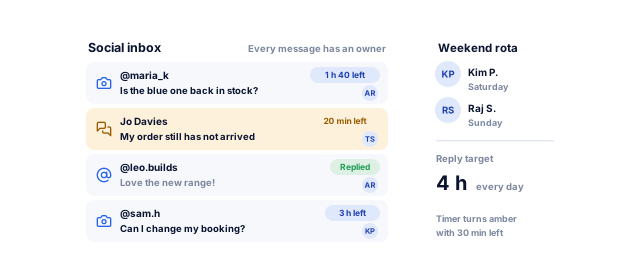
About three-quarters of consumers expect a reply on social within 24 hours, and 73% say they will buy from a competitor if a brand does not respond (Sprout Social Index 2025). Routing and timers give every message an owner.
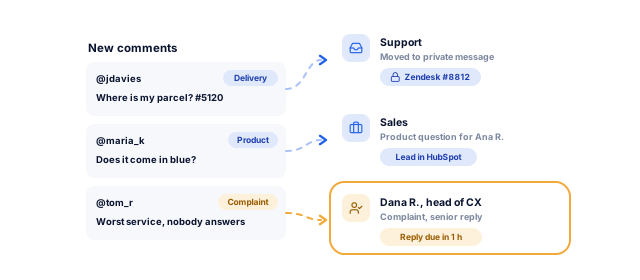
Delivery problems go to support, product questions to sales and complaints to a senior person. Account details move to a private channel, out of public threads.
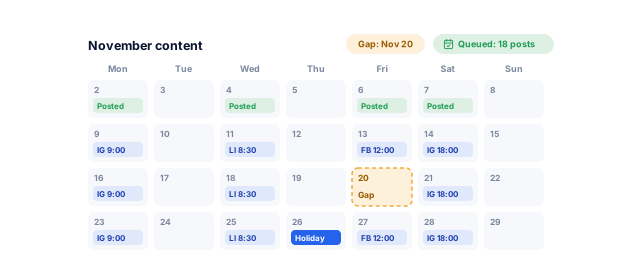
A month of posts planned in one sitting keeps accounts active through holidays and launches, without daily scrambles.
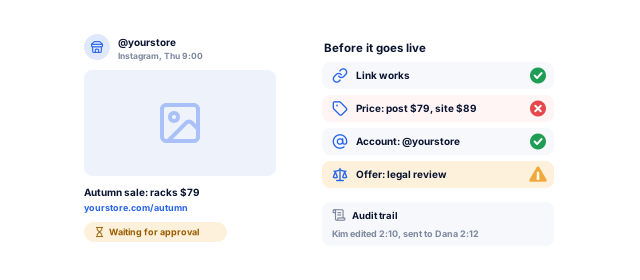
Approvals, brand templates and an audit trail catch wrong links, old prices and posts sent to the wrong account.
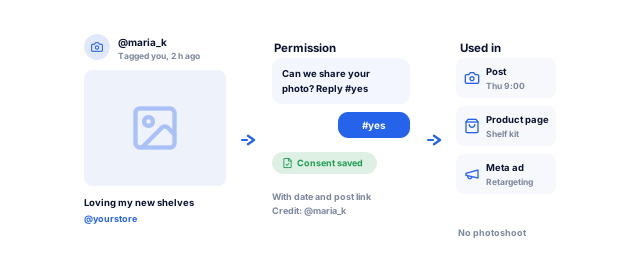
Customer photos, collected with permission, become posts and ads. Our social media graphics team turns them into templates, and influencer marketing extends them.
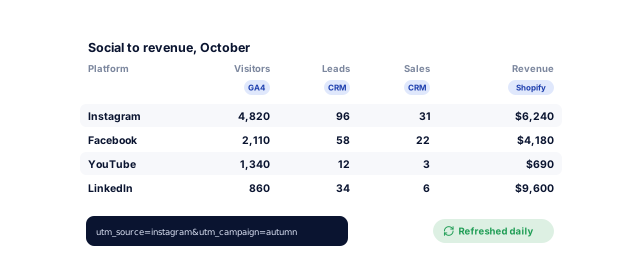
UTM links, GA4 and CRM data show which platforms bring leads and sales. Pew Research Center finds 84% of US adults use YouTube and 70% use Facebook, but usage alone does not show where your customers buy.
Tell us what you need. We review your accounts, tools and response times, and send a written plan for what to automate and what stays with your team, with a price range and timeline.
We list every account, who holds admin access, the tools you pay for, reply times and today's approval route.
A clear picture of where time goesWe agree who approves what, how each message type is handled, what stays with people, and who pauses queues in a crisis.
Rules everyone has signed offWe configure the publishing and inbox tool that fits, connect accounts through official integrations, and link your CRM or helpdesk.
One place to publish and replyPlatform templates, an asset library with UGC permissions, UTM conventions and a seasonal calendar.
Faster, consistent publishingEach person learns their part, and the new workflow runs beside the old one briefly before the switch.
A team that trusts the systemAlerts flag failed posts and disconnected accounts, and a run log shows what published. Support plans from $99 a month cover monitoring, fixes when a platform or tool changes, and small changes.
Automation that keeps upChecked against official documentation in October 2026, and rechecked when platforms change.
Get a free proposalPosts publish through Meta's official APIs, which allow 100 API-published Instagram posts per account in 24 hours. Automated DM replies run inside Meta's 24-hour messaging window.
LinkedIn does not permit third-party software that automates activity on its site. We schedule page and profile posts only through tools built on LinkedIn's official APIs, and outreach stays with your team.
X's automation rules allow automated posts but not automated following or unfollowing, and restrict automated replies and mentions. We schedule posts and route replies to people.
An app must pass TikTok's audit before its Content Posting API can publish public posts; until then, posts stay private. We confirm your tool can post publicly before launch.
The setups we build most often.
DM replies answer order, size and stock questions, then hand specific orders to support with the order number attached. See our work with ecommerce businesses.
A central calendar and shared templates keep brand control, local managers post within approved formats, and each location's comments go to its manager.
Approvals cover anything clinical, saved replies never discuss health in public, and appointment messages move to a private channel. See our work for healthcare providers.
Automated replies share prices, availability and a booking link at any hour, while complaints go to the manager on duty. See how we help beauty and wellness brands.
Approval routes that include legal, a library of posts employees can share, and LinkedIn leads captured through our CRM automation service.
Your team keeps the conversations; the tools take the logistics.
Book a strategy call| Task | Level | How it works |
|---|---|---|
| Scheduling, publishing and recycling evergreen posts | Automate | Queued from an approved calendar, with a pause button |
| Reports and performance alerts | Automate | Dashboards refresh; alerts flag spikes in negative comments |
| Answers to common questions in DMs | Automate with handoff | Saved answers for hours, prices and tracking, then a person |
| Adapting posts for each platform | Assist | AI drafts versions; a person edits and approves |
| Reposting customer content | Assist | Permission requests templated and logged; a person chooses |
| Complaints, negative reviews and sensitive topics | Your team | Routed to a named person with a response timer |
| Crises, tragedies and breaking news | Your team | Queues paused; your crisis procedure decides what is said |
| Likes, follows and comments on other accounts | Kept manual | Bulk engagement looks fake and can break platform rules |
Based on platform rules and our working practice. We review the setup when platforms change their rules.
Scheduling and approvals go live in 1 to 2 weeks; the full setup takes 3 to 6 weeks.
Book a strategy callBy week 2, posts publish from an approved calendar.
By week 4, every message has an owner and a timer.
By week 6, your team runs the whole system.
You approve each stage before the next one starts, and nothing goes live until it has run cleanly on your real records.
Yours to keep, always. Everything is set up in your name, and if you leave we remove our access and hand over the documentation.
Any team spending more time on posting logistics than on content and customers.
Book a strategy callOur social media marketing team plans the content and our automation team builds the workflow. As a Meta Business Partner, we work within Meta's rules.
Pages, profiles, ad accounts and tool subscriptions stay in your name, with our access removable. Templates, routing rules and UGC permission records are documented and yours.
Reports show visitors, leads and sales, not likes alone, with a monthly review call. Clients rate us 4.9 on Clutch from 221 reviews.
These numbers come from our SEO, marketing and software work, measured in each client’s own analytics. For automation, your first numbers come from test runs on your own records before anything goes live.
See all case studies
AkosMDHealthcare, Arizona
+57%
patient footfall
MastersBuddyStudy abroad consulting
160+
keywords in Google's top 10
Eric OriginalsJewelry ecommerce
+1,900%
organic traffic
"From designing a high-converting website to managing our SEO, Google Ads, and Google Business Profile, improveFX delivered exceptional results across every channel."
 Maureen CappalloBroker and founder, Momentus Real Estate Group
"They revolutionized our online presence with a 60% increase in web traffic through strategic e-commerce SEO and content optimization."
 Eric NoahPresident, Eric Originals & Antiques Ltd.
"Visionstar Technologies' online presence transformed significantly with a 40% boost in customer engagement, all thanks to their exceptional website structuring and SEO tactics."
"Their strategic approach to our website and SEO resulted in a 60% increase in local inquiries, revolutionizing our automobile service business."
"Their SEO strategy helped us achieve top search rankings, while their Facebook Ads campaigns drove a steady flow of qualified prospects."
 Amita NaithaniCo-founder, Amita Naithani Resort Wear
Not seeing yours? Ask us directly and a specialist will reply personally.
Our automation projects run from under $2,000 to $50,000+, depending on scope, and a fixed-price first automation, such as approvals feeding a scheduled queue, starts from $500. More accounts and locations, multi-step approvals, CRM or helpdesk integration and custom reporting move a project up the range.
Running costs are your tool subscriptions (Buffer is free for up to 3 channels; Hootsuite runs $99 to $399 a month billed yearly) and any Zapier, Make or n8n usage. Support plans start from $99 a month.
Replies to complaints, sensitive topics and anything during a crisis, plus bulk likes, follows and comments on other accounts. These moments decide how people see your brand, so we keep them with named people on your team, set alerts for spikes in negative comments, and agree the list with you in writing. Our reputation management team can step in when a situation escalates.
Small teams often do well with Meta Business Suite plus Buffer. Teams with several brands, strict approvals or a busy inbox usually need Hootsuite, Sprout Social or Agorapulse. We choose by number of accounts, approval steps, inbox volume, CRM and helpdesk integrations, reporting needs and budget, and set up the tool you already pay for when it fits, often with no new subscription.
AI can draft, adapt and suggest, and a person who knows your brand edits and approves every post. We use AI for first drafts, platform versions and caption options inside a workflow where nothing publishes without approval. That approval step keeps facts, offers and tone accurate, and avoids the generic phrasing that makes AI-written posts easy to spot in a crowded feed.
An automated reply answers common questions and offers options, then hands over to a person. Most automated replies must go out within Meta's 24-hour messaging window after the customer writes, and on Messenger the Human Agent tag gives your team up to 7 days for manual replies. Our chatbot development team designs flows that never leave a customer stuck with a bot.
Yes, with the creator's permission. Tagging or mentioning your brand does not give you rights to reuse their content. We set up a templated permission request, log each creator's reply with the asset, and note where it may be used, such as organic posts, your website or ads. That written record protects your business if questions ever come up later.
Scheduling and approvals usually take 1 to 2 weeks, and inbox routing, CRM or helpdesk integration and automated reporting 3 to 6 weeks in total. The biggest delays are usually access: admin rights to every page, business portfolio permissions and tool logins. We list what we need on day one so access requests do not hold up the rest of the work.
You do. Pages, profiles, ad accounts, your Meta business portfolio and tool subscriptions stay in your name, with our access added as a partner or user you can remove at any time. Approval rules, routing, templates and the content library are documented, so your team or another agency can run and change them without a rebuild. Nothing is held in our name.
Tell us what your team does by hand today, or book a strategy call with our team.


 A specialist replies personally 4.9 from 566 client reviews